
Agentic AI use cases are business workflows where an AI agent can plan, decide, and act with limited human input. You find them through business process analysis and workflow analysis, not by starting with the technology. The best Prospects are repetitive, multi-step, data-rich tasks with clear success criteria and a tolerable cost of error.
Introduction
Here’s a pattern we see in almost every enterprise AI conversation. A leadership team decides it needs AI. Then it goes hunting for somewhere to put it.
That order is backwards. It is also the single biggest reason why AI projects fail.
People tend to picture AI as one of two things. Either a sci-fi system about to take over, or a magic button that fixes everything. The truth is duller and far more useful. The best agentic AI use cases are usually boring, repetitive, high-friction tasks that quietly cost you money every day.
Strong agentic AI use cases don’t start with the model. They start with the business outcome. The teams that win begin with business process analysis, map where time and trust leak, and only then ask whether an agent belongs there.
This guide gives you a practical method to do exactly that. You will learn what makes a workflow a good fit, how to run a quick AI readiness assessment, and how to turn a candidate into an AI implementation roadmap. For the product/business consulting teams in the United States and India building real systems, this is where a sound AI implementation strategy begins and where most AI implementation work should have started.
What are agentic AI use cases?
Most AI you have used so far is reactive. You ask, it answers. Agentic AI is different. An agent can plan a sequence of steps, make a decision, and take an action towards a goal, with limited supervision.
So, an agentic AI use case is any workflow where an agent can do more than generating output. It can act. That shift from “answer” to “act” is why AI Agent Design Requires a New Approach.
Identifying these use cases is research, and AI is more of a system design challenge than a technology challenge, because if the workflow is wrong, no model will save you.
Types of agentic AI use cases
- Not every agent does the same job. In our work, these use cases usually fall into a few clear buckets. Each one needs a different approach to designing for AI.
- Decision-support agents. They surface risk, rank options, and recommend a next step. The final decision always rests with a human.
- Workflow automation agents. They run multi-step, multi-system processes, end to end, like reconciliation or onboarding.
- Monitoring and compliance agents. They watch data continuously and flag what matters, around the clock.
- Service and conversational agents. They resolve customer questions, route issues, and complete transactions.
Internal copilots. They assist knowledge workers with the tools they already use.
When you run a proper workflow analysis, most processes map cleanly onto one of these. That mapping is the start of good AI agent design, because it defines the agent’s role before anyone writes a prompt.
Core principles of good agentic AI design
A few principles hold across every category. They are the foundation of agentic AI design that survives contact with real users.
First, start with the human and the workflow, not the model. Second, define the agent’s role, boundaries, and decision authority explicitly. Third, build trust through transparency and oversight. Fourth, keep a human in the loop wherever a decision is costly or hard to reverse.
These rules sound obvious. They are also where most teams skip ahead and where why AI projects fail stops being a mystery. Evidence beats intuition here, which is why UX research methodologies sit at the center of serious design work.
Also Read: Agentic AI UX: How to Design Interfaces for Autonomous AI Agents
Why it matters in UX and product design
Picking the right use case is not a procurement decision. It is a design decision. The wrong choice burns the budget. The right one, paired with strong AI UX design, compounds.
Impact on user experience
Users do not abandon AI because the model is wrong. They abandon it because they cannot tell when it is wrong. Trust, not accuracy, is the real adoption blocker.
That makes AI UX design the deciding factor. Show the agent’s reasoning. Let people override it. Make the handoff to a human obvious. We validate that trust with UX research methodologies before launch, not after. Good design for AI lowers cognitive load instead of adding a new thing to babysit. This is the part most engineering-led builds miss entirely.
Impact on business metrics
A well-chosen use case with sound AI system design moves numbers you care about: adoption, time saved, risk caught, and cost per task. A flashy one that nobody trusts moves nothing.
This is the quiet truth behind AI implementation budgets. The agent that gets used beats the agent that demos well. The strongest agentic AI use cases earn their keep by getting adopted, so a well-planned AI implementation strategy optimizes for use, not for the demo.
Common mistakes to avoid
We have audited enough stalled programs to see the same errors repeat. Most trace back to skipping the basics.
- Starting with technology instead of workflow analysis.
- Skipping the AI readiness assessment, then discovering the data is a mess.
- Automating a broken process. You just get faster chaos.
- Treating AI agent design as a UI skin over a model, with no real research.
Each of these is a documented reason for why AI projects fail. None of them is a model problem. They are business process analysis problems wearing an AI costume.
How to identify agentic AI use cases: a step-by-step method
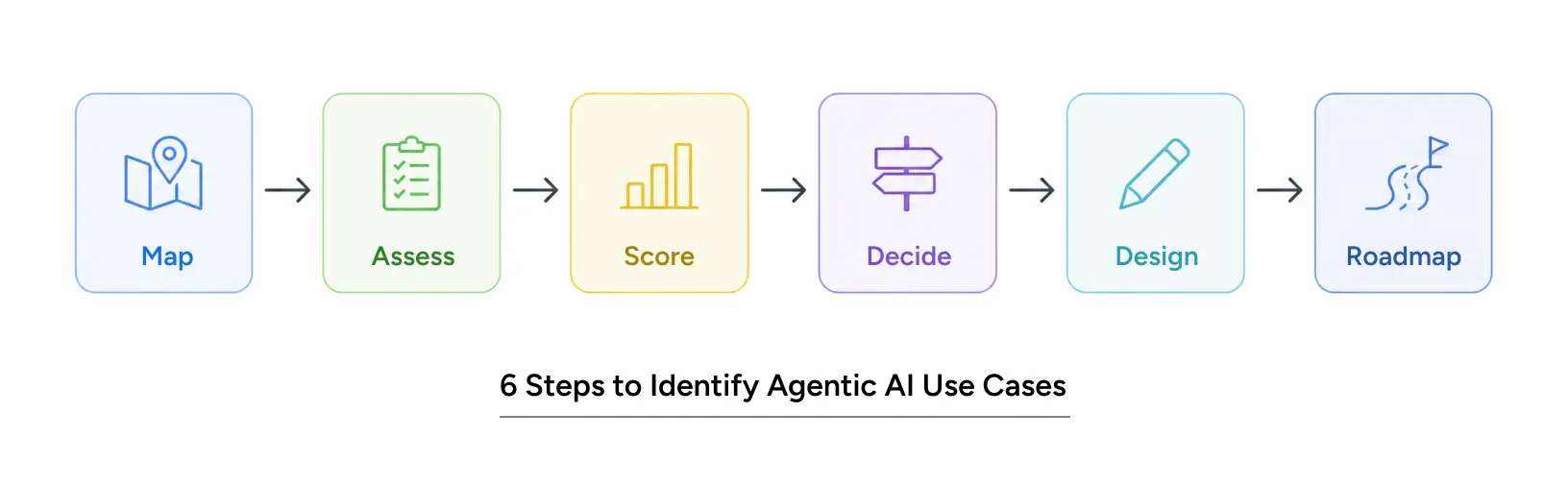
Here is the method we use with enterprise clients. It turns a vague “we need AI” into a ranked, fundable AI implementation roadmap and keeps the whole AI implementation anchored to real work.
Step 1: Map the work
Begin with business process analysis. List your high-volume, repetitive, multi-step processes. For each, note the steps, the systems involved, and where people get stuck. This workflow analysis is unglamorous and essential.
Step 2: Run an AI readiness assessment
Now score feasibility. A practical AI readiness assessment asks four questions. Is the data available and clean? Is the process stable enough to model? Is there a clear success metric? Can you tolerate the agent being wrong sometimes?
If the data is scattered or the process changes weekly, fix that first. An honest AI readiness assessment here prevents the most expensive failures later.
Step 3: Score and rank candidates
Rate each candidate on frequency, friction, feasibility, and value. High on all four means a strong agentic AI use case. The strongest candidates from your workflow analysis rise to the top naturally.
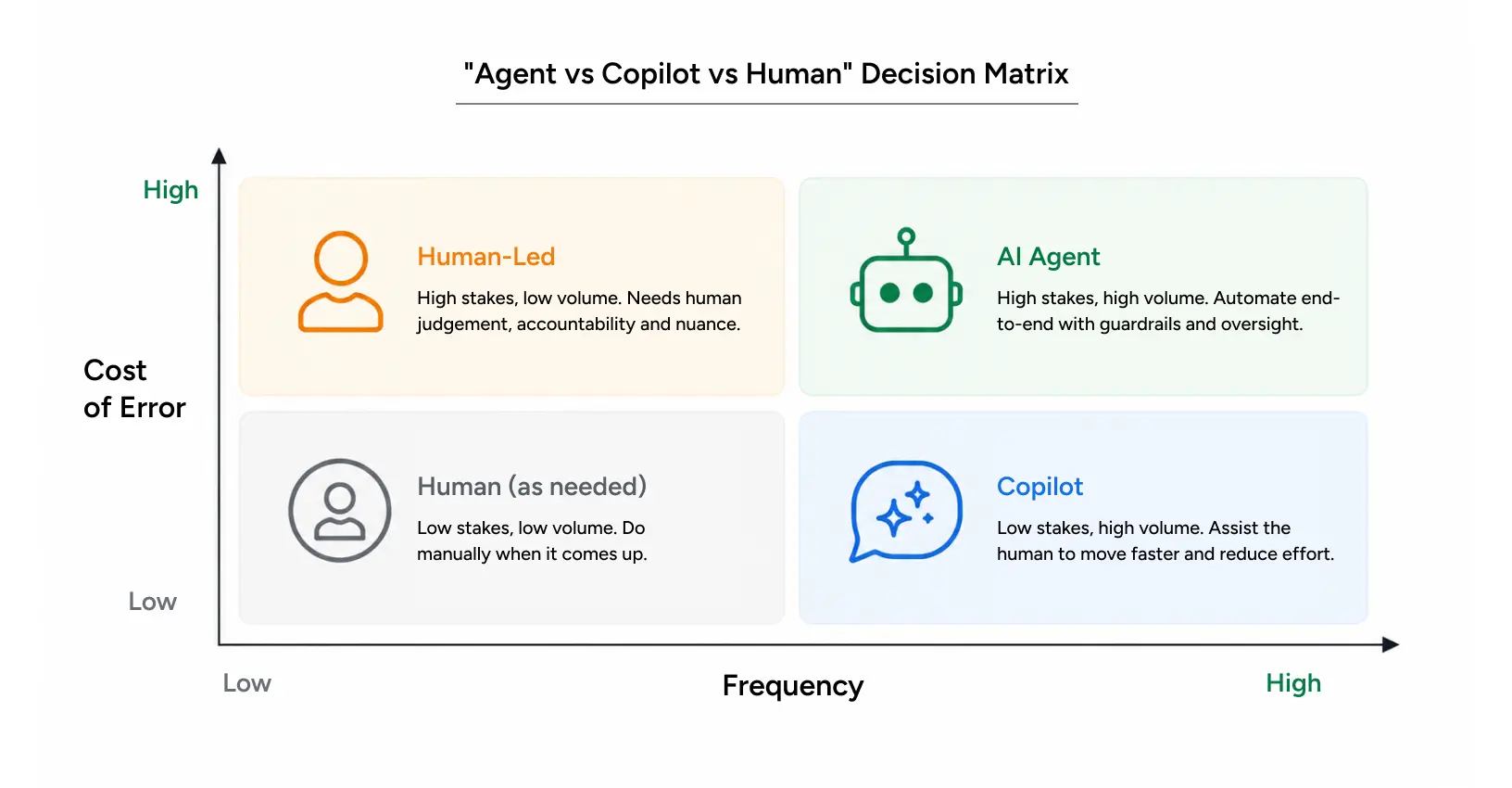
Step 4: Decide agent versus copilot
Ask one question: does this need to act on its own, or just assist? High-stakes, irreversible steps stay human-led. This decision shapes the entire AI agent design that follows.
Step 5: Design for trust
This is where designing for AI earns its keep. Define the agent’s role, its limits, and its escalation paths. Build oversight from day one. This is the core of agentic AI design, and skipping it is the fastest route to a tool nobody uses.
Step 6: Build the roadmap
Turn the top use case into an AI implementation roadmap: pilot, measure, iterate, scale. A phased AI implementation strategy beats a big-bang launch every time. Each phase feeds the next, and your AI implementation stays grounded in evidence.
Pro tips from our practitioners
A few hard-won notes. Validate every assumption with UX research methodologies such as interviews, contextual inquiry, and usability testing on the actual workflow. Talk to the people who do the task today; they know where the agent will break. And treat your first AI system design as a hypothesis, not a final answer.
Also Read: How to Run Usability Testing: Moderated, Unmoderated and Remote Methods Explained
Agentic AI Use Cases in Action: NICE Actimize Case Study
A strong example comes from our work with NICE, a US-based enterprise software company (Hoboken, NJ) that helps financial institutions detect and investigate fraud and money laundering.
The core problem was fragmented systems. Fraud teams and AML teams worked in separate tools, causing cognitive overload and slow investigations, exactly the kind of agentic AI use cases that good business process analysis surfaces. Investigators needed one unified workbench, not five disconnected ones.
Our AI UX design started with design workshops alongside the global leadership team. We mapped specialist personas using UX research methodologies, analyzed daily investigation workflows, and built a single AI-driven platform that consolidates alerts, prioritizes risk, and supports cross-functional case resolution.
The result of that AI system design: faster investigation cycles, improved detection accuracy, and a unified compliance workflow that replaced fragmented legacy tools.
Conclusion
Finding the right agentic AI use cases is not a technology hunt. It is a design and research discipline. Start with the work, not the model.
Run business process analysis. Score opportunities with an honest AI readiness assessment. Choose where an agent should act and where a human should stay in control. Then turn the winner into a phased AI implementation roadmap.
Do this well, and AI implementation stops being a gamble. Skip it, and you join the long list explaining why AI projects fail. The difference is rarely the model. It is the AI system design and the design for AI decisions made before a single line of code.
At Yuj, that is the layer we work in. We bring 25 years of enterprise UX practice to agentic AI design, so your AI implementation strategy is built on evidence, not hope.

FAQs