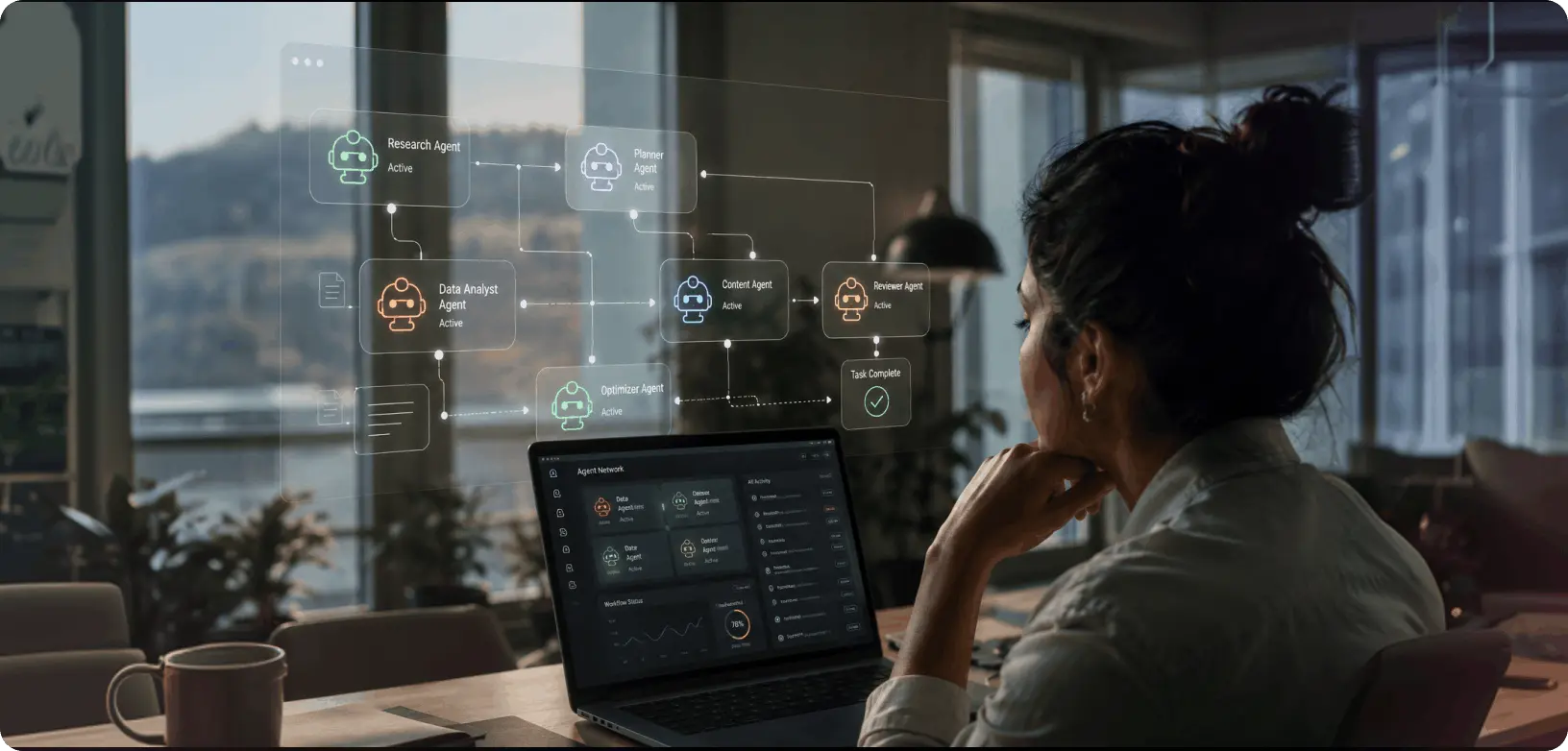
Agentic AI UX is the discipline of designing interfaces for AI systems that take autonomous, multi-step actions on behalf of users. It requires new design principles: visible decision-making, interruptibility, trust calibration, and failure transparency. Unlike traditional UX, agentic AI design must account for unpredictable AI behaviour, delegated authority, and outcomes the user never directly triggered.
Introduction: The UX Problem Nobody Is Talking About
An AI agent books your flights, replies to emails, and schedules meetings without you touching a single button. The model performs flawlessly. The user panics.
That is the central tension in agentic AI UX right now. Autonomous AI systems are being deployed faster than the interfaces designed to explain them. And the gap is not a model problem. It is a design problem.
We have spent decades teaching users to interact with software. Click here, type there, scroll to confirm. But AI agents do not wait for clicks. They make decisions, chain tasks, and take actions, sometimes irreversible ones, based on goals you gave them five minutes ago. The UX mental model that worked for SaaS does not work here.
At YUJ Designs, we have been working on designing AI products for clients across fintech, healthcare, and SaaS, and the pattern is consistent: when autonomous agents fail to convert or get abandoned, it is rarely the model’s fault. It is the interface. Users do not know what the agent is doing, why it made a choice, or how to stop it. That opacity kills trust. Lost trust kills adoption.
This blog unpacks how to design AI agent interfaces that users actually trust and use.
What Is Agentic AI UX?
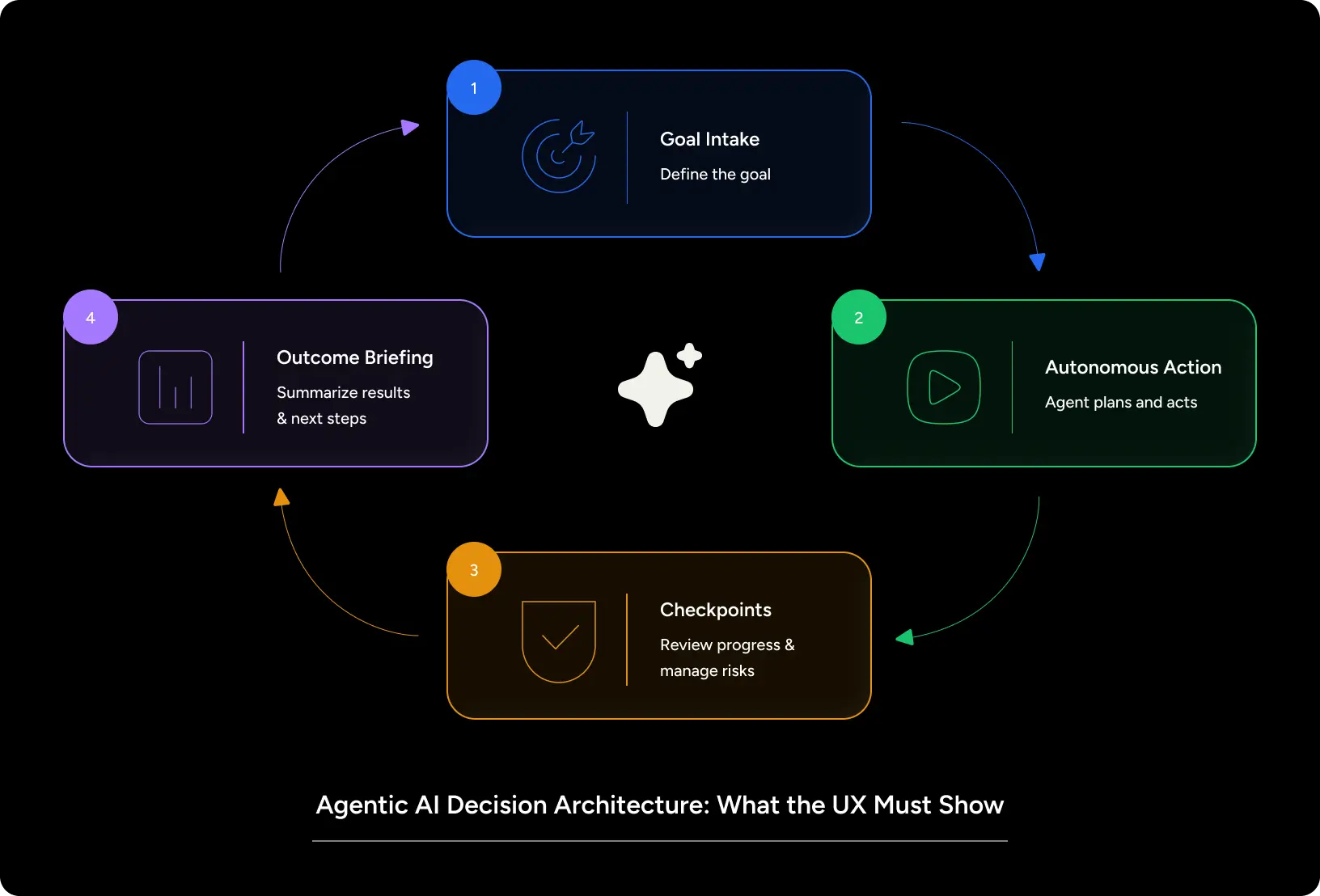
Agentic AI UX is the practice of designing interfaces for AI systems that act autonomously, planning tasks, calling external tools, making decisions, and executing multi-step workflows with minimal human input.
Unlike chatbots (that chat) or recommendation engines (that suggest), AI agents actually do the work.
- Search the web, synthesize information, and draft a report
- Connect to your CRM and update 400 records based on a rule you set
- Monitor your inbox and autonomously respond to low-priority emails
- Manage a manufacturing alert and re-route a supply chain
The interface design challenge: the user gave one instruction, but the agent made 17 decisions they never saw. If the outcome is wrong, where does the user even begin to understand what happened?
That is the core design problem agentic AI design must solve: making autonomous decision chains legible without making the experience so exhaustive that nobody uses it.
Types of Agentic AI Systems
Understanding which type of agent you are designing for shapes every UX decision.
- Single-step agents complete one discrete task (classify this document). The interface can be minimal.
- Multi-step agents chain multiple actions toward a goal (research this topic, then draft a summary, then email it). Every step needs a visibility layer.
- Long-horizon agents operate across hours or days, executing background tasks the user may have forgotten about. These require ambient visibility status updates, interruption points, and outcome summaries without demanding constant attention.
- Multi-agent systems involve networks of agents handing off tasks between each other. AI agent design here requires an interface that can show orchestration, not just individual outputs.
Core Principles of Agentic AI Design
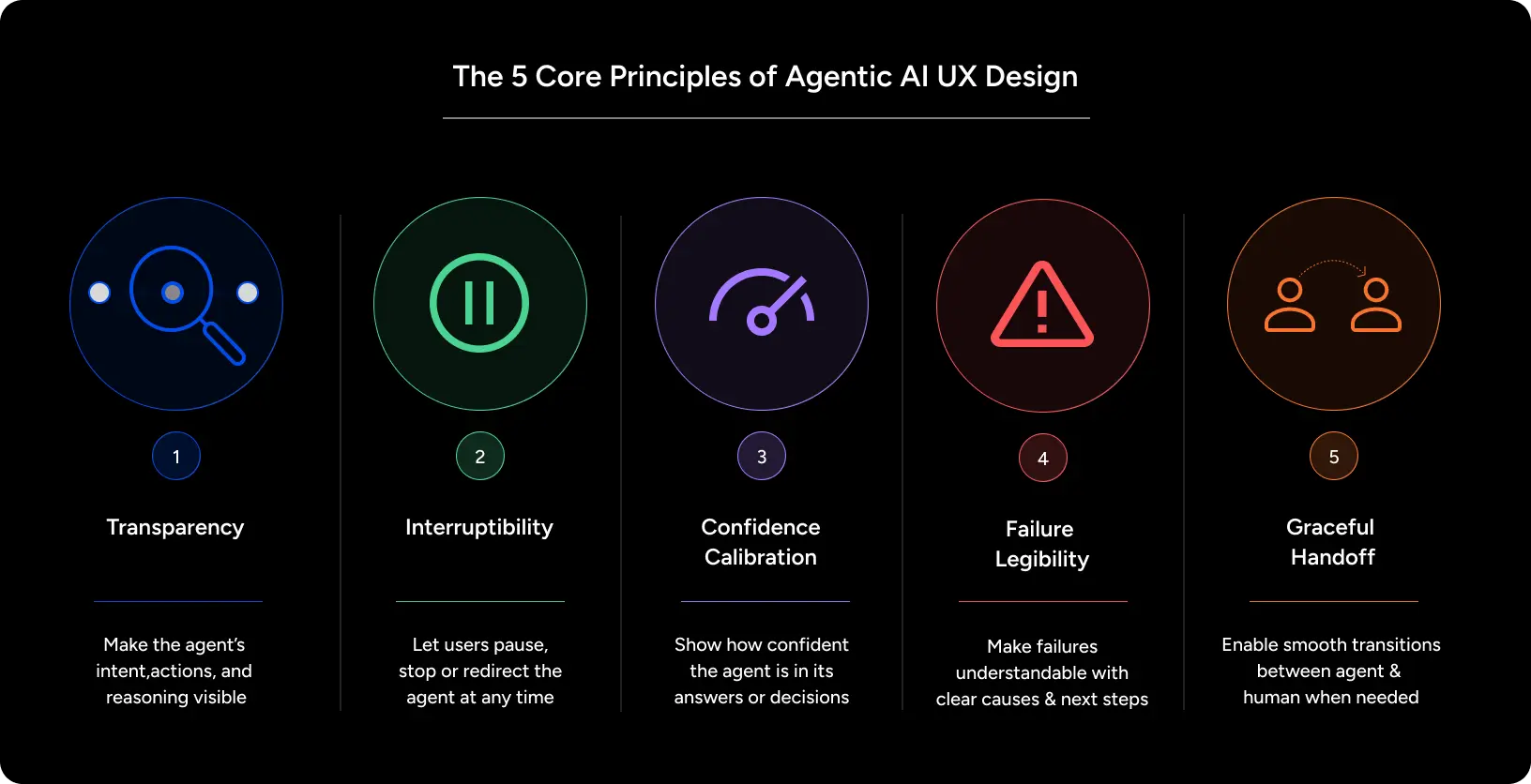
1. Transparency by Default: Every autonomous action the agent takes should be visible to the user, not buried in a log tab nobody opens. In our work on AI-powered products, we have found that users abandon agents not because they did something wrong, but because users couldn’t tell what they were doing.
Design the action trail into the primary UI. Make it scannable, not scrollable.
2. Interruptibility: A user must always be able to pause, review, and redirect the agent mid-task. Human AI interaction design that does not include a clear “stop” or “review before proceeding” mechanism creates anxiety. Anxious users do not delegate tasks. They do not use the product.
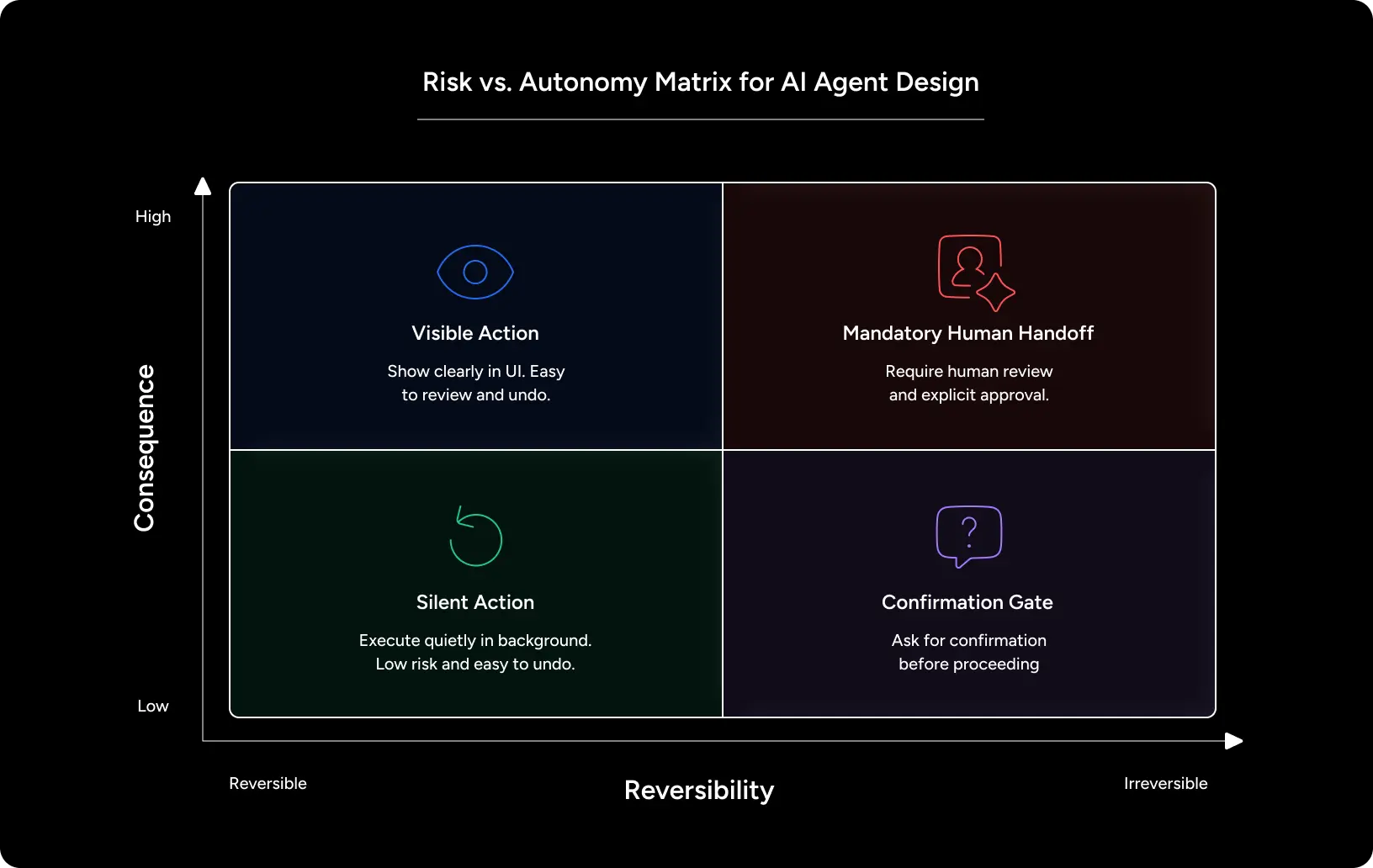
3. Confidence Calibration: Not all agent decisions carry the same risk. Deleting a draft email is reversible. Sending it is not. Agentic AI UX must create friction proportional to consequence, not uniform friction that makes the whole system feel bureaucratic.
4. Failure Legibility: When an agent fails, the user needs to understand: what was attempted, at which step it broke, and what they can do next. Generic error messages are a UX failure. They turn agent errors into user anxiety.
5. Graceful Handoff: Some decisions should never be made autonomously. Great agentic AI design defines the boundary: what the agent handles alone, what it proposes and waits for approval, and what it always escalates to the user.
Why Agentic AI UX Breaks Traditional Design Thinking
In traditional UX, you design for a user who is present and in control. Every interaction is human-initiated. Feedback is immediate. Undo exists.
AI-first design for agentic systems requires a different mindset entirely.
The user is not always present. An agent runs in the background. The UX must account for both the activation moment (when the user sets the goal) and the return moment (when the user comes back to check what happened). Two entirely different design contexts.
Undo is not always possible. An agent who sent 200 outreach emails cannot unsend them. Machine learning UX design for agentic contexts requires you to think upstream, design confirmation checkpoints before irreversible actions, not apology screens after.
Trust is dynamic. In a traditional product, trust is built over time through consistent, predictable UX. In agentic systems, trust can be destroyed in a single unexpected action. A user who asks an agent to “clean up my calendar” and finds three important meetings deleted will not use the product again, regardless of how smart the underlying model is.
The design team is now responsible for building warranted trust that the agent has actually earned through transparent, explainable, and controllable behaviour.
Also Read: UI design vs UX design: The Difference That Actually Matters for Your Product
How to Apply Agentic AI UX: A Practical Framework
Step 1: Map the Agent’s Decision Tree Before Writing a Single Line of Copy
Before designing screens, document every decision the agent will make autonomously. For each decision, ask:
- What is the consequence of this decision?
- Is this reversible?
- What information does the user need to evaluate this decision?
- Should the agent act, propose, or escalate?
This audit becomes your visibility and confirmation architecture. Designing AI products without this step creates interfaces that look clean but terrify users.
Step 2: Build a Visibility Layer- Not an Activity Log
An activity log is what engineers want. Users want a story.
Design the agent’s action trail as a timeline of meaningful events, not a dump of system calls. “Researched 14 sources and identified 3 conflicts in your schedule” is useful. “Function: calendar_conflict_check() returned array[3]” is not.
Human AI interaction design at this layer is about translation from machine actions to human-meaningful context.
Step 3: Design Interruption Points Proportional to Risk
Map your decision tree from Step 1. For every decision above a risk threshold (irreversible, high-stakes, outside the agent’s usual scope), add an interruption point.
Interruption points are not confirmation dialogues. They are brief, clear summaries of what the agent is about to do, with one-tap approval or a brief redirect option. In practice, agentic AI UX that gets this right sees dramatically higher completion rates, users feel in control, so they delegate more.
Step 4: Design for the Return Moment
Most design effort in agentic products goes into the activation flow. The return moment when the user comes back after 4 hours to find what the agent did is often an afterthought.
This is a mistake. The return moment is where trust is won or lost.
Design the return experience like a smart briefing: what the agent did, what it decided, what it flagged for your attention, and what you need to do next. This is a core machine learning ux design discipline, not just showing model outputs, but showing them in a way a human can act on.
Step 5: Define the Agent’s Authority Boundary in the UI
Users need to see what the agent can and cannot do. Not in a help article in the interface itself. A simple “what I can do” statement that appears before the first task (and is accessible at any time) reduces the cognitive burden significantly. It also sets accurate expectations, which is the foundation of AI First Design.
Pro Tips from Our Designers
- Never auto-proceed on high-stakes tasks after a timeout. If a user hasn’t approved an action in 10 minutes, pause, don’t assume.
- Make the agent’s reasoning visible, not just its outputs. “I chose Option A because it was 40% faster” is more trustworthy than just showing Option A.
- Test with users who are sceptical of AI. They will find every gap in your transparency layer. Build for them, and you build for everyone.
Also Read: Why Complex Organizations Can’t Scale Without Strong Design Teams
Real-World Applications
Here’s a case study on how YUJ Embedded UX Design for Global IT Services
THE CHALLENGES
- Inconsistent Design Delivery– Managing 85+ concurrent projects across healthcare, manufacturing, telecom meant quality was unpredictable project-to-project. Enterprise clients could see it.
- Resource Allocation Pressure– Fluctuating demand meant choosing between: hire permanent staff (waste in slow months) or risk delays in peak months. No middle ground.
- Cross-Industry Expertise Gaps– Healthcare, manufacturing, and telecom have completely different design constraints. A healthcare designer doesn’t know manufacturing regulations. Knowledge wasn’t being transferred between verticals.
- Quality Assurance Complexity– With dozens of concurrent projects, quality checks were reactive (caught at the end). No systematic way to predict which projects are at risk or identify systemic problems.
THE APPROACH: Design the System, Not Just the Work
Instead of hiring more people, Yuj Designs worked on a three-layer partnership model:
Layer 1: Clear Governance
- Defined roles, ownership, decision authority
- Yuj handled: Designer allocation, training, integration, continuous improvement
- Client handled: Business priorities, product vision, stakeholder management
- Result: Faster decisions, no ambiguity about who decides what
Layer 2: Fixed + Variable Capacity
- Fixed team(12-22 designers): Core specialists with deep vertical expertise, mentors, strategic work
- Variable team (additional designers quarterly): Handles execution peaks, grows junior designers
- Why it works: Can flex from 18 ? 30+ designers without permanent overhead; juniors trained by seniors
Layer 3: Standardized Processes
- Repeatable stakeholder workshops and discovery methodology
- Vertical-specific frameworks (healthcare compliance patterns, manufacturing supply chain UX, telecom enterprise SLAs)
- Quality gates built into every project phase (not just at the end)
- Cross-vertical knowledge transfer (healthcare solutions inform manufacturing thinking)
- Pattern libraries and case study documentation
THE IMPACT BY DESIGN
| Metric | Result | What It Means |
|---|---|---|
| Client Satisfaction | 94% across all verticals | Enterprise clients rated work as meeting/exceeding expectations on nearly every project (most agencies hit 70-80%) |
| Delivery Speed | 40% faster than traditional agencies | Standardized processes, knowledge transfer, and clear ownership = faster execution. Clients can take on more projects and win more bids. |
| Revenue Impact | Design-led projects achieved 60% higher retention + 30% greater scope growth | Projects led by design thinking kept clients longer and expanded budgets. This is the real business ROI. |
| Quality Consistency | Zero major design revisions in 18 months | Across 85+ projects. Quality gates caught issues early. Clients trusted the work so much they didn’t demand do-overs. Most agencies hit 10-20% revision rate. |
| Scale & Utilization | 30+ designers at 98% utilization; 85+ projects delivered; 15 long-term partnerships | The model actually scales without breaking. Grew from 12 to 30+ designers, got more efficient, not less. |
Conclusion
Agentic AI is not a feature. It is a shift in how products work and a fundamental shift in what UX design needs to do.
The teams getting agentic ai ux right are not the ones with the best models. They are the ones who understand that autonomy without transparency destroys trust. That control without friction enables delegation. The return moment matters as much as the activation moment.
Designing AI products for autonomous AI agents requires the same rigour you bring to any complex UX challenge, plus a new layer of discipline around decision visibility, risk calibration, and warranted trust.
The model will keep getting smarter. The interface is where users decide whether to trust it.
If you are building an agentic AI product and the UX is not keeping pace with the model, that is the problem to fix.
FAQs