Introduction:
A team launches an AI feature. The demo works. Early users love it. Leadership greenlights the next phase. Then six months later, the same product feels fragile. Users don’t trust the outputs. Support requests increase, and user adoption slows down.
The MVP proved the model could work. It did not prove the product could scale.
That gap is where most AI-native teams get stuck. Building a proof of concept is one problem. But building something thousands of people rely on on a daily basis is a completely different one. The hard part was never the model. It was the experience wrapped around it.
This is where designing for AI stops being about prompts and starts being about product thinking. In this guide, we’ll walk through what actually happens when AI products scale, the UX patterns that hold up under real usage, and how your team can apply them.
What ‘AI-Native Product’ Actually Means
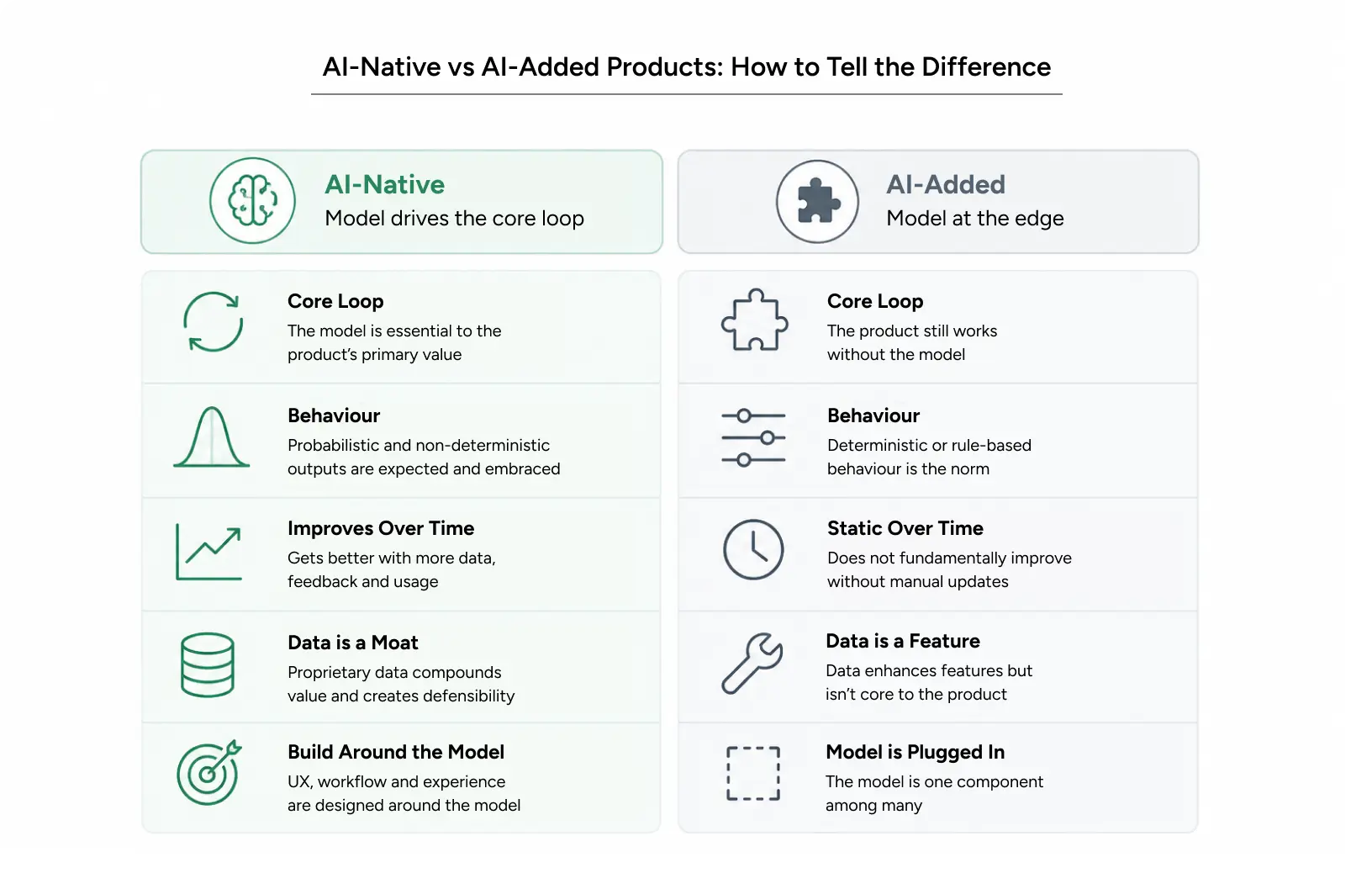
An AI-native product is built from the ground up with AI at its core, making it central to the value it delivers rather than just an added feature. Remove the model and the product stops making sense. Compare that to an “AI-added” product, where you could strip out the smart feature and still have a working tool.
A spreadsheet that uses AI to suggest formulas is a traditional tool with AI added. A supply chain platform that predicts disruptions before they happen is AI native. The difference shapes every design decision you’ll make.
Three Traits of AI-Native Products
- AI performs the product’s main function. Users use the product because of its AI capabilities, not because it includes an AI feature.
- AI responses are not always the same. The same input can produce different outputs, so the design should support this variability.
- The product improves as it processes more data. Users should be able to see these improvements over time.
Why Does This Matter for AI Product Design?
Traditional software behaves predictably. Click a button, get the same result every time. AI product design throws that assumption out. Because AI outputs can vary, users need clear signals to know what they can trust. This shapes how you design layouts, feedback, error handling, and onboarding.
Most teams underestimate this. They design AI products like regular apps with a smart engine underneath. Then they wonder why users hesitate.
Also Read: UXplorer 2026: The World’s First Agentic Design Challenge
Why AI Product Design Gets Harder After the MVP (Minimum Viable Product)
The MVP is forgiving. Early adopters expect rough edges. They’ll tolerate a wrong answer because what it gets right matters more than the occasional mistake. As your product grows, user expectations change.
Users Stop Being Enthusiasts
Your first users came for something new. Everyone after that comes for a product they can trust. A skeptical enterprise buyer treats a wrong AI output as a reason to churn, not a quirk to forgive. This is the moment AI UX design has to carry real weight.
Edge Cases Become Common
In an MVP, unexpected inputs are uncommon. At the production scale, they’re constant. A model that works 90% of the time fails hundreds of times a day when usage grows. Suddenly, your error handling is not a detail. It’s the product.
Trust Becomes the Bottleneck – to review after this
At YUJ, we believe that users don’t expect AI to be perfect. What they do expect is clarity about when they can rely on it. That’s where an AI UX designer makes the difference by designing experiences that build trust through transparency, helpful feedback, and clear guidance. When users understand AI outputs, they’re more likely to keep using the product with confidence.
The Cost of Confusion Grows
Confusion in an MVP is an opportunity to learn and improve. As an AI product scales, the same confusion can lead to lower adoption, reduced user trust, and lost revenue. With Agentic AI design, the stakes are even higher because AI systems can make decisions and take actions independently. That’s why clear, reliable design is essential for building AI products that users can trust.
The UX Patterns That Matter at Scale
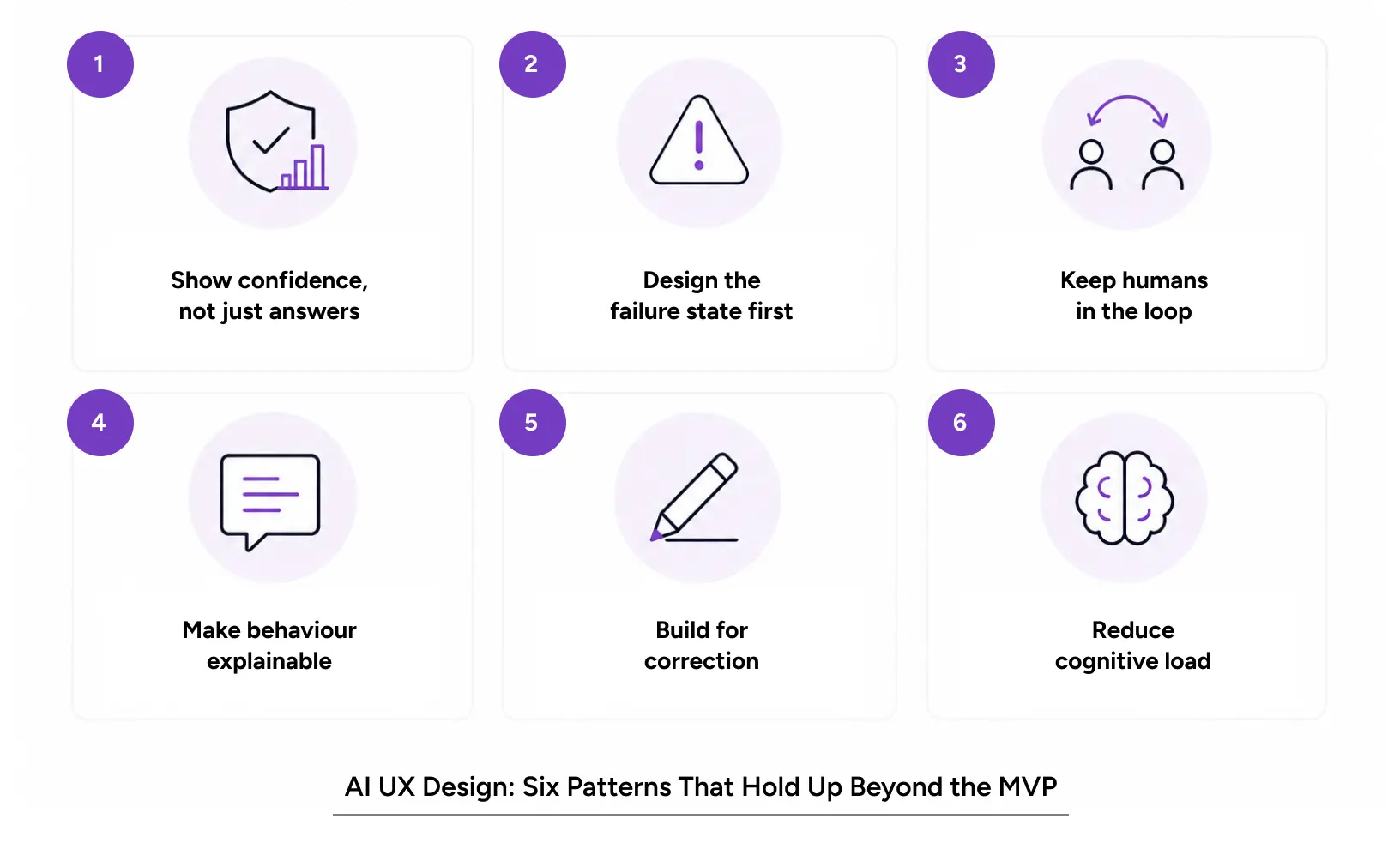
These are the design patterns we use to help AI product designs move beyond the pilot stage. Each one solves a real problem that appears when users start using the product.
1. Show Confidence, Not Just Answers
Users need to know how sure the system is. A prediction shown with a confidence level lets people decide how much to rely on it. This is foundational AI UX design. Hiding uncertainty makes users trust everything equally, which means they trust nothing for long.
2. Design the Failure State First
Most teams design the happy path and treat errors as an afterthought. Flip it. In designing for AI, the failure state is where trust is won or lost. Tell users clearly when the model is unsure, when it needs more input, and what they can do next.
3. Keep Humans in the Loop
Especially in agentic AI design, autonomy without oversight is a liability. Give users a way to review, approve, or reverse what the agent does. The best AI agent design feels like a capable assistant, not an unaccountable black box.
4. Make Behavior Explainable
When an AI makes a decision, users want to understand why. Explainability is not a compliance checkbox. It’s a mechanism. Good AI agent design surfaces the reasoning in plain language, so people can follow the logic without a data science degree.
5. Build for Correction
Users will disagree with the model. Let them. A product that learns from corrections & feedback gets better and makes users feel heard. An AI UX designer who designs feedback loops builds a product that compounds in value.
6. Reduce Cognitive Load
AI can present too much information at once. Good AI UX design helps users focus on what matters by organizing and prioritizing the most relevant information. The goal is to make decisions easier, not overwhelm users with too many options.
Also Read: Mobile Banking UX: Why 33% of Users Quit Their Bank App
How to Apply These Patterns: A Practical Workflow
Knowing the patterns is easy. Applying them under deadline pressure is the real test. Here’s a workflow that keeps AI product design grounded as you scale.
Step 1: Map Where Trust Breaks
Before interacting with the interface, identify the moments when users lose confidence. Watch real sessions. Where do people hesitate? Where do they double-check the AI? Those friction points are your design brief.
Step 2: Design the Model’s “Voice”
Every AI-native product has a personality, whether you plan it or not. Determine how the system communicates uncertainty, acknowledges mistakes, and requests assistance. This is central to agentic AI design, where the agent’s tone shapes whether people trust it.
Step 3: Prototype the Edge Cases
Prototype real-world scenarios, not just the ideal experience. Test how your product responds when the AI is wrong, slow, or uncertain. Identifying these situations early helps create a better user experience. This is where AI UX design makes the biggest difference.
Step 4: Test With Skeptics, Not Fans
Your MVP users loved you. Your next users won’t. Recruit testers who are naturally distrustful of AI. If they trust your product, everyone will.
Step 5: Instrument and Iterate
Track where users override the AI, where they abandon flows, and where they hesitate. Feed that back into the design. AI product design is never finished. It’s tuned continuously.
Tools Worth Knowing
- Figma for interface design and prototyping AI states.
- Amplitude or Mixpanel for product analytics: see where users override the AI, drop off, or hesitate in production.
- Hotjar or FullStory for session replays that show the exact moments trust breaks.
- Maze or Dovetail for structured usability testing and research synthesis.
- LangSmith or Weights & Biases to observe and evaluate model behavior alongside the UX.
For enterprise teams, a partner with deep AI UX design experience shortens this loop considerably. That’s a large part of what we do at Yuj Designs.
Also Read: Design Ops Explained: How to Scale UX Across a Growing Organization
Real Example: Yuj and Resilinc’s EventWatch
Resilinc is a California-based supply chain risk management company and a recognized leader in the space. Their EventWatch app gives professionals visibility into complex, multi-tier supply chains, along with tools to analyze and mitigate risk before it hits.
The app worked, but it was hard to use. Important information was buried. Impacted partners took six clicks to find. Users couldn’t see current events at a glance. Resilinc wanted to grow the user base and expand from B2B into B2C, which meant the experience had to carry more weight.
Yuj redesigned EventWatch into a news-centric app. We restructured the information hierarchy so users could read customized, relevant updates instantly, even before registering. We introduced clear categories like “War Room” for active disruptions and “Relevant” for forecasted risks, and classified news as New, Assessing, Mitigating, or Resolved.
The result was higher user adoption, new customer acquisition, stronger stickiness, and lower support costs. It’s a clear example of how thoughtful AI product design turns a capable engine into a product people rely on.
Conclusion
The difference between an AI-native product that succeeds and one that doesn’t is rarely the model. It’s the user experience that builds trust, clarity, and confidence.
Teams that see AI UX design as an afterthought often struggle to build lasting user trust. On the other hand, teams that make it a core part of the product create experiences people understand and rely on. Design for real-world challenges, keep users informed, and give them control. At scale, AI UX design isn’t just an added feature. It’s a key part of the product.
At Yuj, we’ve spent 25+ years helping enterprise teams get this right, and the AI era has only made the work more important. The companies that win the next decade won’t just have the best models. They’ll have the experiences users actually trust.

FAQs