Interaction design is the practice of shaping how people and products talk to each other. It covers buttons, gestures, transitions, and feedback, so every action feels clear and predictable. Good interaction design reduces confusion, builds trust, and helps users finish tasks without friction or second-guessing.
Introduction
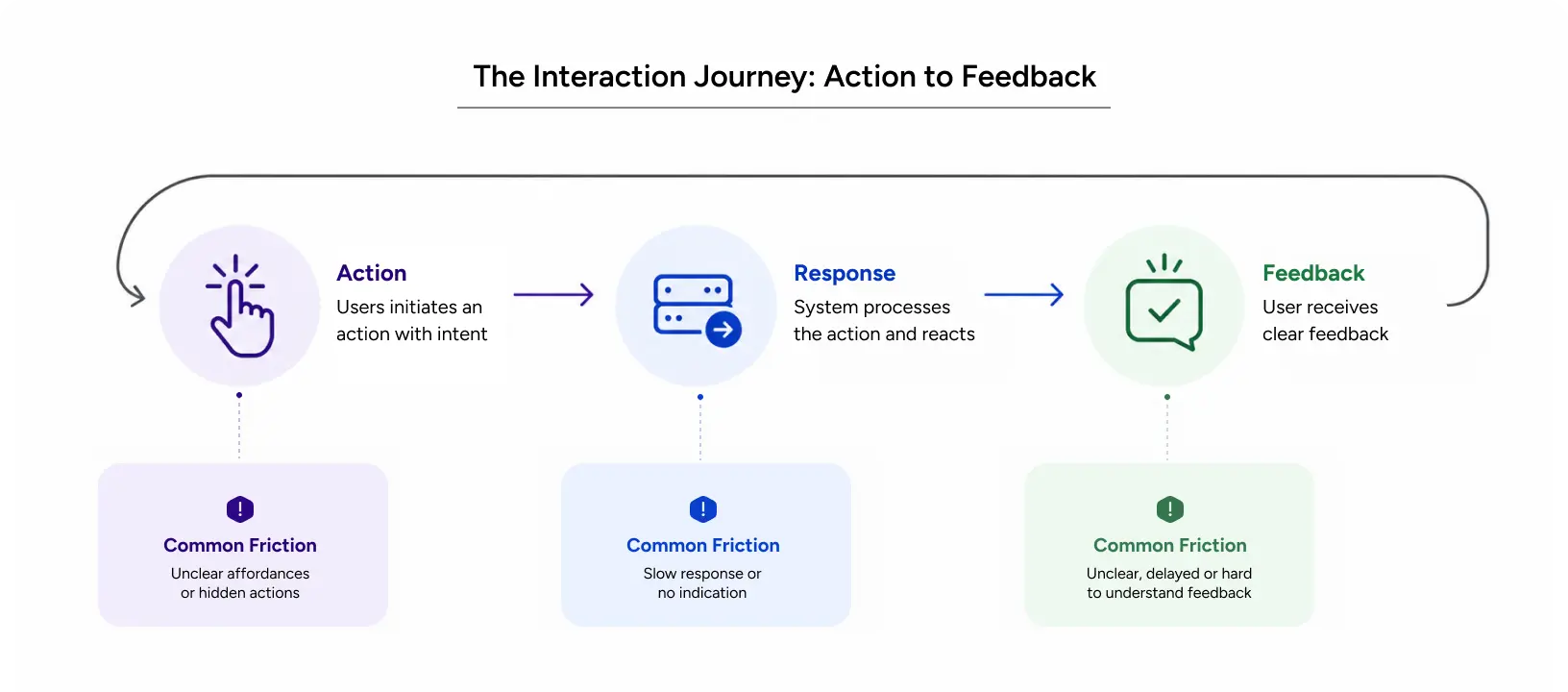
Think about the last app that annoyed you. You tapped a button, and nothing happened. So you tried again. Then the screen jumped, and now you have no idea if it worked or if you just ordered two of something. That gap, between what you did and what the product told you, is an example of interaction design failing.
Here is the part people miss. That failure had nothing to do with how the app looked. The screen was probably fine. What broke was the response, and users feel that instantly, long before they can explain it.
This is exactly what we help businesses solve at YUJ Designs. We design interactions that feel intuitive, consistent, and effortless, so users always know what’s happening and what to do next. From clear feedback and smooth transitions to predictable controls, every interaction is crafted to create a seamless user experience.
In this guide, we’ll break down what interaction design is, the principles behind it, the patterns that work, and how thoughtful interactions create better digital experiences
What Is Interaction Design?
Interaction design refers to the way users and a digital product interact with each other.
So what is interaction design in plain terms? Click, swipe, hover, type: the product has to answer every one of those, clearly and predictably. That back-and-forth is the whole job.
People mix it up with visual design all the time. Visual design is how something looks. Interaction design is how it behaves. Take a search bar. Visual design makes it look clean. Interaction design decides whether it suggests results as you type, how it signals loading, and what happens when you search for something that does not exist.
A few examples that you’ve probably used these interactions today without even noticing: a “like” button that fills with color the second you tap it. A form field that goes red when you skip it. Pull-to-refresh spinning while new posts load. All interaction design, all quietly doing their job.
Types of Interaction Design
It shows up in a few forms, and each one asks something slightly different of you.
- Web interaction design: hover states, dropdowns, loading indicators, scroll behavior. Web interaction design carries people through content on bigger screens, usually with a mouse or trackpad in play.
- Mobile interaction design: touch and gestures on small screens. Tap, swipe, pinch, and everyone needs a clear response because there is no cursor to hint at what is clickable.
- Voice and conversational design: spoken commands and chat, where you lose the visual layout entirely and have to signal state some other way.
- Microinteraction design: the smallest unit. A microinteraction design is one contained response, like a toggle sliding over or a heart animating on tap. Tiny, but they add up.
Core Principles
Great interaction design follows a few simple principles:
- Give feedback: Every action should have a clear response, whether it’s a visual change, animation, or message.
- Stay consistent: Buttons, menus, and other elements should work the same way throughout the product.
- Give users control: Let people undo actions, cancel tasks, or go back without frustration.
- Reduce effort: Keep tasks simple and remove unnecessary steps wherever possible.
These principles work because they match how people already use digital products. Users come with expectations based on the apps and websites they use every day. When your product follows familiar patterns, it’s easier to learn and use. When it doesn’t, users have to figure everything out from scratch.
Also Read: Ethnographic Research in UX: How to Understand Users in Their Real Context
Why Interaction Design Matters in UX
Impact on User Experience
Interaction design determines how easy and intuitive a product feels to use. When users get clear, instant feedback, they can complete tasks with confidence. Without it, they may hesitate, repeat actions, or abandon the task altogether.
Interaction design also plays a key role in accessibility. Features like clear focus states, keyboard navigation, and easy-to-understand error messages make products usable for a wider range of people.
Good interaction design also creates a better overall experience. Smooth, predictable interactions make a product feel effortless to use, while confusing or inconsistent interactions leave users frustrated. People may not notice when everything works perfectly, but they quickly remember when it doesn’t.
Impact on Business Metrics
Interaction design doesn’t just improve the user experience. It directly impacts business results.
Clear and intuitive interactions help users complete tasks with ease. This keeps people engaged, reduces drop-offs during sign-ups or checkouts, and encourages them to return. When a product is easy to use, users are more likely to trust it and keep coming back.
According to Forrester, a well-designed user interface can increase conversion rates by up to 200%, while a better overall user experience can improve conversions by up to 400%. The same research estimates that every $1 invested in UX can generate up to $100 in return. At the same time, 88% of users are unlikely to return after a poor user experience.
Good interaction design also reduces support requests because users can complete tasks without confusion. Continuous UX improvements have also been shown to increase revenue retention over time.
At its core, interaction design builds trust. When users know what to expect, and every interaction feels smooth and reliable, they’re more likely to become loyal customers.
Common Mistakes to Avoid
Even well-designed products can fall short because of a few common interaction design mistakes. These are the issues we see most often during UX audits at Yuj Designs:
- Missing feedback. A user acts, the product says nothing. Every action needs a response you can see or hear.
- Overusing animation. When everything moves, nothing reads. Motion should show cause and effect, not just look modern.
- Inconsistency. The same control behaving differently across screens forces people to relearn it every time.
- Overloading microinteraction design. One delightful animation is nice. Ten on a screen is noise. Keep them purposeful, not decorative.
How to Apply Interaction Design (A Practical Guide)
Step-by-Step Workflow
Interaction design is not guesswork, even though it can feel that way early on. Here is the workflow our teams at Yuj Designs actually use.
- Map the task. Write down what the user is trying to do and the real steps they take to get there. Not the ideal path. The real one.
- Define the states. For every element, decide how it looks and behaves when idle, active, loading, done, and broken. The broken state is the one everyone forgets.
- Sketch the flow. Rough out how one screen leads to the next and where feedback shows up along the way.
- Build an interaction prototype. Turn the flow into something clickable. An interaction prototype lets you experience how the product behaves before a single line of code is written.
- Test with real users. Watch where they pause, squint, or tap the wrong thing. That hesitation is your bug list.
- Refine and repeat. Fix the friction, test again. It rarely lands on the first pass, and that is fine.
The interaction prototype is the part that changes everything. It drags the conversation out of opinion and into evidence. Once a stakeholder can click through a real interaction prototype and feel it for themselves, the “should the button do this or that” arguments tend to end on their own.
Pro Tips From Yuj Designs
Design the error states first, not at the end. Products fail people at the edges, not on the happy path, and the edges are exactly what gets skipped when a deadline looms. Watch your timing too: anything slower than about 400 milliseconds starts to feel laggy and users read lag as “broken.” Use motion to explain cause and effect, not to show off. And please design the loading state. Waiting is part of the experience, whether you design it or not.
Tools and Resources
- Figma: The go-to choice for most teams, with strong support for interactive states, transitions, and clickable prototypes.
- Adobe XD & ProtoPie: Better suited for advanced animations, motion design, and detailed microinteractions.
- Zeplin: Simplifies developer handoff by providing clear interaction specs and reducing back-and-forth communication.
Also Read: Wireframing vs Prototyping in UX: When to Use Which and How to Test Both
Real-World Applications
Interaction design shows up everywhere: web apps, mobile products, dense enterprise tools. The best interaction design examples all have one thing in common. They fix a real friction point instead of just adding shine.
Case Study: FoodLink (USA)
FoodLink is a US-based SaaS platform connecting a fresh-food supply chain of 2,000+ growers, shippers, aggregators, and retailers, with more than 10,000 people using it every day.
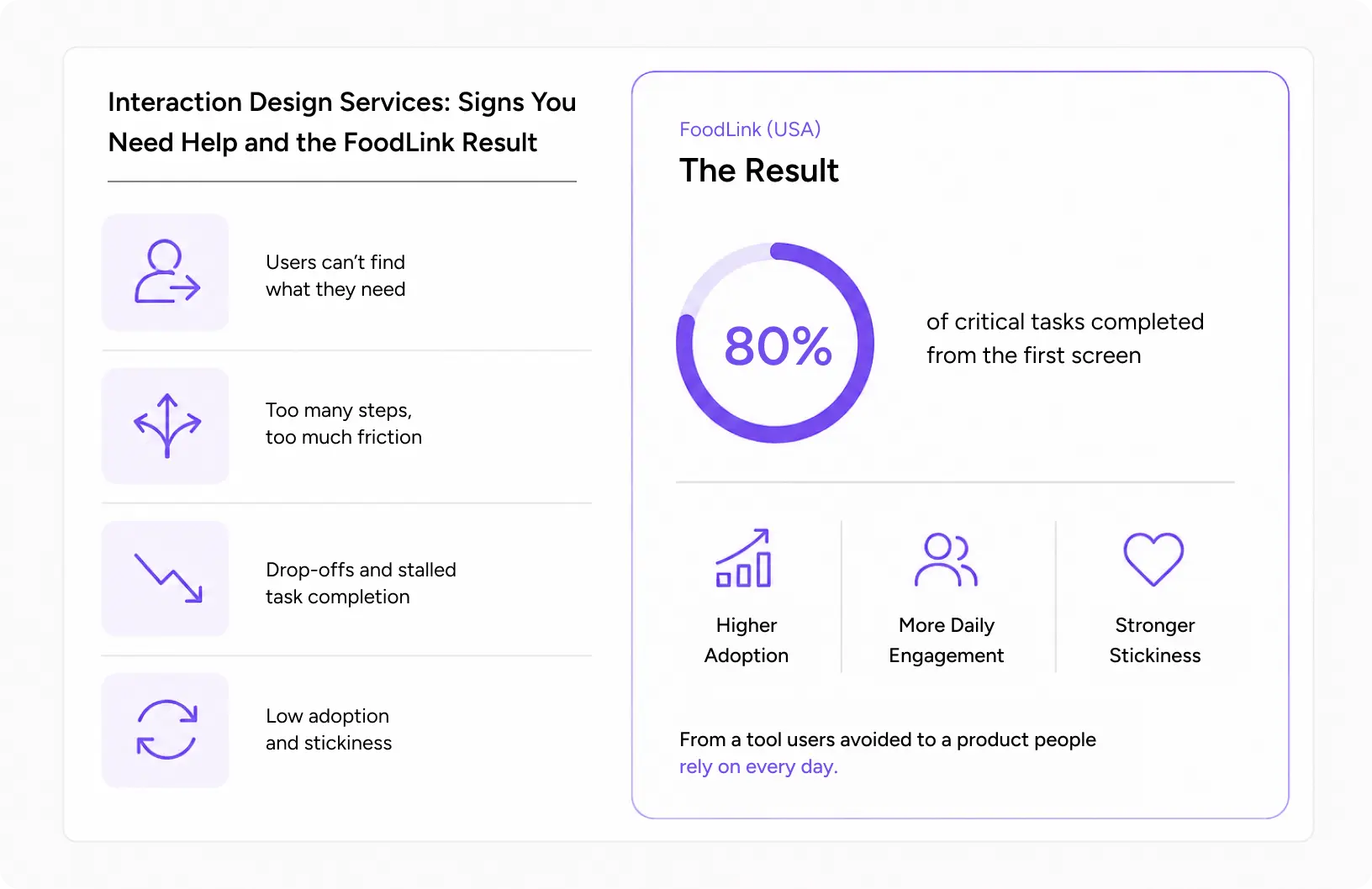
On paper, it should have been sticky. In practice, adoption had stalled. The legacy system had no clear structure, no fast way into common tasks, and a navigation path that lost people. Users could not find features or follow where the information went. None of that was a visual problem. It was an interaction design problem from top to bottom.
We studied how people actually moved through their work, then simplified the interaction without stripping out the complexity the job required. The team rebuilt the structure and navigation, grouped tasks the way users think about them, and settled on one consistent visual language. The centerpiece was a “workbench” concept that let people finish 80% of critical tasks from the very first screen.
Then we added gamification to pull people back in, and the product got noticeably stickier. A tool people used to avoid turned into part of the daily routine.
Read More: Foodlink Case Study
Conclusion
Interaction design is what makes a product feel easy and intuitive to use. It determines whether users can complete tasks smoothly or struggle to figure out what to do next. When done well, the experience feels seamless. When done poorly, even the most attractive interface can frustrate users.
The key to great interaction design is simple. Provide clear feedback, stay consistent, give users control, and remove unnecessary steps. These principles apply across web interaction design, mobile apps, and every microinteraction design that users interact with.
Yuj Designs has spent years creating interactive experiences for enterprise products used by thousands of people every day. We see interaction design as more than visual polish. It’s a strategic tool that improves usability, builds trust, and supports long-term business growth.

FAQs