AI onboarding is the first-run experience that teaches a new user what an intelligent product does and how to trust it. Good AI UX design sets clear expectations, shows the product’s limits, and guides the first useful action fast. The goal is confidence, not just a feature tour.
Why the First Run Decides Everything
A user opens your AI product for the first time. The screen loads. Now you have about thirty seconds.
In that half minute, they decide one thing. Can I trust this, or not? That single moment is where AI user experience either works or falls apart.
Most businesses treat onboarding as a checklist. Show the logo. Show a tour. Ask for a signup. But intelligent products break that old pattern. The user is not just learning buttons. They are learning whether a machine will do the right thing with their data, their money, or their time.
This is the part of AI user experience that businesses get wrong most often. They ship a smart model, then wrap it in a first-run flow built for a normal app. The model works. The trust never lands.
At Yuj Designs, we have redesigned first-run experiences for enterprise AI products across fintech, healthcare, and supply chain. This guide explains what makes AI onboarding effective, why it matters, and how to build it step by step.
What Is AI Onboarding UX?
AI onboarding is the first-run experience that introduces a new user to an intelligent product. It teaches what the product does, what it cannot do, and how to get the first useful result.
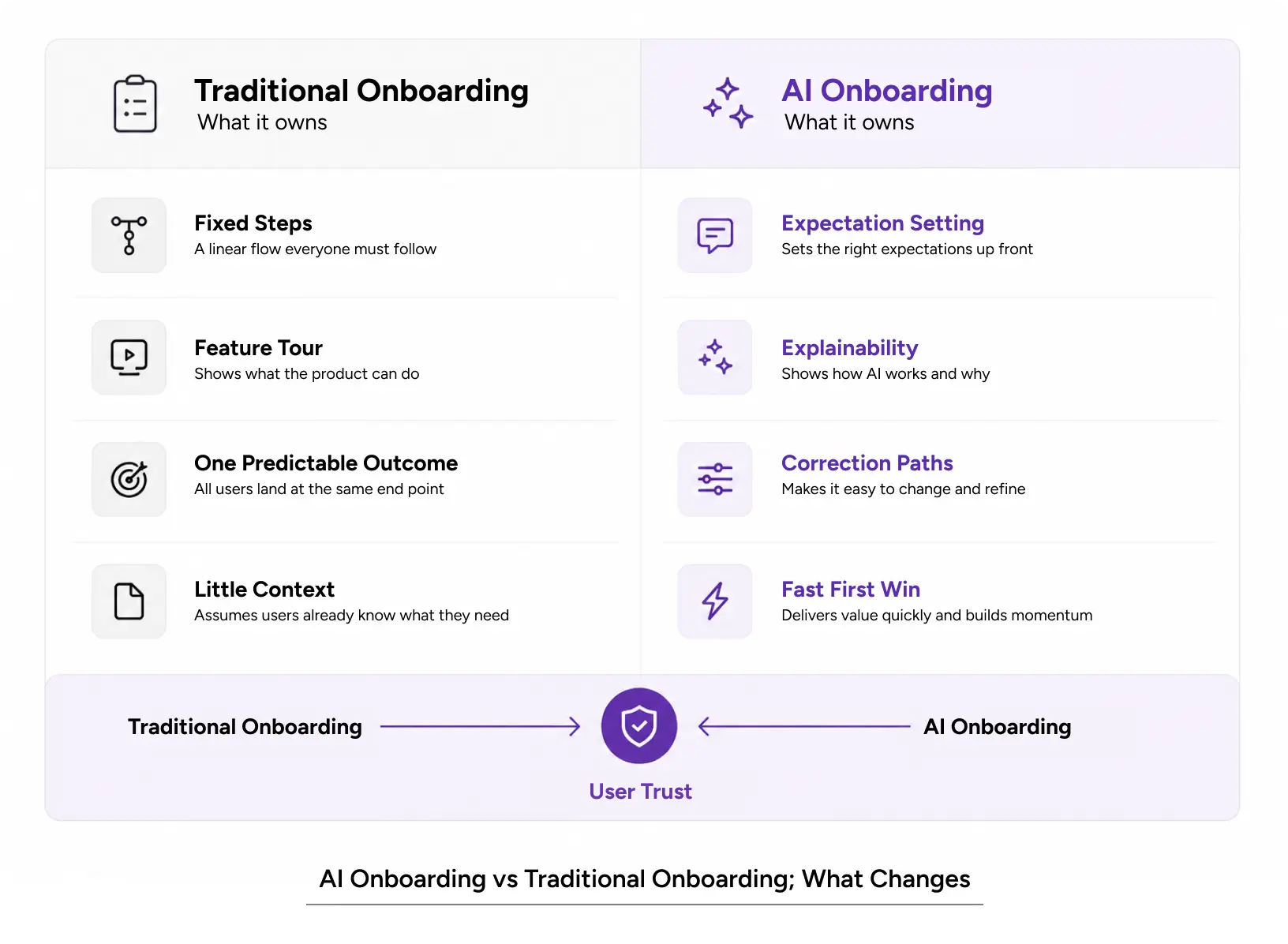
Regular onboarding explains an interface. AI UX onboarding does more. It has to manage expectations about a probabilistic, not fixed, system. The same input can produce different outputs. Users need to understand that early, or they lose faith fast.
Good AI UX onboarding answers three questions in the first session. What can this do for me? How do I know when it is right? What happens when it is wrong?
Types of AI Onboarding
There are three common forms, each suited to a different product.
- Guided onboarding. The product walks the user through one real task. Best for complex enterprise tools where the first win needs help.
- Progressive onboarding. Features unlock as the user grows. Best for AI UX products with deep functionality.
- Invisible onboarding. The product teaches through use, with small hints in context. Best for consumer tools where friction kills adoption.
Pick the type based on user skill and product depth. Many strong AI UI UX design flows blend two of these.
Core Principles of Designing for AI
A few rules hold across every first-run flow we build. These are the foundations of designing for AI that people actually trust.
- Set expectations before the first output. Tell users the AI can make mistakes. A clear explanation at the start avoids problems later.
- Show confidence, not just answers. Display why the AI made a choice. Explainability is the heart of AI UX design.
- Give an easy exit. Let users correct, undo, or override. Control builds trust in designing AI products.
- Deliver one real win fast. The first useful result matters more than any feature tour.
Also Read: Ethnographic Research in UX: How to Understand Users in Their Real Context
Why AI Onboarding Matters for Users and Business
Onboarding is not a nice-to-have. It is where adoption is won or lost. Here is why first-run design pays off when designing AI products.
Impact on User Experience
The first run shapes how users feel for the rest of the relationship. A strong AI user experience lowers cognitive load from the start. A confusing one does the opposite. People do not know what the product expects, so they freeze or leave.
Trust is the real currency in AI user experience. When users cannot tell whether the AI is right, they stop relying on it. Strong onboarding lowers that anxiety. It shows the reasoning, not just the result.
Accessibility matters too. Clear language, plain steps, and readable states help every user, not only new ones. This is core to responsible AI UX work.
Impact on Business Metrics
The numbers follow the experience. Research on product onboarding shows that around 25% of apps are used once and never opened again. For AI products, the drop-off is often worse because the trust gap is wider.
Better AI onboarding improves the metrics leaders care about. Activation rates increase when users achieve their first win. Retention improves when people understand the product. Support costs fall when the flow answers questions before they are asked.
For businesses designing AI products, this is the difference between a demo that impresses and a product people keep.
Common Mistakes to Avoid
We see the same errors again and again in AI UI UX design.
- Not telling users what the AI can’t do.
- Front-loading a long tour before any value.
- Asking for heavy signup before the user sees a result.
- Treating explainability as a legal footnote, not a design job.
How to Apply It: A Practical Workflow
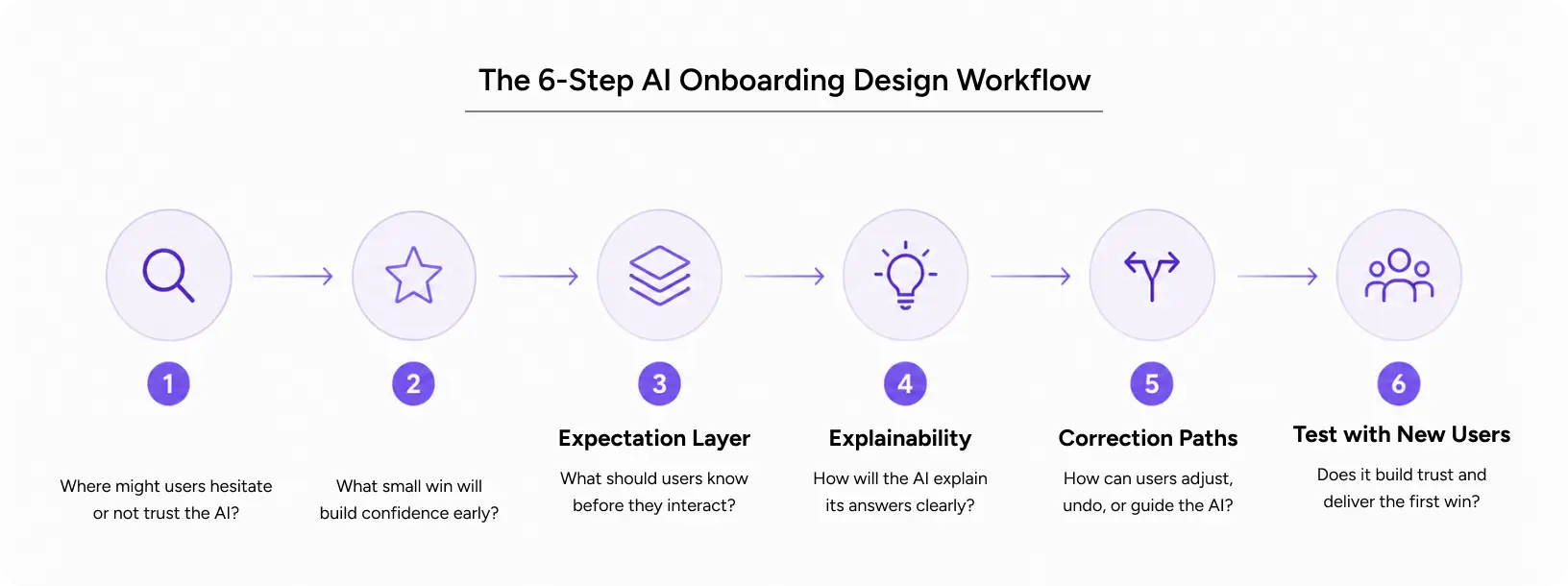
Here is the workflow we use when designing for AI first-run experiences. It moves from research to test, and it works for both consumer and enterprise products.
Step-by-Step Workflow
Step 1: Map the trust gaps. Before designing a single screen, interview five to eight real users to uncover their biggest fears, like “Will it lose my data?” or “Will it be wrong?” Then turn those concerns into your design brief.
Step 2: Define the first win. Choose one task that proves value in under a minute. Everything in the first run should push toward that task.
Step 3: Design the expectation layer. Write plain lines that explain what the AI does and where it can slip. This honesty is the base of trustworthy AI UX.
Step 4: Build explainability into the output. Show sources, confidence, or reasoning next to results. Users trust what they can question.
Step 5: Add correction paths. Let people edit, reject, or flag AI output. Control turns skeptics into users.
Step 6: Test with new users only. Watch first-time sessions. If someone hesitates or asks “is this right?”, you have found a gap.
Pro Tips from Yuj Designs
A few things separate good flows from great ones in AI UI UX design.
- Use empty states as teaching moments, not dead ends.
- Default to reversible actions so mistakes feel safe.
- Reduce choices in the first session. One clear path beats five.
- Match the AI’s tone to the stakes. A banking tool should sound calmer than a photo app.
Tools and Resources
Most of our AI UI UX design work runs through a small, practical stack.
- Figma for wireframes, prototypes, and design systems.
- Maze or UserTesting for first-run session testing.
- Dovetail for organizing research and trust-gap findings.
Also Read: Building AI-Native Products at Scale: UX Patterns for Teams Moving Beyond the Minimum Viable Product
Common Questions About AI Onboarding UX
Businesses come to us with the same five questions. Here are our straight answers, drawn from real project work.
1. What makes AI onboarding different from traditional onboarding?
Traditional onboarding teaches a fixed interface. Click here, then here, and you get the same result every time. AI onboarding cannot promise that. The system is probabilistic, so the same input can give different outputs.
That changes the job. You are not just teaching buttons. You are teaching judgment. Users need to know when to trust the output and when to check it. A weather app can be wrong, and nobody panics. An AI that drafts a contract or flags a payment is different. The stakes are higher, so the trust work matters more. That trust work is what sets AI UX onboarding apart.
2. How much should users know about the AI during the first run?
Less than most businesses think. Do not explain the model, the training data, or the architecture. Users do not care how it works. They care whether it helps.
Teach three things only. What it does for me. How do I know when it is right? What I do when it is wrong. Everything beyond that belongs in later sessions or a help guide. A first run that tries to explain everything teaches nothing. Good onboarding protects that first session from overload and gets the user to one clear result.
3. What are effective ways to set expectations around AI capabilities and limits?
Say the hard part out loud, early. A short line like “This can make mistakes, so review before you send” does more than a legal disclaimer buried in settings. It sets an honest frame before the first result lands.
Then back it up in the interface. Show confidence levels so users can weigh an answer. Show sources so they can check it. Show a clear way to correct or reject output. When people can question a result, they trust it more, not less. Honesty about limits is a feature, not a weakness, in products people rely on.
4. Which onboarding patterns help users reach value quickly?
The fastest pattern is the “first win” pattern. Pick one task that proves value in under a minute, then remove everything that blocks it. If a user sees one useful result early, they come back.
A few patterns work well across products:
- Let users try before they sign up, so value comes before commitment.
- Pre-fill an example so the first result is instant, not a blank page.
- Use empty states to suggest the next useful action.
- Cut choices in the first session to one clear path.
Each pattern lowers the effort between opening the product and getting something back. These are the backbone of practical AI UI UX design for first-run flows.
5. Can onboarding really improve AI adoption?
Yes, and the effect is often larger than a model upgrade. In our first-run design projects, the first session is usually the single biggest lever on activation and retention. A stronger model helps, but users only benefit if they get past the first screen and start trusting the output.
The example below shows it clearly. A better first-run experience lifted trust in the AI without changing the model at all.
Real-World Example: KonaAI Compliance Platform
KonaAI is a US-based AI platform that helps enterprises detect and investigate financial and compliance risk. It has processed over $1.7 trillion in transactions and monitors more than 20 Fortune 500 companies.
The core challenge was trust. Auditors did not just want an alert. They wanted to know why something was flagged, how risky it was, and what to do next. Unclear AI rationale slowed every investigation.
Yuj Designs rebuilt the first-run experience around that need. New users get an adaptive workflow: a guided, step-by-step path for compliance-heavy tasks, or direct access for power users. Every alert now shows its rationale and evidence in one view.
The results were clear. Investigation cycles ran 30% faster. User trust in AI recommendations rose 20%. Explainability, built into the first run, turned skeptics into confident users.
Read the full KonaAI case study
Conclusion
Intelligent products do not fail because the model is weak. They fail because the first run does not earn trust.
AI onboarding is where that trust is built. Set clear expectations. Show the reasoning. Give users control. Deliver one real win fast. Do that, and people stay.
The businesses that win at designing AI products treat the first thirty seconds as seriously as the model itself. That is the whole idea behind good AI UX design: design the experience people feel, not just the screen they see.
Trusted by clients across India and the USA, Yuj Designs has spent more than 25 years turning complex products into experiences people trust. First-run design for AI is where that work matters most right now.

FAQs