What is UX design?
UX design or user experience design is the practice of shaping how people interact with a product. It covers research, information architecture, interaction design, usability testing, and visual hierarchy. The goal is not beautiful screens. It is products that work clearly, efficiently, and without friction for the people using them.
Introduction: The UX Problem No One Talks About
25% of apps are downloaded once and never opened again.
It is rarely the idea that fails. It is an experience.
Most product teams know this at some level. They run sprints, ship features, and track DAUs. But when users drop off after the first session, before the first purchase, before they ever see the product’s real value, the blame lands on marketing. On the pricing page. On the competition.
Rarely on the design.
Understanding what is UX design really means, not just the Wikipedia definition, changes how product teams make decisions. It shifts the question from “what should we build?” to “what do people actually need, and will this design let them get there?”
This guide is for product managers, founders, and design leads who want a clear, practitioner-grounded answer. You will walk away knowing what UX design is, how the UX design process works in practice, and what separates products that retain users from products that lose them.
What Is UX Design? Definition and Core Concepts
What is user experience design? At its core, it is the practice of designing how a person interacts with a product, digital or physical, so that the interaction is clear, purposeful, and effective.
What is UX in the context of product development? It is everything the user touches, hears, reads, and feels from the first moment they encounter a product to the last. The loading state. The error message. The onboarding flow. The moment they decide to come back or not.
UX design is not decoration. It is not the final layer applied before launch. It is a discipline with its own research methods, frameworks, and measurable outcomes.
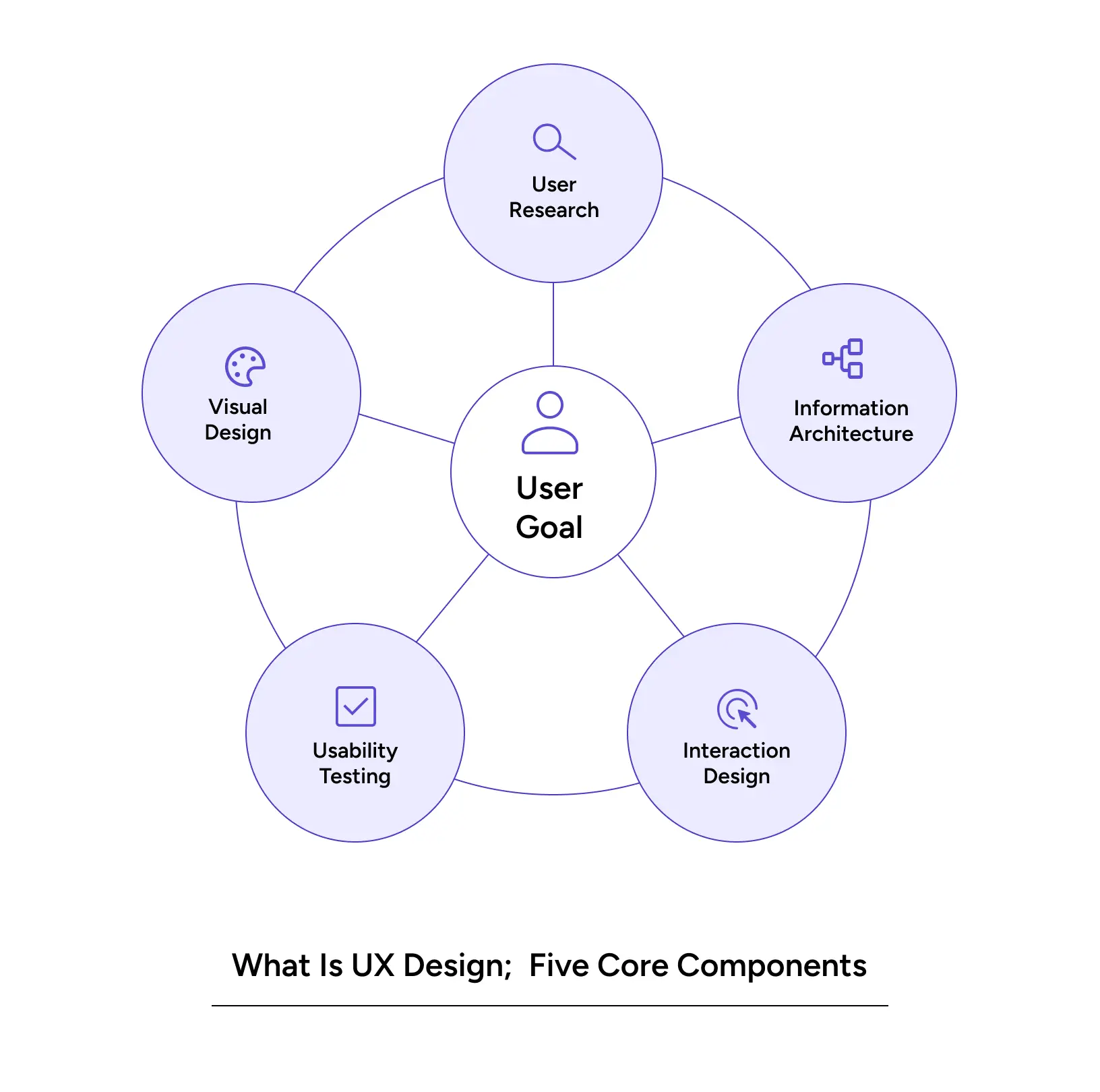
The Core Components of UX Design
User Research Before a single wireframe is drawn, UX designers need to understand who they’re designing for. That means interviews, surveys, behavioral data, and usability testing. Research is not optional in UX; it is the foundation.
Information Architecture: How content is organized determines whether users find what they need or give up trying. Information architecture is the invisible skeleton of every digital product.
Interaction Design: Every tap, swipe, hover, and transition is an interaction. Interaction design defines how those moments behave and whether they feel natural or awkward.
Usability Testing Design assumptions fail to contact real users every day. Usability testing is how you find out where the gaps are before they become drop-off points.
Visual Design: Visual hierarchy, typography, spacing, and color are not aesthetic choices. They are functional tools that guide attention, signal priority, and reduce cognitive load.
Also Read: 2026: Agentic AI Moves from Experimentation to Enterprise
What Is UX and UI? Why Does the Difference Matter
What is UX and UI? These two terms appear together so often that many people treat them as interchangeable. They are not.
UX (User Experience) is about how the product works. Does the flow make sense? Can users complete key tasks without confusion? Does the product solve the problem it was built to solve?
UI (User Interface) is about how the product looks. The button styles, the color palette, the typography, and the visual layout.
You can have a beautiful UI with a terrible UX. The screens look polished, but the checkout flow asks for information in the wrong order, loses progress on errors, and never explains what just happened. That is a UI that fails UX.
You can also have strong UX with a rough UI, users can navigate intuitively, complete tasks without friction, and understand the product’s logic, but the visual design feels unfinished.
Both matter. But they are different problems. Confusing them leads to product teams that invest in visual polish while their core flow is still broken.
UX Principles Every Product Team Should Know
These are the UX principles that separate products people love from products people tolerate.
1. Design for the actual user, not the ideal user
The person using your product is probably on a slow connection, distracted, and doing three things at once. UX principles start with this reality. Design for the anxious user, the hurried user, the first-time user.
2. Clarity is more important than cleverness
Novel interactions feel exciting in demos. They frustrate users in real contexts. If a user has to think about how to use something, the design has already failed. UX design at its best is invisible.
3. Reduce cognitive load at every step
Every decision a user makes costs mental energy. Good UX principles minimize decisions. They surface defaults, pre-fill fields, reduce options, and make the next step obvious without requiring thought.
4. Test assumptions, always
Designers are not users. Neither are product managers. Every assumption about how users think or behave is a hypothesis. UX principles treat assumptions as things to test not things to defend.
5. Accessibility is not a feature; it is a baseline
Designing only for users who see perfectly, move precisely, and read fluently is designing for a minority. What is user experience design if it excludes the people who need it most?
6. Consistency builds trust
When interactions behave the same way across a product, users build mental models. They stop thinking about the interface and start thinking about their task. Inconsistency breaks that trust immediately.
The UX Design Process: How It Actually Works
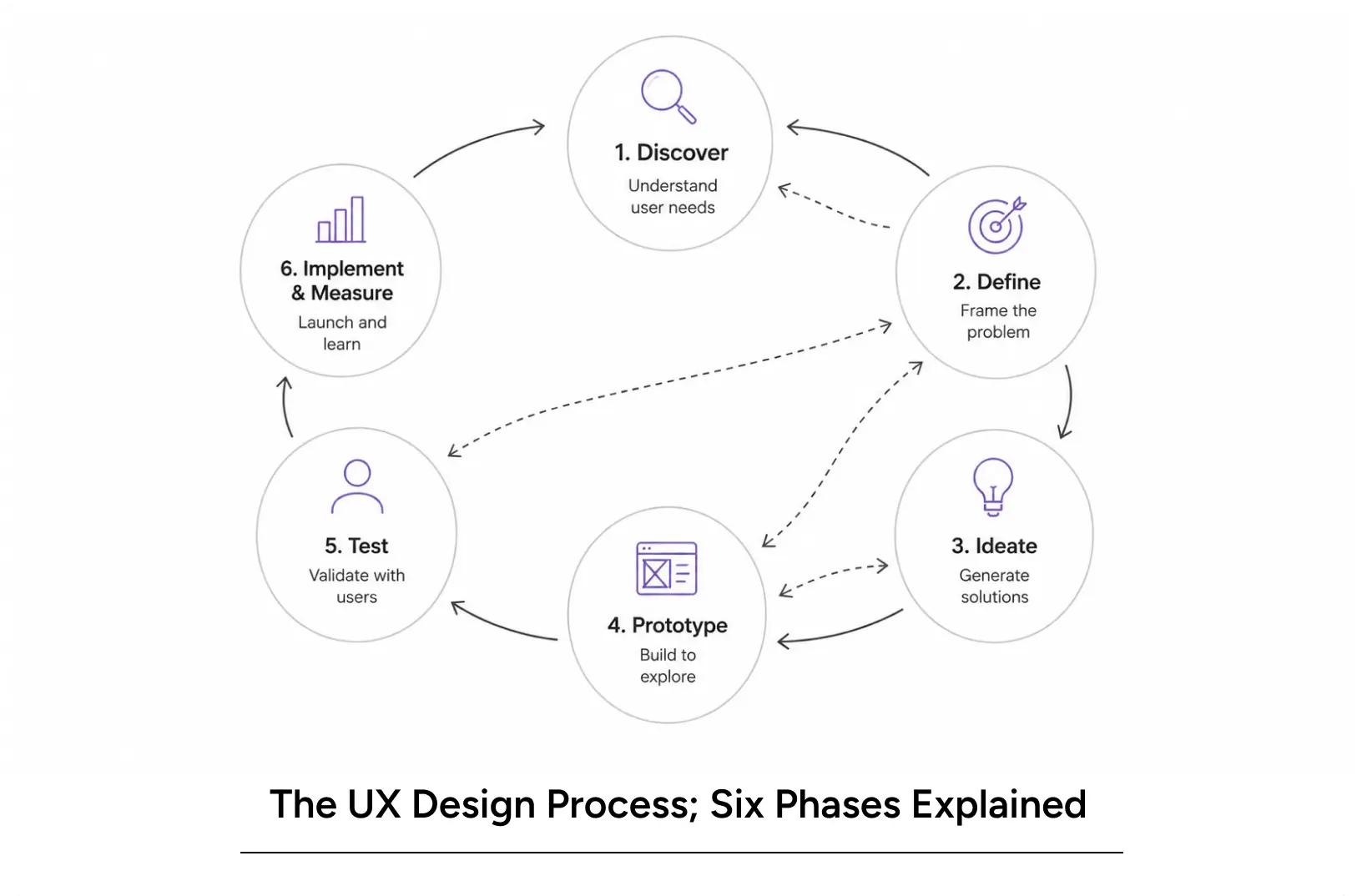
The UX design process is not a linear checklist. It is an iterative loop. But it has recognizable phases that every high-performing design team works through.
Phase 1: Discover
This is where the UX design process begins with questions, not answers. Who are the users? What are they trying to accomplish? Where does the current experience break down? Methods include user interviews, contextual inquiry, surveys, analytics review, and competitive analysis.
Phase 2: Define
Discovery generates data. Define turns it into a direction. The team synthesizes research into problem statements, user personas, and journey maps. The question changes from “what did we learn?” to “what problem are we actually solving?”
Phase 3: Ideate
With a defined problem, the team generates solutions. Not the first solution — many solutions. Sketching, design sprints, collaborative workshops, and concept testing all belong here. The UX design process does not commit to a direction until multiple directions have been explored.
Phase 4: Prototype
Ideas become testable artifacts. Prototypes range from paper sketches to high-fidelity Figma flows, depending on what question you’re trying to answer. The goal is to build the minimum artifact needed to validate or invalidate the hypothesis.
Phase 5: Test
Prototypes go in front of real users. What works? What breaks down? Where do users hesitate, misread, or give up? Testing feeds back into the process, informing refinement or sending the team back to ideation.
Phase 6: Implement & Measure
The design ships. But the UX design process does not stop at launch. Behavioral data, customer support patterns, and retention metrics tell you whether the design is working in the real world and where the next iteration should focus.
The UX Design Methodology Behind High-Performing Products
UX design methodology refers to the frameworks a design team applies to guide decisions. Three methodologies dominate modern product design.
Human-Centered Design (HCD)
The foundational UX design methodology for most agencies and in-house teams. HCD keeps the user’s needs, context, and behavior at the center of every design decision — from research through to implementation. It treats empathy as a design tool, not a value statement.
Design Thinking
A broader innovation framework that overlaps heavily with UX. The five stages — Empathize, Define, Ideate, Prototype, Test map closely to the UX design process. Design Thinking is valuable for cross-functional teams that need a shared language for problem-solving.
Lean UX
Built for speed. Lean UX strips the UX design methodology down to its core: form a hypothesis, test it fast, learn from the result, repeat. It is particularly effective for startups and agile product teams where design and development move in tight cycles.
Pro Tips for Applying These Methodologies
- Do not pick a methodology and follow it rigidly. High-functioning teams blend frameworks based on the problem at hand.
- Match the research method to the question. Interviews answer “why.” Usability tests answer “where.” Analytics answer “how many.” Know which question you’re asking before you choose the method.
- Document decisions, not just deliverables. The most valuable output of any UX process is the reasoning behind the design — not just the final file.
Tools commonly used: Figma (wireframing, prototyping), Miro (collaborative ideation), Maze (remote usability testing), Hotjar (behavioral analytics), Dovetail (research synthesis).
Also Read: Navigating the Agentic Era: Redefining UX for Real-World Impact
Why UX Design Directly Affects Business Metrics
What is user experience design worth to a business? The answer shows up in the numbers.
Impact on User Behavior
- Drop-off rates are almost always a UX problem. When users exit before completing a flow, it is because they hit friction confusion, too many steps, unclear copy, or missing trust signals.
- Session depth improves when users can navigate without effort. The design gets out of the way, and users go deeper.
- Return rate rises when the experience is reliable. Users come back to products that worked for them last time.
Impact on Conversion
Poor UX design in an onboarding flow does not just create a bad experience. It kills conversion. Each additional step that requires unnecessary effort adds drop-off risk. Each unclear label creates a moment of doubt. Moments of doubt compound.
Rebuilding an onboarding flow with strong UX principles, removing friction, surfacing value faster, and reducing input fields consistently produces measurable conversion gains.
Impact on Brand Trust
Users do not distinguish between “bad UX” and “bad company.” A product that is confusing to use signals something about the organization behind it. Design is a trust mechanism.
Common UX Mistakes That Cost Businesses
- Designing for power users while ignoring first-time users
- Skipping usability testing before launch (assumptions replace evidence)
- Treating accessibility as optional (excludes a significant user segment)
- Adding features without auditing the existing flow (complexity without clarity)
- Measuring output, not outcomes (tracking velocity, not user success)
Real-World Applications: UX in Action
Real-World Applications: UX in Action
StubHub: Where UX Design Methodology Moved the Revenue Needle
StubHub, the US’s largest secondary ticketing marketplace, had stagnant conversion despite a feature-rich platform. Buyers were dropping off. The culprit: a complex search flow, static seat maps, confusing labels, and too many steps to purchase.
YUJ ran the full UX design process, user research to find the drop-off points, concept design to fix them, and usability testing before shipping. The redesign restructured the information hierarchy, cut unnecessary steps, and introduced a dynamic seat-map showing row configuration, seat view, and pricing, giving buyers the confidence to commit.
The result: a 4.4% increase in overall conversion rate and an ROI of $117M for StubHub after the seat selection flow was redesigned
Read More: StubHub Case Study
Industry Use Cases
Fintech: Trust and clarity are everything. What is user experience design in fintech? It is the difference between a user who completes a KYC flow and one who drops off at step 2. It is the error message that explains what went wrong versus the one that just says “try again.”
In healthcare products, UX principles carry real stakes. A confusing medication scheduler, an inaccessible appointment form, and a results page that fails to communicate urgency clearly, these are not just bad experiences. There are risks.
SaaS: Onboarding is where most SaaS products are won or lost. What is UX in SaaS? It is getting a new user to their first moment of value, the feature that makes them say “I get it now” as fast as possible.
E-commerce: Every extra step between intent and purchase costs conversion. UX design in e-commerce is about ruthless simplification fewer fields, clearer trust signals, and faster checkout.
Also Read: Gamifying AI with Octalysis: Designing Motivation in Intelligent Systems
Conclusion
What is UX design? Here is what every product team should walk away knowing:
- UX design is not UI design. One is about how a product works. The other is about how it looks. Both matter. They are not the same problem.
- UX principles, clarity, reduced cognitive load, consistency, and accessibility are not design preferences. They are performance drivers.
- The UX design process is iterative. Research, define, ideate, prototype, test, measure. Then repeat.
- The right UX design methodology depends on the context. Human-centered design, design thinking, and lean UX are tools, not religions.
- What is user experience design worth? Look at your drop-off rates, your conversion numbers, and your retention curves. The UX impact is already in the data.
- Good UX design does not add features. It makes existing features easier to use, easier to trust, and easier to come back to.
Product teams that treat what is ux as a question worth answering seriously not a phase in the roadmap, but a continuous discipline, build products that compound. Every iteration makes the product measurably better. Every research session removes a layer of assumption.
YUJ Designs has run that process across fintech, healthcare, SaaS, and e-commerce products. The pattern is consistent: when the design reflects what users actually need, not what the product team assumed they needed, the metrics follow.
FAQs