
What Is Designing for AI?
Designing for AI is the practice of creating user interfaces, interactions, and experiences for products powered by artificial intelligence. It combines traditional UX principles with AI-specific considerations like uncertainty, explainability, trust, and dynamic behaviour. The goal is to make intelligent systems feel intuitive, predictable, and genuinely useful to people.
The AI UX Problem Nobody Is Diagnosing Correctly
A fintech team in Mumbai rebuilt its AI-generated investment recommendation interface. Model accuracy had not changed. The underlying algorithm was the same. But trial-to-paid conversion went from 11% to 27% in 90 days. The only thing that changed was the design, specifically, whether users could understand why the AI suggested what it suggested.
That is the AI UX problem in a concrete example. The model was not broken. The product was. And it is a problem that most teams are still using the wrong framework to solve.
Designing for AI is not traditional UX with a chatbot added. It is a different discipline that requires designing for probability, not predictability, for systems that learn, adapt, occasionally fail, and do so in ways a button never would. This guide covers what that means in practice: the principles, the framework, and the specific decisions that determine whether users trust an AI-powered product or abandon it.
What Is AI UX and Why Is It Different From Traditional UX?
Traditional UX design assumes deterministic systems. Click a button, get a result. Fill a form, trigger an action. Behaviour is predictable. Outputs are consistent.
AI changes this entirely. An AI system produces probabilistic outputs. The same input can yield different outputs on different days. The system learns and shifts. It can be confidently wrong. It can fail in ways that are difficult to explain.
This creates a fundamentally different design challenge. Here is how AI UX design diverges from classical UX:
| Design Dimension | Traditional UX | AI UX Design |
|---|---|---|
| Output predictability | Deterministic | Probabilistic |
| Error handling | Known failure states | Unexpected, novel failures |
| User mental model | Static and learnable | Evolving and adaptive |
| Trust signals | Accuracy and speed | Transparency and consistency |
| Feedback loops | User confirms action | The system learns from interaction |
| Communication layer | Instructions and forms | Conversational UX, natural language |
An AI UX designer must account for all of these dimensions simultaneously. You are not just designing screens. You are designing trust.
Also Read: Gamifying AI with Octalysis: Designing Motivation in Intelligent Systems
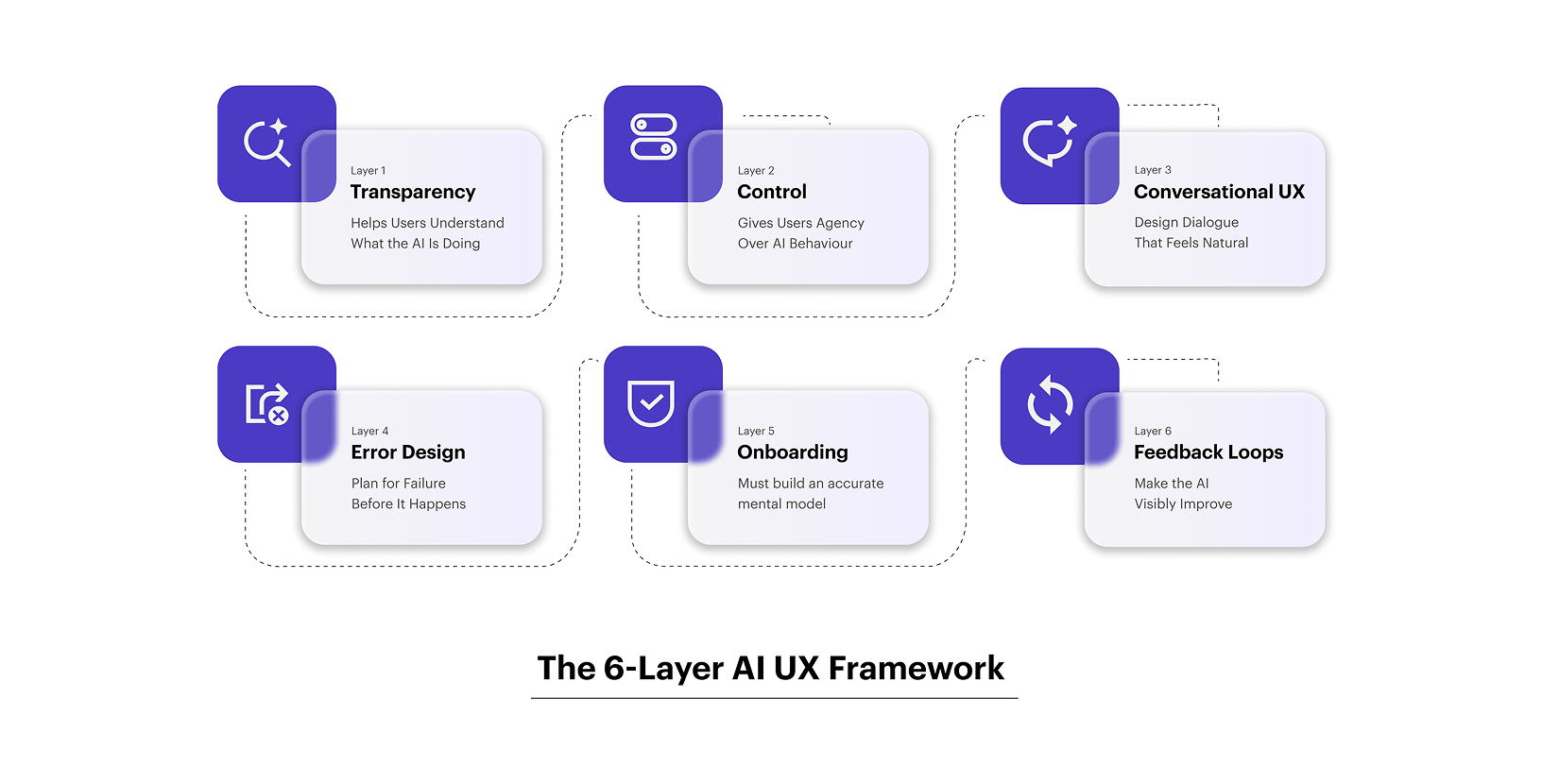
The 6-Layer AI UX Framework
Layer 1: Transparency Help Users Understand What the AI Is Doing
Users don’t need to understand the model. They need to understand the output. There is a significant difference.
Transparency in AI UX design means:
- Showing confidence levels where outputs are uncertain
- Explaining the basis for recommendations (in plain language)
- Surfacing limitations proactively, not reactively
- Distinguishing between AI-generated content and human-authored content
What good transparency looks like in practice:
A financial AI tool recommending portfolio allocations should show not just the recommendation, but the inputs it considered and the confidence range. A content generation tool should flag when output is based on limited context. A customer service AI should indicate when it is escalating to a human.
Opacity breeds distrust. Users who don’t understand why an AI did something cannot learn to use it well. They also cannot correct it effectively.
Layer 2: Control Give Users Agency Over AI Behaviour
Users need to feel in control. This is especially true when AI makes consequential decisions.
Control does not mean making users do everything manually. It means giving users meaningful override options, preference settings, and correction mechanisms.
Control mechanisms to design into AI products:
- Inline editing: Let users modify AI-generated content directly
- Preference tuning: Allow users to set tone, style, risk level, or scope
- Rejection with learning: Let users reject an output, provide a reason, and ensure the AI improves
- History and rollback: Show previous versions, allow users to restore earlier states
- Escalation paths: Always give users a clear route out of the AI flow
The absence of control creates what UX researchers call “automation bias.” Users over-rely on AI outputs because overriding them feels difficult or illegitimate. You want users to actively engage with and refine outputs, not passively accept them.
Layer 3: Conversational UX Design Dialogue That Feels Natural
Conversational UX is no longer limited to chatbots. It now encompasses any AI interface where users interact through natural language voice assistants, copilots, generative tools, and recommendation engines.
Designing conversational UX well requires a shift in mindset. You are not designing a form. You are designing a dialogue. And good dialogue has rhythm, context, and appropriate responses to ambiguity.
Core principles of conversational UX design:
Progressive disclosure over front-loading: Don’t ask users for ten inputs upfront. Ask for one process, then ask for the next. Mirror how a human expert would gather information.
Graceful handling of ambiguity: When user intent is unclear, surface 2-3 interpretations and let users select one. Never silently guess. Silent guesses generate wrong outputs and destroy trust.
Context retention across turns: In multi-turn conversations, the AI must remember earlier context. Users who have to repeat themselves lose patience fast.
Recovery dialogues: When the AI fails or misunderstands, provide a structured path to recovery, not just an error message. “I didn’t quite catch that. Did you mean X, Y, or Z?” is far more effective than “Request failed.”
Personality consistency: Define a clear AI persona. Give it a consistent tone, a consistent vocabulary, and consistent response patterns. Inconsistency feels uncanny and untrustworthy.
Conversational UX is the highest-leverage layer in the framework for user experience AI products. Getting it right dramatically improves activation and retention metrics.
Layer 4: Error Design Plan for Failure Before It Happens
AI systems fail differently from traditional software. The failures are often:
- Subtle rather than obvious
- Confident rather than cautious
- Unexpected rather than predictable
A well-designed AI product anticipates these failure modes and designs recovery mechanisms for each.
Failure mode taxonomy for AI UX:
| Failure Type | Example | Design Response |
|---|---|---|
| Hallucination | AI invents a fact or cites a non-existent source | Show source links, confidence scores |
| Out-of-scope query | User asks beyond AI’s trained domain | Acknowledge limitation clearly, offer alternatives |
| Ambiguity misread | AI interprets vague input incorrectly | Surface interpretation before processing |
| Staleness | AI outputs based on outdated data | Display data freshness timestamp |
| Overconfidence | AI presents low-probability output as certain | Use nuanced confidence language |
The cardinal rule in AI error design: never let users feel stupid for the AI’s failure. Frame errors as “This information may be incomplete” rather than “Invalid input.” Protect the user’s sense of competence at all times.
Design patterns that work:
- Confidence watermarks on AI-generated content
- Source attribution for factual claims
- Clear “AI-generated” labels (critical for trust and compliance)
- Soft failure messages that preserve dignity and offer a path forward
Layer 5: Onboarding & Mental Model Building
New users arrive at an AI product with wildly different expectations. Some expect magic. Some expect an advanced search engine. Some are genuinely uncertain.
Your onboarding must build an accurate mental model. Users who understand what the AI can and cannot do use it more effectively and churn far less.
Mental model building tactics:
Show before you tell: Use live demonstrations over capability lists. Let users see the AI in action with a real example before asking them to use it themselves.
Set calibrated expectations: Don’t promise accuracy you can’t deliver. Be specific about what the AI is good at. Users who are positively surprised by what the AI can do become advocates. Users who feel misled by capability claims become detractors.
Use progressive capability revelation: Start users with simple, high-success tasks. Introduce more complex use cases as users build confidence and familiarity.
Celebrate early wins: Design the first interaction to succeed. An AI that impresses on day one earns the goodwill to occasionally fail on day ten.
One SaaS brand we worked with was struggling with 40% drop-off in their AI writing tool’s first session. We redesigned the onboarding to lead with a pre-populated use case rather than a blank prompt. First-session completion improved by 68% within six weeks.
Layer 6: Feedback Loops Make the AI Visibly Improve
Users who see evidence that their feedback shapes the AI’s behaviour become deeply invested in the product. This is one of the most underused levers in AI product design.
Feedback loop design principles:
Make feedback frictionless: Thumbs up/down is the minimum viable feedback mechanism. But pairing it with optional one-tap labels (“Too long,” “Wrong tone,” “Inaccurate”) dramatically increases the quality and quantity of signals.
Close the loop visibly: If a user’s correction changes a future output, show them. “Based on your earlier feedback, I’ve adjusted the tone” is a powerful trust signal.
Aggregate feedback into product improvements: Users should see, at an aggregate level, that their collective feedback is making the product better. Release notes that specifically mention “improved based on user feedback” build community investment.
Personalization signals: Show users that the AI is learning their preferences. “Based on your previous edits, I’ve started writing in a more direct style,” which makes users feel seen and valued.
Also Read: Navigating the Agentic Era: Redefining UX for Real-World Impact
What Makes a Great AI UX Designer?
The role of an AI UX designer is distinct from that of a traditional product designer. Here is what differentiates the best practitioners:
1. Systems thinking
Great AI UX designers understand feedback loops, data flows, and how model behaviour changes over time. They design not just for today’s model outputs but for how those outputs will evolve.
2. Probabilistic mindset
They are comfortable designing for uncertainty. They build interfaces that work gracefully across a range of outputs from best-case to worst-case.
3. User psychology expertise
Trust, cognitive load, automation bias, and technology anxiety are all central concerns. Understanding these dynamics shapes better design decisions.
4. Prototyping with AI tools
The best AI UX designers can prototype using real AI outputs rather than static mockups. This surfaces usability issues that flat design reviews miss entirely.
5. Cross-functional fluency
They can communicate meaningfully with ML engineers, product managers, and business stakeholders. They translate technical constraints into design decisions and design decisions into product requirements.
If you are building an AI product and your design team lacks these capabilities, your AI investment is at risk of under-delivery regardless of model quality.
Common Mistakes AI UX Designers Make
These mistakes show up across every industry, across every maturity stage of AI product development:
Over-automating without consent. Not every user wants the AI to take the wheel. When systems act without clear permission, users feel out of control.
Hiding the AI entirely. Trying to make AI invisible backfires when it fails. Users with no mental model of the system can’t recover from errors.
Treating AI as a feature instead of a layer. The best AI experiences aren’t bolted on; they run through the whole product. Treating ai ux as a standalone feature leads to inconsistent experiences.
Skipping the error states. Teams design the happy path and ship. When the AI model returns something unexpected, there’s nothing to catch the user.
Rethinking UI/UX in the Era of AI
AI is exposing a fundamental flaw in how design has been framed for years. “UI/UX” became a convenient shorthand, but it blurred an important distinction. UI is not separate; it is the outcome of UX. UX defines intent and logic; UI is how that thinking becomes visible.
This distinction is critical in AI products. In traditional systems, a weak interface may frustrate users but still work. In AI, the interface shapes trust. It must communicate not just outputs, but reasoning, confidence, and limitations. When treated as a surface layer instead of the result of deep UX thinking, it fails at key moments.
Good AI UX starts with understanding user goals, concerns, and mental models. The interface comes last, making that intelligence clear and usable.
This is where YUJ Designs stands apart. Rather than treating AI as a visual upgrade, YUJ approaches it as a systems-level design problem grounded in research, strategy, and real user context. The result is not just interfaces that look intelligent, but experiences that feel reliable, understandable, and trustworthy.
Also Read: Terminator vs. Toaster: Executive’s Guide to Identifying AI Applications
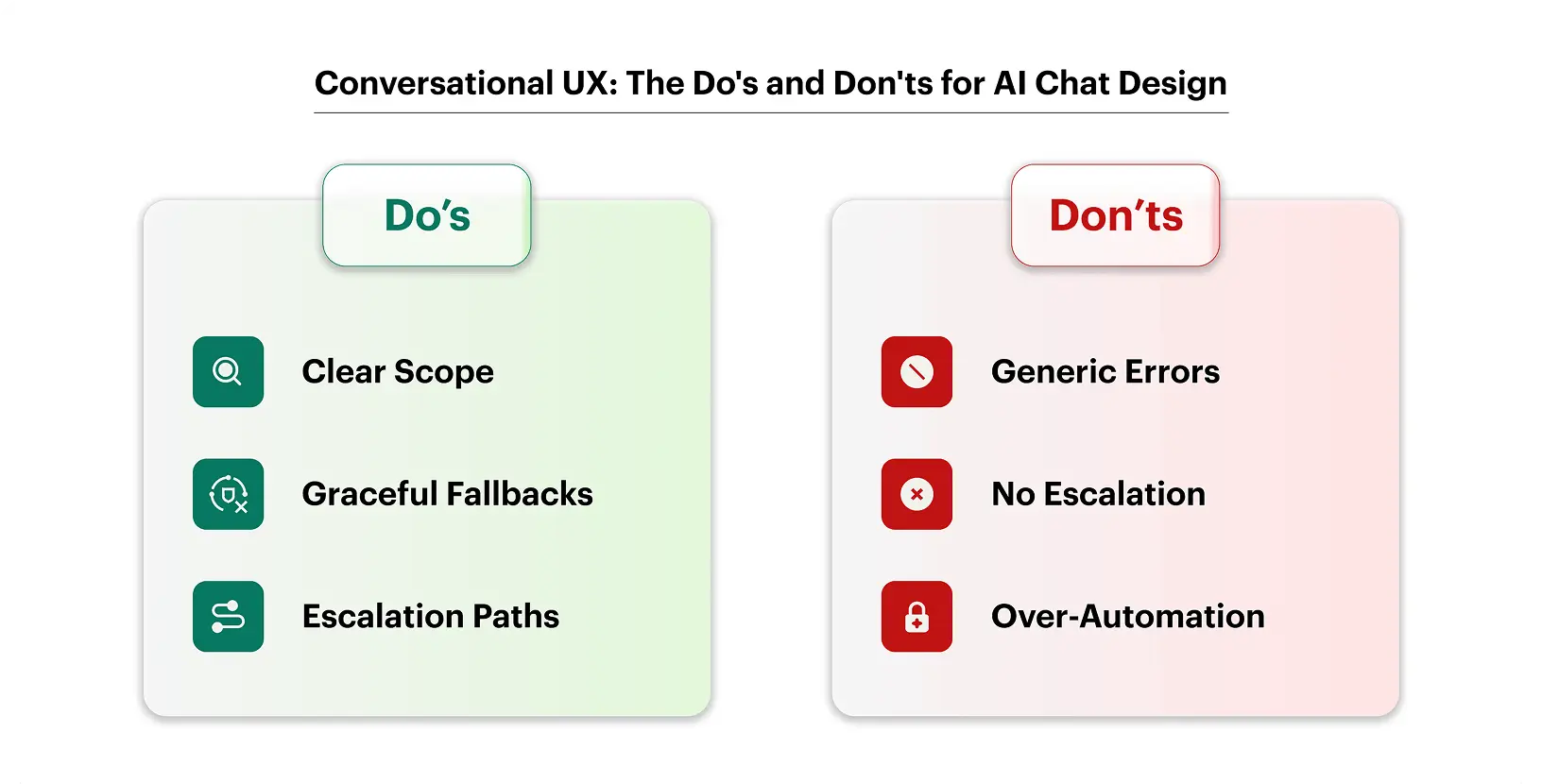
Conversational UX: The Language Layer of AI Design
Conversational ux deserves its own section because it gets treated as a UI problem when it’s actually a language design problem.
When you’re designing a chatbot or voice interface, you’re not designing screens. You’re designing dialogue. The rules are completely different.
What Makes Conversational UX Work
Honest constraints up front. The single biggest improvement in most chatbot experiences is a clear, friendly scope statement at the start. “I can help you with orders, returns, and account questions” sets expectations. Users don’t get frustrated when the bot can’t help with something it never claimed to handle.
Fallback design. Every conversational ux project needs a well-designed fallback. What happens when the system doesn’t understand? “I didn’t get that. Can you try rephrasing?” is fine. “I’m sorry, I don’t understand your request” repeated four times is not.
Personality that fits the brand. AI that’s too casual feels unprofessional. AI that’s too formal feels robotic. The tone should feel like your best customer support rep on their best day.
Escalation paths. No conversational AI should be a trap. If the user is frustrated or the problem is complex, there should always be a clear path to a human.
Where Conversational UX Fits in AI Product Design
Conversational ux is central to designing for AI in customer-facing products, support tools, onboarding flows, product discovery features, health apps, and financial advisors. In Mumbai-based startups and global SaaS companies alike, the chat-first experience is often the first meaningful touchpoint users have with an AI system.
Getting it right isn’t about making the AI sound smarter. It’s about making users feel heard.
Also Read: From Browsing to Buying: The Impact of UX Design on E-Commerce Growth
Real-World Applications Across Industries
(Subjective to real information)
1. Fintech
A Mumbai-based wealth management app redesigned its AI product design around one core insight: users don’t trust recommendations they can’t understand. By adding a plain-English explanation to every AI-generated investment suggestion, they saw a 34% increase in users who acted on the recommendation, not because the AI got better, but because the design got better.
2. Healthcare
Patient-facing AI tools face an especially high bar. Here, AI user experience has to balance clinical accuracy with emotional sensitivity. An error in a symptom checker isn’t just bad UX; it can cause real harm. The best healthcare AI designs build in clear disclaimers, easy escalation to providers, and visual cues that distinguish AI-generated content from clinical advice.
3. SaaS
In enterprise SaaS, ai ux design often means designing for the skeptic, the power user who doesn’t trust the AI until it proves itself. Letting users see the AI’s work, export its outputs, and override its suggestions isn’t a limitation; it’s what makes adoption happen.
4. E-commerce
Recommendation engines are one of the oldest applications of AI in product design. The difference between a good recommendation experience and a creepy one usually comes down to one thing: transparency about why the product was suggested. “Because you bought X” beats “You might also like” every time.
Also Read: Ethical considerations in connected mobility design
Conclusion
If there’s one thing this guide is trying to make clear, it’s this:
- AI products don’t fail because the model is bad. They fail because the design doesn’t account for how people actually respond to uncertainty, error, and automation.
- Designing for AI means designing for probability, not predictability. Your interface needs to reflect that.
- The four pillars of strong ai ux are transparency, user control, calibrated trust, and graceful failure.
- An ai ux designer needs to work closely with product and engineering from day one, not be handed a spec after the model is built.
- Conversational ux is a language design problem, not just a UI one. Fallback, tone, and scope matter as much as the interface.
- Great AI product design creates honest products, ones that tell users what they can and can’t do, and handle errors without losing users’ trust.
- AI user experience has direct business impact: poorly designed AI features erode retention; well-designed ones build loyalty.
The teams building the best AI products aren’t the ones with the most powerful models. They’re the ones who understand that intelligence without usability is just noise.
FAQs