
Enterprise AI adoption depends less on model accuracy and more on the experience wrapped around it. Teams that apply enterprise UX design, clear user onboarding best practices, and trustworthy AI product design see faster rollout, higher daily usage, and fewer support tickets across their enterprise application UX.
Introduction
A product team spends eight months training a model. Accuracy hits 94%. Launch day arrives, and three weeks later, usage has fallen to a handful of power users. This story repeats across enterprise software every quarter, and it rarely has anything to do with the model.
Enterprise AI adoption fails for a simple reason: the tool works, but the people using it do not trust it, understand it, or know where it fits in their day. A sales manager who doesn’t understand why AI marked a deal as “at risk” may simply ignore the warning. A claims team member who has to click through four screens to understand the AI may just go back to the old spreadsheet.
This is a design problem before it is a technical one. Getting adoption right means designing for the moment a user first meets the system, the moment they start to trust it, and the moment it becomes part of how they actually work. This piece explains the UX patterns that help employees use AI tools effectively instead of letting them sit unused in a dashboard.
You will learn how enterprise UX design principles apply specifically to AI products, what user onboarding best practices look like for tools that behave probabilistically instead of predictably, and how agentic AI UX differs from traditional software UX. We will also look at a real case from Yuj Designs and a US-based supply chain risk intelligence company to show these patterns in practice.
Understanding Enterprise AI Adoption: What It Means and Why It Fails
What Enterprise AI Adoption Actually Means
Deploying AI is only the first step toward enterprise AI adoption. For AI to become part of everyday work, employees need to find it useful, easy to understand, and trustworthy enough to act on. A system being live across a company is only the beginning. Even a fully deployed platform can see low adoption if the user experience is difficult or unclear.
Adoption depends on three things working together: the AI producing useful output, the interface making that output easy to understand, and the workflow making the tool easier to use than the alternative. Miss any one of these, and adoption can stall regardless of how strong the underlying model is.
Types of Enterprise AI Products
Not every AI tool needs the same UX design AI treatment. Broadly, enterprise teams build three kinds of AI products.
Assistive tools suggest an action and let the human decide. Think of a recommendation engine that flags which leads to call first.
Autonomous agents take action on their own within defined limits and report back. This is where agentic AI UX becomes critical, since users need to know what the agent did and why, after the fact rather than in the moment.
Co-pilot systems sit inside an existing workflow and respond to direct requests, similar to how a spreadsheet formula responds to input.
Each type needs a different balance of visibility, control, and explanation, and conflating them is one of the most common mistakes in AI product design.
Core Principles Behind AI Product Design
Four principles consistently show up in AI products with strong enterprise AI adoption numbers.
Transparency over polish. Users trust systems they can see into, not systems that look impressive.
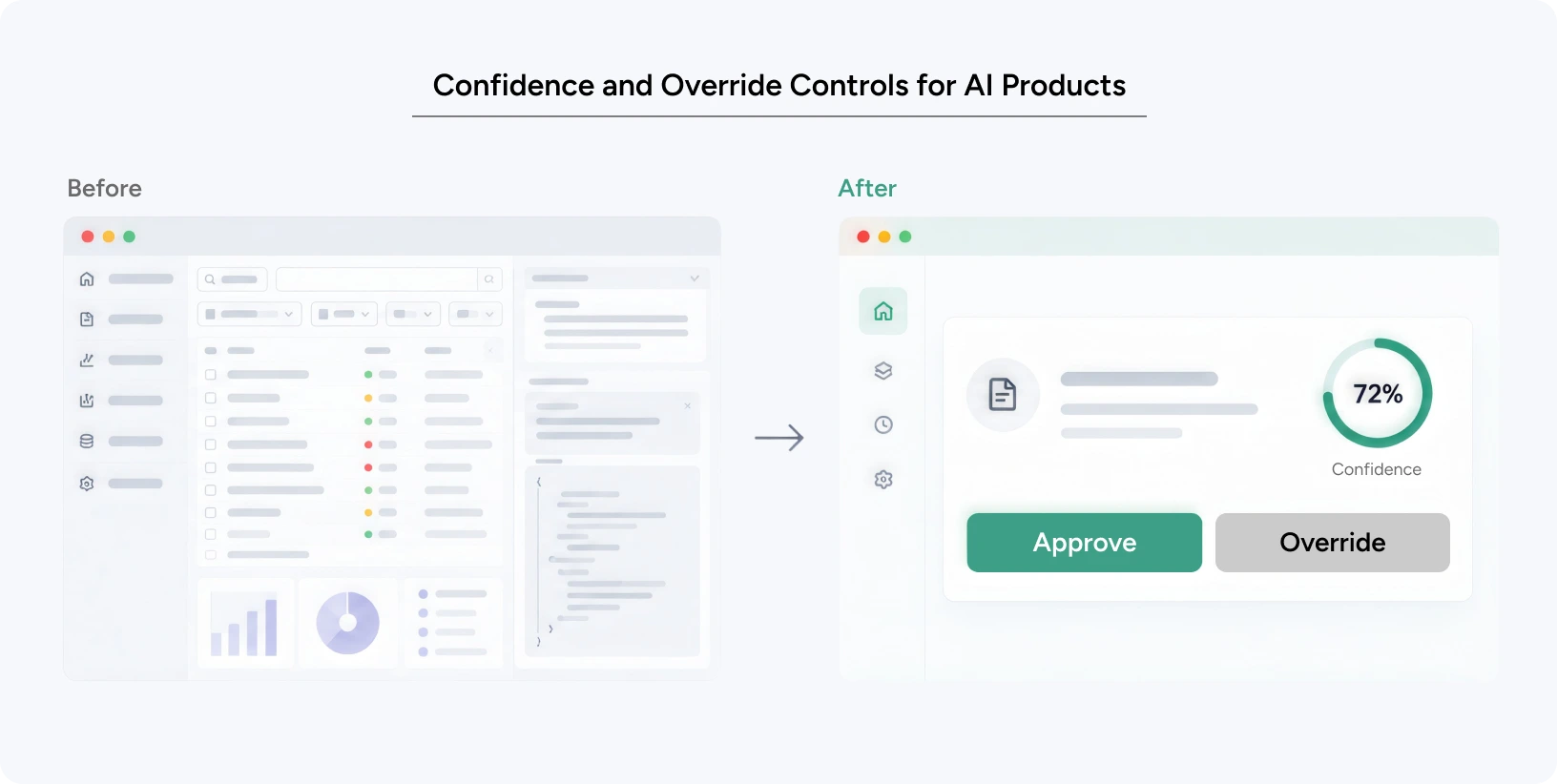
Reversibility. Every AI-suggested action needs a visible, low-friction way to undo it.
Progressive disclosure. Show the answer first, then let users drill into the reasoning if they want it.
Consistent mental models. The AI should behave consistently across different contexts, so users know what to expect and can trust it.
Why Enterprise UX Design Matters
Impact on User Experience
Poor enterprise application UX around AI features creates a unique kind of friction that traditional software rarely does. Users do not just get confused by this, but they get suspicious. Every unexplained AI decision adds a small tax on cognitive load, because the user now has to decide whether to trust the output before they can act on it.
Accessibility suffers too when AI features are only explained through hover tooltips or buried settings pages. And the emotional response matters more than most product teams admit. An employee who feels replaced or second-guessed by an AI feature will find quiet ways to avoid it, no matter how good enterprise UX design has made the interface look.
Impact on Business Metrics
The business case for getting this right is direct. Companies that invest in stronger UX around their AI products see higher feature engagement, because users actually open the tool instead of working around it. The scale of the problem shows why this matters: WalkMe’s 2025 State of Digital Adoption report found that while most executives feel confident about their AI transformation goals, only around one in four employees report being able to use AI efficiently, and enterprises lost more than $100 million in 2024 alone to underused technology. A widely cited MIT NANDA study on generative AI in business puts the failure rate of enterprise AI pilots at roughly 95%, with weak adoption behind most of that gap rather than weak models. Conversion from pilot to full rollout improves when early users become advocates rather than skeptics, and the same WalkMe research found that firms following even a single strong digital adoption practice nearly tripled their transformation ROI, from 22% to 64%. Retention climbs because trust, once built, compounds. And brand trust extends beyond the product itself. A workforce that has a good experience with one AI tool is more open to adopting the next one.
Common Mistakes to Avoid
The most common failure is over-explaining. Teams try to compensate for user distrust by showing every model parameter, which overwhelms rather than reassures.
The second is under-explaining, where a confidence score appears with no context for what it means or how it was calculated.
The third is inconsistent placement, where AI features appear in different locations across different modules, forcing users to relearn the interface every time.
How to Apply These Patterns: A Step-by-Step Guide for Product Teams
A Practical Guide to Adoption-Ready Enterprise AI UX
Getting enterprise AI adoption to stick requires a repeatable process, not a single redesign sprint.
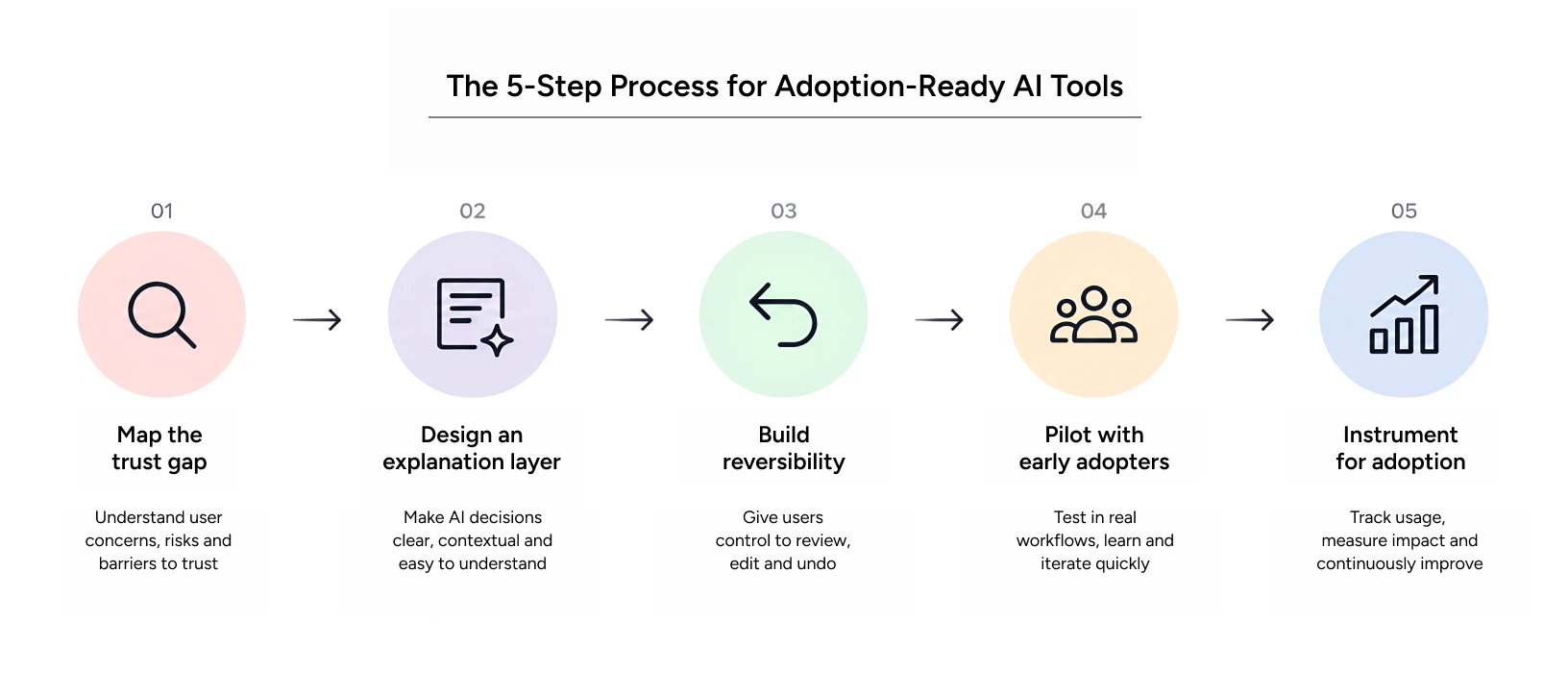
Step one: map the trust gap. Talk to real users before writing a single screen. Find out where they already distrust automated recommendations and why.
Step two: design the explanation layer first. Before polishing visuals, decide how the system will show its reasoning. This becomes the backbone of your AI product design.
Step three: build in reversibility. Every automated suggestion needs an obvious undo path. This alone removes a huge share of user hesitation.
Step four: pilot with a narrow, high-trust group. Early advocates become the internal voice that drives broader adoption across the enterprise once the tool proves itself.
Step five: instrument for adoption, not just usage. Track whether users are accepting AI UX suggestions, overriding them, or ignoring them entirely. That ratio tells you more than login counts ever will.
Step-by-Step Workflow
Ideation should start with the trust gap research above, not with the model’s capabilities. Execution follows the explanation-layer-first order, and testing should specifically probe whether users understand why the AI reached its conclusion, not just whether they can complete a task.
Pro Tips from Yuj Designs
Our teams have found that the strongest user onboarding best practices for AI tools involve a short, guided first session where the system explains one decision in detail, live, in front of the user. This single moment does more for enterprise AI adoption than any onboarding email or help article.
We also recommend building a visible “confidence trail” that lets a user trace any AI output back to the data points behind it. This single feature consistently reduces support tickets tied to enterprise application UX confusion.
Tools & Resources
Figma and Adobe XD remain the standard for prototyping explanation layers and confidence indicators. Usability testing platforms that support think-aloud protocols work particularly well for agentic AI UX research, since users need to narrate their trust decisions out loud so researchers can catch moments when confidence breaks down.
Real-World Application: The Resilinc EventWatch Story
Yuj Designs worked with Resilinc, a US-based supply chain risk intelligence company, to redesign EventWatch. This mobile application helps enterprise risk teams track and respond to supply chain disruptions in real time. The existing app buried critical information: users needed up to six clicks to learn which of their suppliers had been affected by a disruption, and important events were easy to miss entirely.
Yuj Designs restructured the information hierarchy around how risk professionals actually assess information. Events were grouped into clear categories such as active disruptions, forecasted risks, and general industry news. The redesign made the system’s reasoning visible at a glance instead of hidden behind menus, which is the exact enterprise UX design pattern that modern AI tools need to borrow. The result was higher user engagement, faster response times during live events, stronger customer retention, and lower support costs. It is a clear example of how thoughtful enterprise application UX turns a capable but under-used tool into one teams rely on daily.
Read More: Resilinc Case Study
Conclusion
Enterprise AI adoption rarely fails because the model is weak. It fails because the experience around the model never earns the user’s trust. The teams that get this right, whether they are scaling an AI platform out of New York or rolling one out across a distributed US workforce, treat AI product design as seriously as they treat model performance, applying enterprise UX design principles from day one instead of retrofitting them after launch.
Strong user onboarding best practices, a visible explanation layer, and honest agentic AI UX all point toward the same idea: people adopt tools they understand, not tools that are simply accurate. Getting enterprise application UX right is what turns a technically impressive AI product into one that becomes part of how a company actually works.
Yuj Designs has spent 25 years designing for complex enterprise systems, including US enterprise clients like Resilinc, and that practitioner depth now shapes how we approach AI products for teams across the United States building the next generation of enterprise software. Design that earns trust is what makes AI adoption last past the pilot stage inside the enterprise.

FAQs