
Design ops (design operations) is the practice of orchestrating people, processes, and tools so design teams can work efficiently, collaborate effectively, and deliver consistent outcomes. function can scale UX consistently as an organization grows. It connects your UX team structure, workflows, and design systems, reducing friction and freeing designers to focus on solving real user problems instead of fighting process chaos.
Introduction
Most growing companies hit this wall without ever naming it. The design team doubles in a year. Output goes up. But somehow quality slips, nobody can find the latest file, and two squads ship two completely different button styles in the same release.
If that sounds familiar, here’s the thing: you don’t have a talent problem. You have an operations problem.
When a team is small, context just sort of takes care of itself. People sit near each other, they remember why a decision was made, and the gaps fill themselves in. Then the team grows, and all that quiet coordination starts to break down. Invisible coordination falls apart. Handoffs get dropped. Designers burn hours hunting for the right asset instead of actually designing. And users? They feel every bit of that internal mess as a confusing, inconsistent product they slowly stop trusting.
This is the gap design ops is built to close. Think of it as the connective tissue that lets your UX scale without losing its coherence or its craft along the way.
In this guide, we’ll get into what design ops really means, how it maps to your UX team structure, where it sits inside a UX maturity model, and a practical way to actually roll it out. There’s also a real US client example near the end and a rundown of the tools that make any of this stick.
What Is Design Ops and How Does It Work
At its simplest, design ops is the discipline of making design more effective at scale. It’s basically everything that supports the work of designing without being the design itself, things like hiring and onboarding, the tooling people use day to day, the design system, the team rituals, and the way you measure whether any of it is paying off.
Here’s an analogy that tends to land. If your designers are the people building the house, then design ops is the supply chain, the shared blueprint library, the build schedule, and the inspector who makes sure every house comes out solid. The designers still do the creative work. Ops just makes sure they’re not reinventing the foundation every single time.
So what does a healthy practice actually look like? Usually, a single source of truth for files and components, onboarding that doesn’t depend on one person’s memory, clear handoff rituals with engineering, and a few honest metrics that connect design back to outcomes.
A quick example to make it concrete. A fintech company I came across had twelve designers spread across four squads, and they kept shipping forms that looked like they came from four different products. They added a shared component library and one weekly critique. That was mostly it. Rework dropped, releases sped up, and not one designer got “better” in the process. The work around them just got less chaotic.
Types of Design Ops
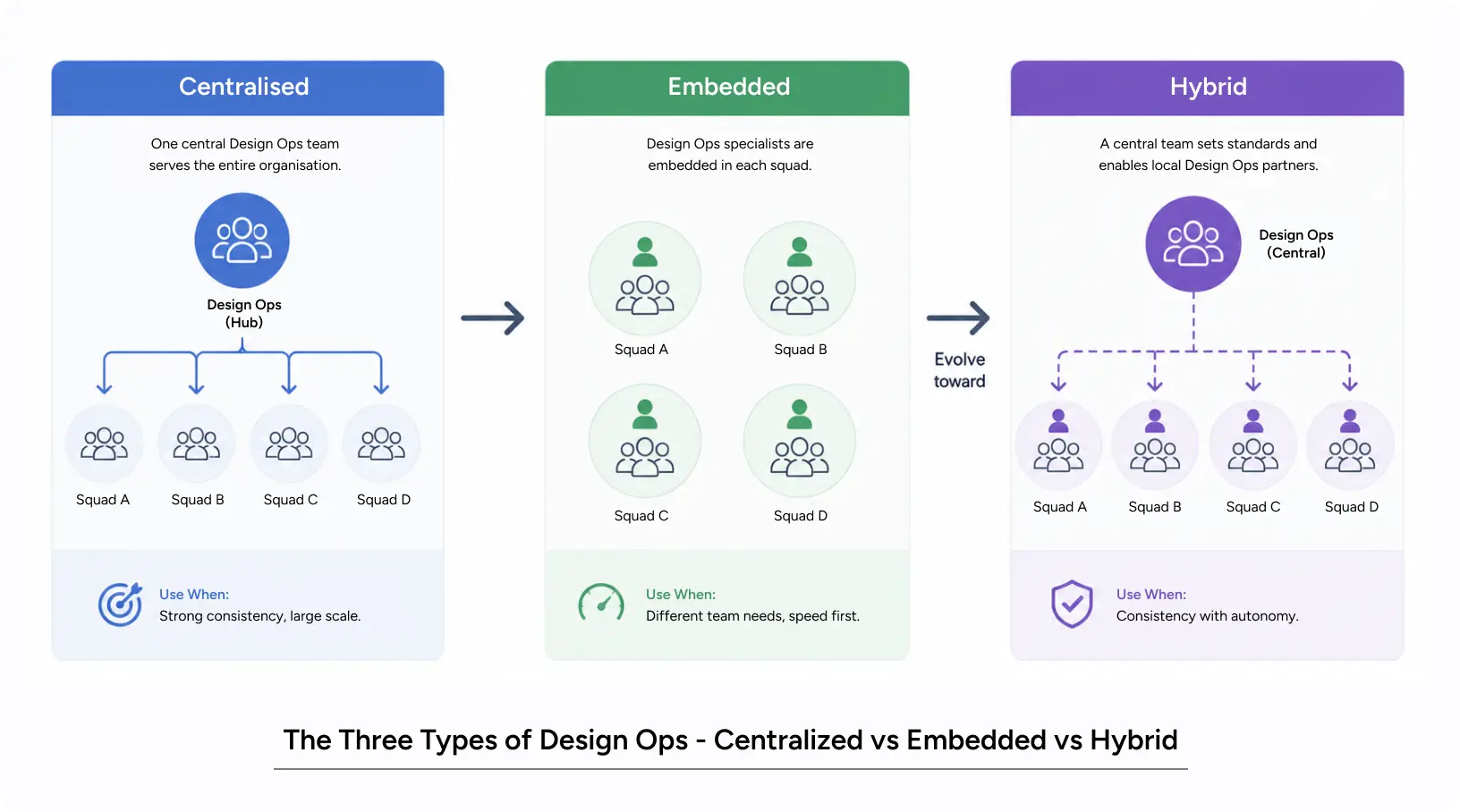
Design ops tends to show up in three forms, and most companies end up mixing them.
There’s centralized design ops, where one dedicated team owns the systems, tooling, and standards for everyone. This works when consistency really matters, and you’re big enough to justify a team whose whole job is keeping things aligned.
Then there’s embedded design ops, where the ops people sit right inside the product squads. Reach for this when your teams have genuinely different needs and shipping fast matters more than everything looking identical.
And there’s hybrid design ops, a central team setting the standards while embedded partners adapt them locally. This is where most mature organizations land, because it gives you consistency without smothering autonomy. In practice, your UX team structure usually drifts from embedded toward hybrid as your design maturity grows.
Core Principles of a Strong Design Ops
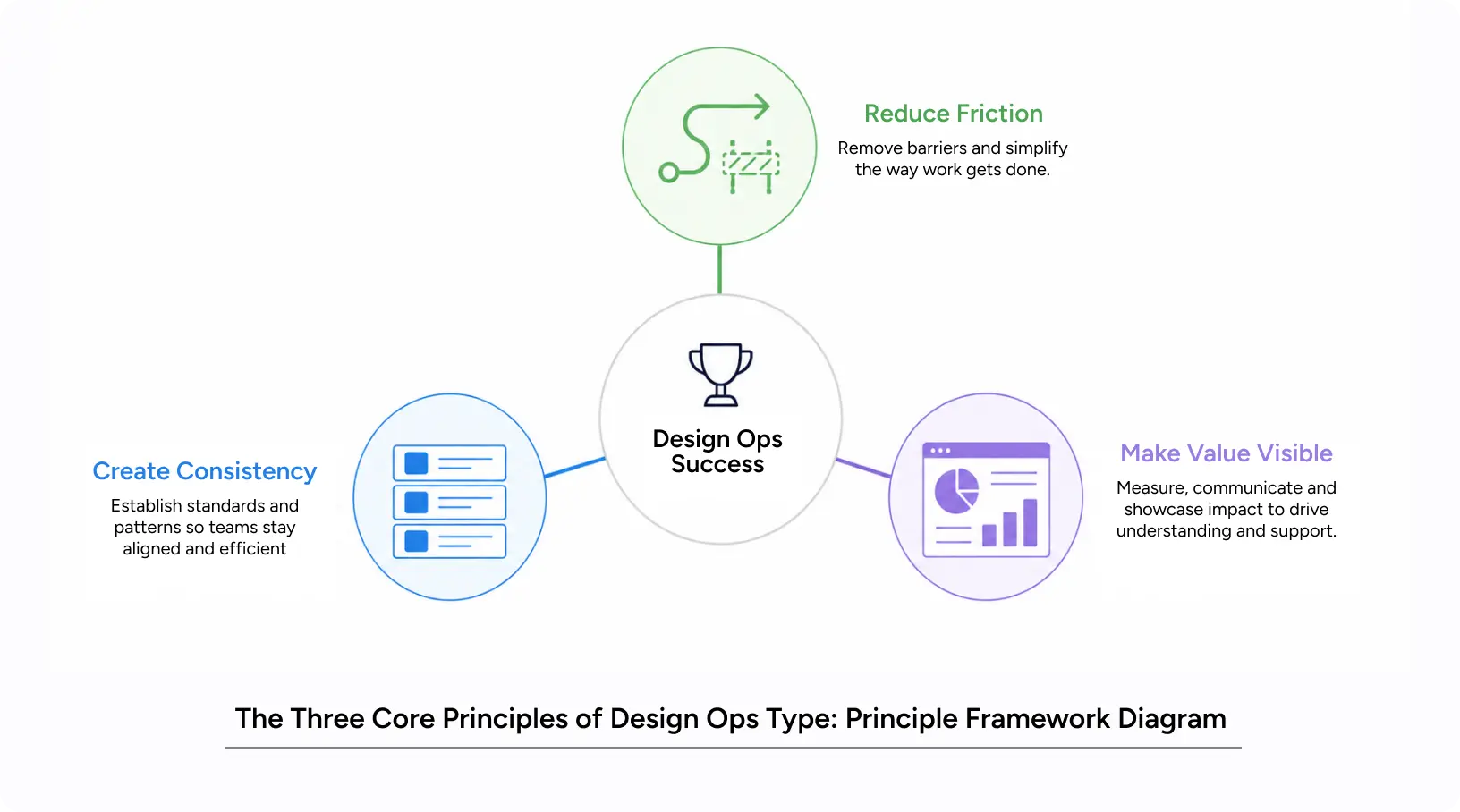
Three ideas hold the whole thing together. Reduce friction, so designers spend their time designing instead of hunting for the right file or piece of context. Build consistency through shared systems and rituals. And make the design’s value visible, because work nobody can measure tends to be the first thing cut.
Why does this matter for UX specifically? Because friction, inconsistency, and invisible work are exactly what cause experiences to fragment as a team grows. A solid UX design team structure built on these principles is really just a shield between the user and whatever chaos is happening behind the scenes.
Why Design Ops Matters in UX Design
Impact on User Experience
Users feel a broken operation long before any internal dashboard catches it. When components drift out of sync, people have to relearn the same pattern on every screen, and that quietly piles on cognitive load. Dropped handoffs let accessibility gaps slip straight into production. Slow workflows mean a usability problem someone flagged in March is still sitting there in July.
A disciplined design ops function tightens all of that. Shared design systems keep interactions predictable, which lowers cognitive load and builds the kind of quiet confidence that makes a product feel safe to use. Consistency isn’t a cosmetic nicety here. It’s emotional. It’s the difference between a product that feels considered and one that feels held together with tape.
Impact on Business Metrics
This connects to the numbers leadership actually loses sleep over. Smoother, more consistent experiences lift engagement and conversion simply because users stop hitting dead ends. Retention improves when the product feels reliable enough to come back to. And trust grows when every touchpoint feels like it came from the same company rather than five different ones.
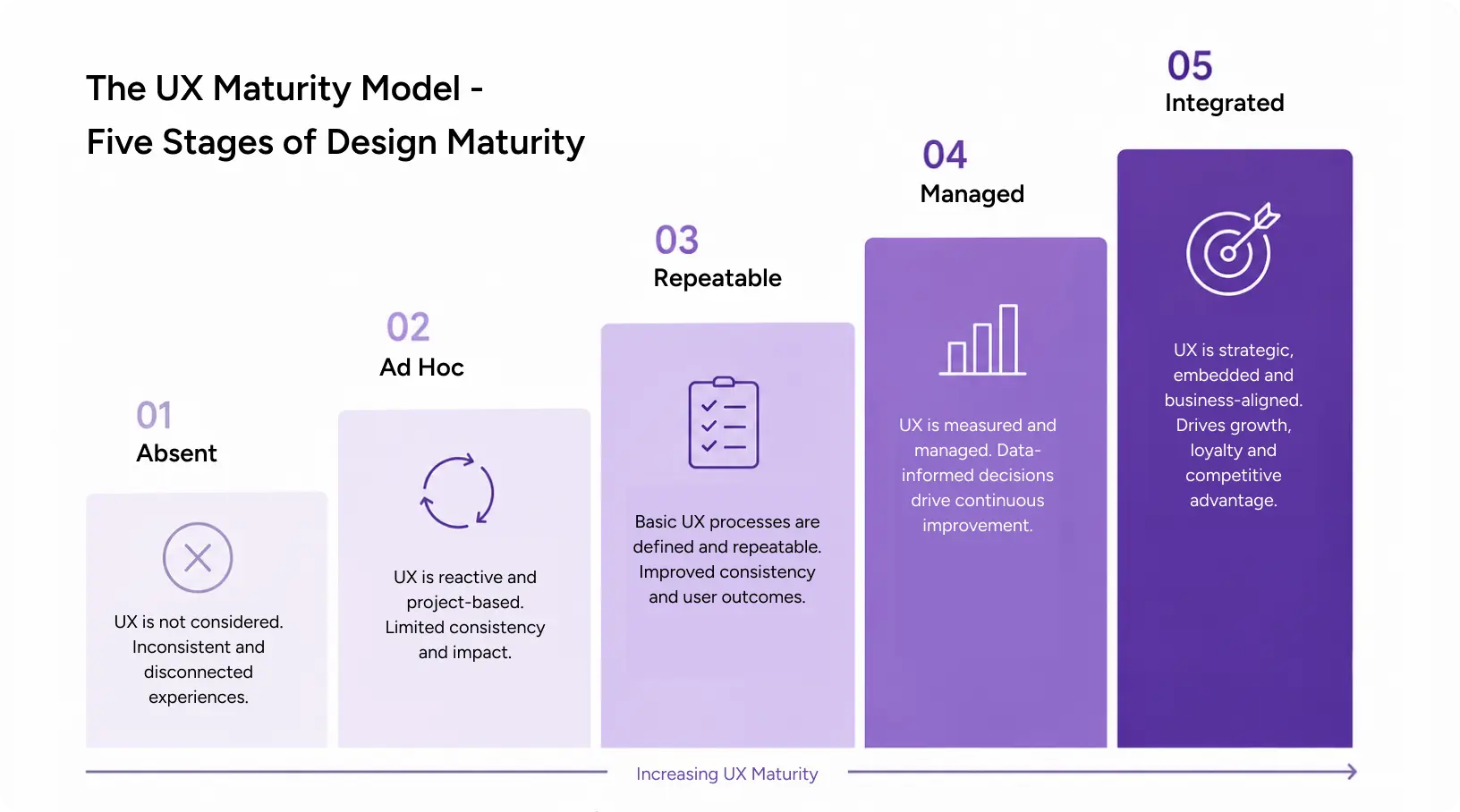
There’s real evidence behind this, too. McKinsey’s Business Value of Design research tracked design-led companies over five years and found they outpaced their industry-benchmark peers on growth by a wide margin, roughly doubling in the strongest cases. The catch is that big organizations only capture that upside if their operations can keep up. Otherwise, it leaks away into internal sprawl. Where you sit on a UX maturity model, and how far along your design maturity actually is, is a pretty good predictor of which side of that line you land on.
Common Design Ops Mistakes That Slow UX Teams
The biggest trap is letting design ops curdle into bureaucracy. Process for its own sake just slows everyone down and irritates the designers it’s supposed to help. Every ritual has to earn its place by removing friction, not adding a meeting.
A few other ways teams shoot themselves in the foot: buying tools before they’ve figured out the workflow (tools amplify whatever process you’ve got, mess included), hiring one ops person and expecting a miracle with no real mandate behind them, and skipping measurement altogether. That last one is sneaky, because design ops that can’t prove their value are the first thing to go when budgets tighten.
Also read: 2026: Agentic AI Moves from Experimentation to Enterprise
How to Apply Design Ops (Practical Guide)
Good news: rolling out design ops doesn’t take a big team or a fat budget. What it takes is doing things in the right order and not losing your nerve halfway through. Here’s a path that works.
Step-by-Step Workflow
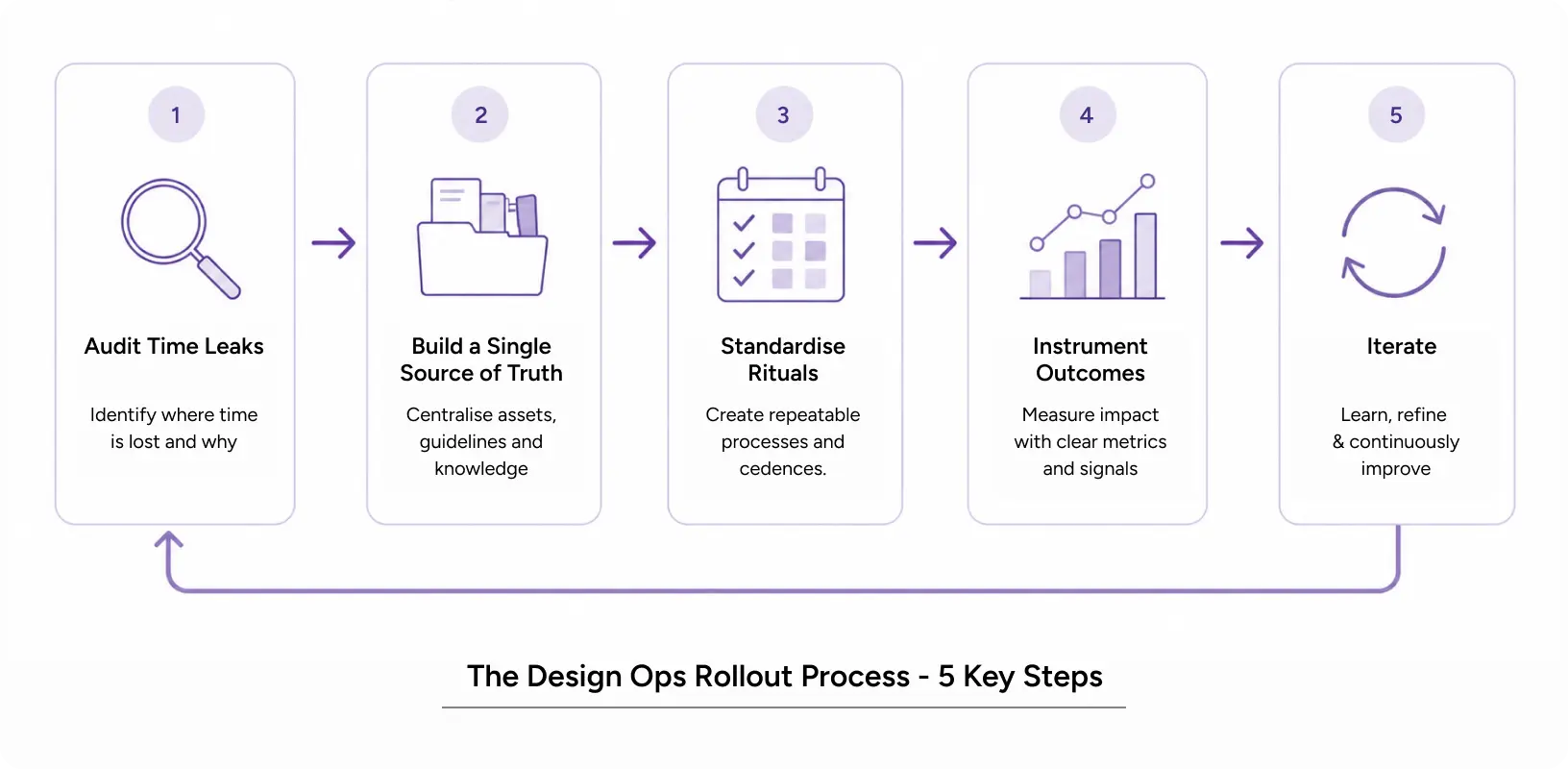
Start by finding where the time actually goes. Trace a feature from first idea to shipped and mark every spot where work stalls, gets lost, or gets redone from scratch. Most teams are genuinely surprised by how much of the calendar disappears into handoffs nobody owns.
Next, build a single source of truth. One place for current files, one design system as the canonical component library, and that’s the non-negotiable foundation. Once that exists, standardize a couple of rituals: a weekly critique, a real handoff checklist with engineering, and a recurring slot to maintain the system so it doesn’t rot.
Then start measuring. You don’t need a wall of dashboards, just a few honest signals like time-to-ship, how often work gets redone, and whether people are actually using your components. After that, you iterate. Treat your operations like a product you’re shipping: put it out, see what breaks, fix it. That loop, ideation to execution to testing, is really the heartbeat of any mature design ops setup.
Pro Tips from Designers
A few things the people who’ve done this a few times will tell you. Start with the one bottleneck that hurts most instead of trying to overhaul everything at once, because the big-bang rewrite rarely survives contact with reality. Make the right way the easy way, so doing it properly takes no extra effort. Give your design system a dedicated owner. When accountability is shared by everyone, it often ends up belonging to no one.
One more: measure adoption, not output. A gorgeous component library that nobody actually pulls from is a museum, not a system. As your UX design team structure grows, small habits like these quietly compound into a real advantage.
Tools & Resources
You really don’t need a sprawling stack. Figma anchors most modern workflows, design, prototyping, and the component library all in one place. Storybook documents and tests live components right alongside the engineers. Something like Jira, Linear, or Asana keeps work flowing and makes bottlenecks visible. Notion or Confluence is fine for housing your documentation and the record of why decisions were made. And Zeroheight is a popular pick for publishing design system guidelines to the wider company.
The real rule, though: pick tools that fit your UX team structure, not the other way around. Bending your team to suit the software is how good tools turn into expensive shelfware.
Also Read: Navigating the Agentic Era: Redefining UX for Real-World Impact
Design Ops in Action: How StubHub Achieved USD 117M ROI
Design ops principles carry across web design, mobile apps, branding, and dense product interfaces. The job underneath is always the same: bring structure to scale without strangling the craft in the process.
A good example is YUJ Designs’ work with StubHub, the US-based ticket marketplace owned by eBay. Their seat-selection and ticket-buying flow had gotten complicated over time, with a clunky search that buried events and a stiff reservation step that made buyers hesitate right at the moment of purchase.
YUJ worked through it methodically, with user research, concept design, and a real round of testing rather than guesswork. The reworked flow lifted the overall conversion rate by 4.4% and helped StubHub see an ROI of around USD $117M off the back of the seat-selection redesign. None of that came from a single clever screen. It came from a disciplined process applied at scale, which is exactly what good operations make possible.
Read More: StubHub UX Case Study.
Conclusion
Scaling UX is hardly ever about hiring more designers. It’s about building the operational backbone that lets the designers, you already have, do their best work, consistently, without tripping over each other.
That backbone is design ops. Done right, it ties your UX design team structure, your workflows, and your systems together so that growth strengthens the experience instead of cracking it. Line it up against a clear UX maturity model, and you can watch scattered effort start to compound, your design maturity rising step by step, with design connecting straight to the things that matter: engagement, conversion, retention, trust.
The teams that get this treat their operations like a product in their own right, watched, measuring, and continuously improving. You don’t have to do it all at once. Pick your worst bottleneck, build one source of truth, and start measuring what counts. The payoff is a product people feel, not just one they look at.
That’s really the whole idea behind user-first design thinking, and it’s the kind of work YUJ Designs does alongside growing organizations trying to scale UX without losing the craft.

FAQs