
Voice user interface design and chatbot UX are the practice of designing how people talk to products, not just tap on them. Good chatbot UX design and conversational UI design treat tone, timing, and error recovery as core interface decisions, not an afterthought bolted onto a screen.
Why Chatbot UX Matters More Than Most Teams Realize
A chatbot that cannot admit when it does not understand a question is a design failure, even if the underlying model is capable. This is the quiet problem behind most conversational products today. Companies invest heavily in language models and speech recognition, then treat the actual conversation design as a copywriting task handled late in the process. The result is an interface that sounds smart in a demo and frustrates real users within the first exchange.
Think about the last time a voice assistant misheard a simple request, or a support chatbot looped you through the same three questions without resolving anything. Small breakdowns like these compound fast, because a screen at least shows you where you are. A conversation gives you almost nothing to hold onto if it goes wrong. This is where thoughtful chatbot UX earns its place at the center of the product roadmap, not the edges. At Yuj Designs, we see this gap across nearly every conversational product engagement we take on, working with clients from the US and India.
In this guide, we will break down what this discipline actually involves, why it affects both usability and revenue, and how product teams can apply it in practice. We will also look at where voice user interface design and screen-based interfaces need to work together, since almost no product is voice-only or chat-only anymore.
Understanding Chatbot UX and Voice User Interface Design
What This Actually Means
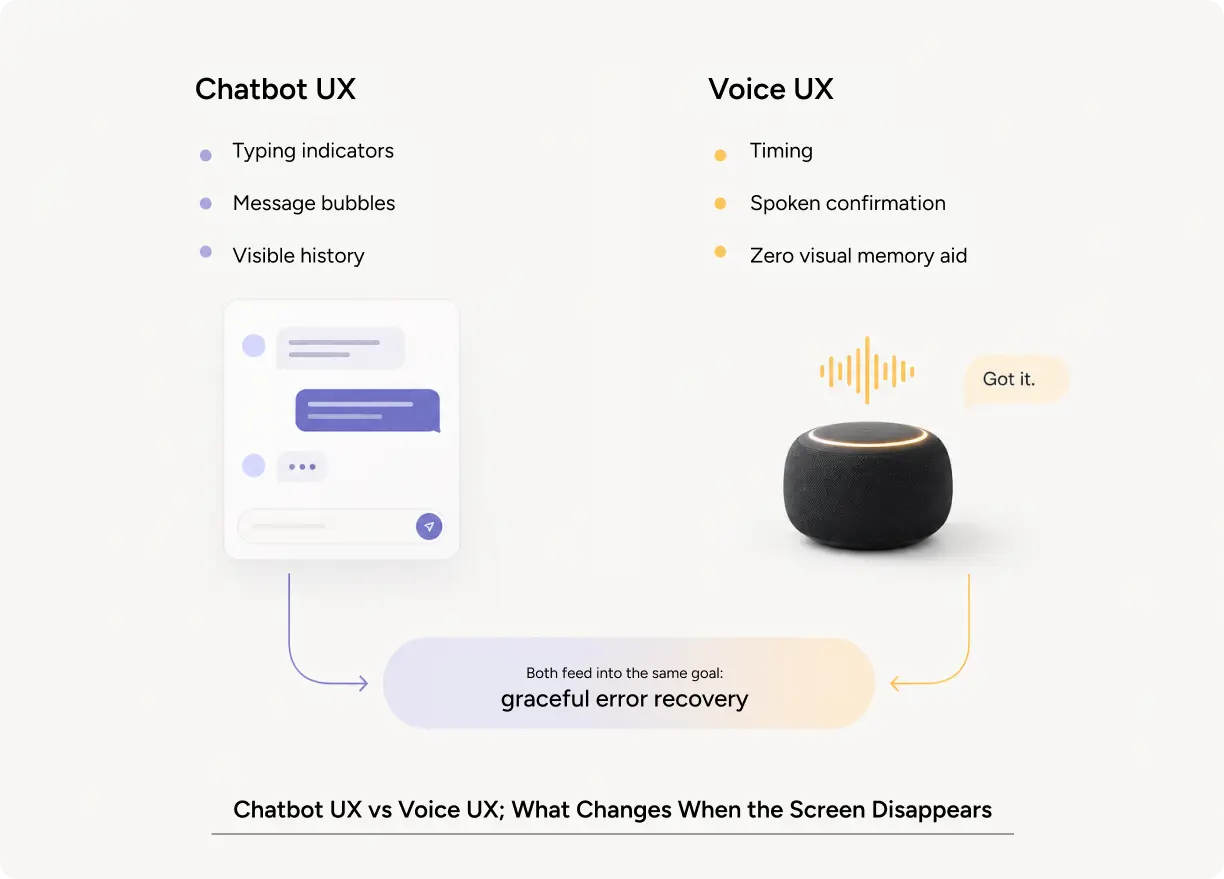
Conversational UI design is the practice of designing text and voice-based interactions so they feel natural, predictable, and easy to recover from when something goes wrong. Chatbot UX encompasses the full experience of a chat-based assistant, from the initial greeting to the handoff to a human when it reaches its limits. Voice user interface design applies the same thinking to spoken interactions, where there is no screen to lean on, and every word carries more weight.
A simple example makes this concrete. A banking chatbot that says “I can help with that” before asking a clarifying question feels more trustworthy than one that guesses and gets the answer wrong. That single design choice, confirming before acting, is chatbot UX design in action.
Types of Conversational Interfaces
Not every conversational product needs the same approach. Customer support chatbots prioritize fast resolution and a clear path to a human agent. Voice user interface design for assistants in the home or car prioritizes brevity and hands-free confirmation, since the user often cannot look at a screen. In-app assistants layered into a SaaS product prioritize context awareness because they already know which page the user is on. Looking at strong conversational UI examples across these categories shows a common thread: the best ones set expectations early and never pretend to know more than they do. Getting chatbot UI UX right across these categories often matters more than picking the fanciest model underneath it.
Core Principles Behind a Strong Conversational Approach
A few principles hold across nearly every conversational product our team has worked on. First, the system should tell the user what it can and cannot do, ideally in the first exchange. Second, errors need a graceful recovery path, not a repeated prompt that assumes the user will simply try again. Third, conversational UX should match the emotional weight of the task. A playful tone works for a retail chatbot and fails badly in a healthcare or financial support flow. Voice user interface design has almost no room for a lengthy error message, so brevity is not optional the way it might be on a screen.
Why Chatbot UX Design Matters for Product Teams
Impact on User Experience
Poor conversational design creates a very specific kind of frustration, because the user has no visual map of what went wrong. Cognitive load is a real risk here too. A voice interface that requires a person to remember a long list of commands is asking for too much mental effort in a channel that has almost no memory aid built in. Strong interaction design reduces this load by keeping each turn short, confirming what was heard, and offering the next likely option instead of an open-ended prompt.
Accessibility deserves specific attention in this category. Voice user interface design can be the single most important access point for a user with a visual impairment or a motor limitation, which means it cannot be treated as a secondary channel bolted onto a visual product. The best conversational products treat voice, chat, and screen as equally important paths to the same outcome.
Impact on Business Metrics
The business case for investing in chatbot UX design is measurable. Zendesk’s 2023 Customer Experience Trends Report found that 60% of customers want, or are already planning to use, conversational customer service experiences, and 71% of business leaders say they are rethinking their entire approach to customer experience as a result.
On the flip side, a poorly designed chatbot creates its own cost. Multiple industry surveys on conversational AI adoption have found that a large share of users abandon a chatbot interaction and ask for a human agent when the bot fails more than once or twice in a row, making the interaction more expensive than simply speaking to a human from the start.
Common Mistakes to Avoid
The most common mistake in chatbot UX design is launching a bot that can only follow a rigid script, then presenting it as if it understands free-form language. Another frequent issue is inconsistent personality between the chatbot, the voice assistant, and the rest of the brand, which quietly erodes trust. Teams also tend to underuse simple conversational UX signals, like typing indicators or confirmation messages, missing an easy opportunity to make the system feel responsive rather than robotic.
How to Apply This in Your Product
A Practical Workflow
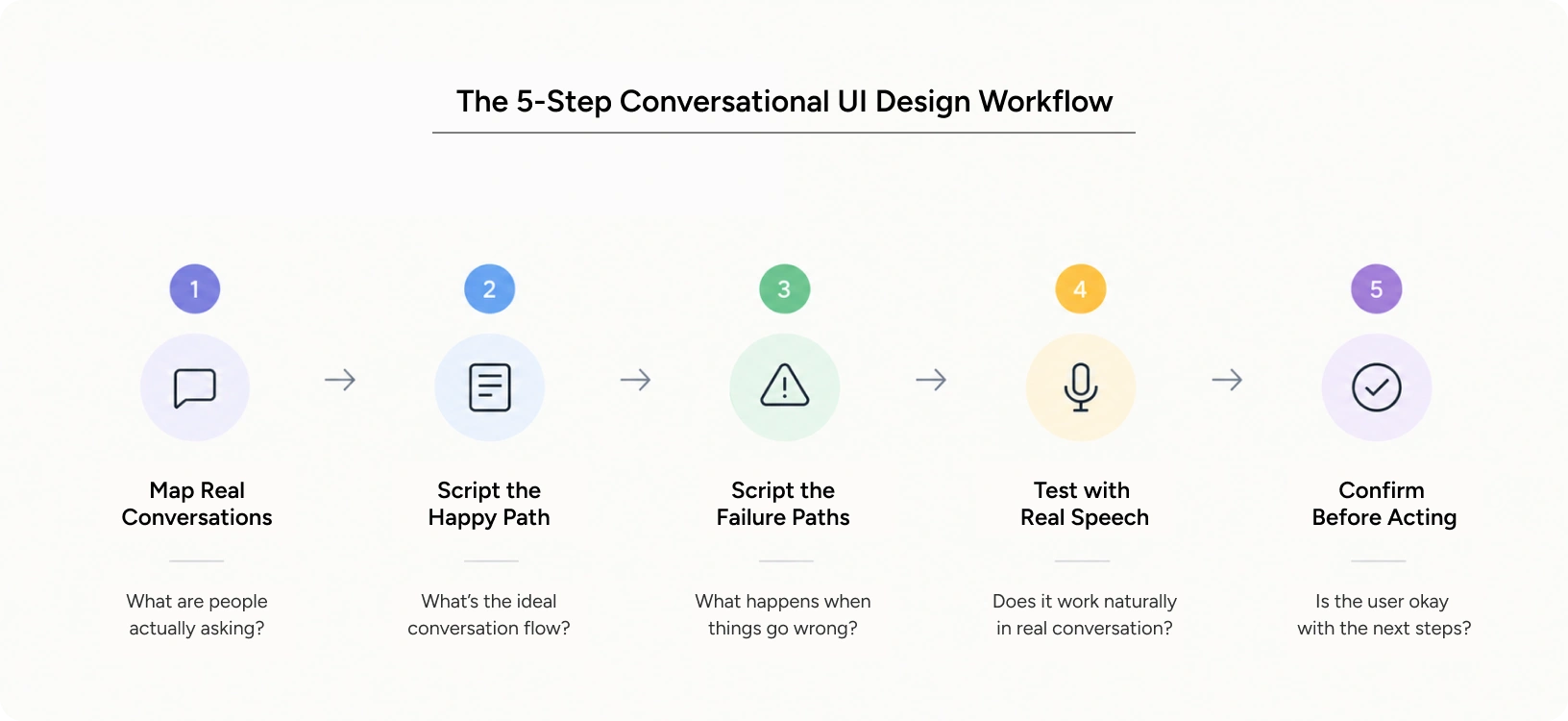
Start by mapping the real conversations users already have with your support team or sales team, since these transcripts are the best source of authentic language patterns. Next, script the happy path and, more importantly, script the failure paths, since most conversational products are judged by how they handle confusion, not by how they handle a perfect request. Testing should include real speech and real typing wherever possible, since voice user interface design tested only by reading a script out loud behaves very differently once a real accent, background noise, or a half-finished sentence enters the picture.
Where Voice and Text Come Together
Many products now blend chatbot UI UX with voice input, which means teams need a single conversation design system that works whether the user types or speaks. Reviewing conversational UI examples from products you personally use is a fast way to build intuition here, since patterns that feel natural on a smart speaker often feel clunky in a text chat window, and the reverse is also true. Both channels share one rule: the system should confirm what it understood and what it is about to do, since a person cannot see a loading spinner the way they would on a screen.
Pro Tips From Yuj Designs
Confirm before you act: A well-placed confirmation step is one of the most underrated tools in this category. Repeating back a key detail before taking action, like a payment amount or an appointment time, builds far more trust than a fast but silent response.
Study real conversational UI examples: Looking at strong conversational UI examples from competitors is one of the fastest ways to calibrate tone before writing a single line of your own script. In our work with US enterprise clients, this single habit has cut down on support escalations more than any model upgrade.
Test with non-technical users: Testing chatbot UI UX with users who are not comfortable with technology reveals the real gaps in a system’s conversational UX, since confident users tend to fill in the blanks that everyday users cannot.
Tools and Resources
Figma and Voiceflow are common starting points for prototyping chat and voice flows before any code gets written. For voice user interface design specifically, tools that let you script and test full conversation trees save significant rework later, since fixing a broken conversational path after launch is far more expensive than catching it in a script review. Collecting a swipe file of conversational UI examples before you start scripting also saves real time later. Whatever the toolset, the goal stays the same: validate the full chatbot UX across every likely path before a single line of production code ships.
Real-World Applications
KonaAI is a US-based AI platform that helps enterprises detect and investigate financial and compliance risk. It has processed over $1.7 trillion in transactions and monitors more than 20 Fortune 500 companies. It is not a chatbot or voice product. Still, it is Yuj Designs’ clearest published example of designing how a system explains itself in plain language, the same trust problem at the center of good conversational design.
The core challenge was trust. Auditors did not just want an alert. They wanted to know why something was flagged, how risky it was, and what to do next. Unclear AI rationale slowed every investigation, the same failure mode that makes a chatbot feel evasive instead of helpful.
Yuj Designs rebuilt the first-run experience around that need. New users get an adaptive workflow: a guided, step-by-step path for compliance-heavy tasks, or direct access for power users. Every alert now shows its rationale and evidence in one view, written in plain language instead of a raw system log.
The results were clear. Investigation cycles ran 30% faster. User trust in AI recommendations rose 20%. Explainability, built into the first run, turned skeptics into confident users.
Read More: Kona AI Case Study
Conclusion
Conversational UI and voice UX are not a niche concern anymore. They sit at the center of how people expect to reach a product, from a quick customer support question to a hands-free command in the car. Teams that treat chatbot UX design, voice user interface design, and conversational UI design as one connected practice build products people actually trust. Teams that treat them as a copywriting task handled at the end of the process end up with technically capable bots that frustrate the very people they were built for.
At Yuj Designs, we have spent years helping enterprise teams across the US and India design conversations that feel natural, recover gracefully from errors, and match the trust level the task actually requires. Whether the challenge is a support chatbot for a customer service flow or voice user interface design for a hands-free product, the underlying discipline is the same: design the conversation with the same rigor you would design a screen.

FAQs