Roughly 33% of users abandon a bank app because of a bad digital experience: slow load times, confusing navigation, painful logins, or broken onboarding. Strong mobile banking UX removes that friction. It makes the core tasks fast and clear and it makes them feel safe, which turns a leaky app into something people actually open every day.
Introduction
A user downloads your bank app, glad to skip the branch visit. Ninety seconds later, they’re stuck in a login loop, a form won’t save, and they quietly delete the app. No complaints. No feedback. Just gone.
That happens millions of times a year. Research shows nearly 33% of consumers have left a bank or credit union over a bad digital experience. That’s not a rounding error. It means losing one out of every three growth opportunities.
Here’s the uncomfortable part: people rarely quit over a missing feature. They quit over friction. A button that’s hard to find. A balance that takes too long to load. A transfer flow that asks one question too many. That’s where banking UX quietly decides who stays and who leaves.
This blog covers why users really abandon bank apps, what good mobile banking UX actually looks like and a step-by-step way to fix the leaks. We back it with real data and a real client outcome. No fluff, no theory you can’t use.
Understanding Mobile Banking UX
Mobile banking UX is the whole experience a person has while using your banking app. How easily they log in, find what they need, finish a task and feel safe doing it. Usability, accessibility, visual clarity and a sense of trust all fold into one flow.
Good banking user experience isn’t about looking pretty. It’s about removing every reason a user might hesitate. When a transfer takes three taps instead of seven, when a balance loads instantly, when an error message actually tells you what to do next that’s UX doing its job in the background where nobody notices it.
UX Is Not UI: Why the Distinction Matters in Banking
Plenty of product teams use “UX” and “UI” as if they mean the same thing. In banking, that confusion gets expensive. UI is what the screen looks like: colours, buttons, type, spacing. UX is whether a stressed user can move money safely at 11 pm on a slow connection.
A beautiful interface can still fail. If a user can’t find the transfer button, the polish doesn’t matter. We’ve audited apps that won design awards and still leaked users at the login screen. That gap, between how an app looks and whether it works under pressure, is the difference between visual design and banking app UX design.
So the takeaway is simple. Invest in the decisions users feel, not just the pixels they see. Flow, hierarchy, error recovery and trust signals move retention. A new colour palette rarely does.
The Three Layers of Banking User Experience
Strong banking user experience works on three layers at once.
The functional layer asks: Can the user complete the task? The cognitive layer asks: how much mental effort does it cost? The emotional layer asks: does the user feel safe and in control?
Most teams optimise only the first one. They make the features work, then push them live. But money is emotional. A user who finishes a transfer while feeling anxious won’t come back with confidence. The emotional layer is where loyalty is built, or quietly lost.
Types of Mobile Banking UX Challenges
Not every problem is the same. Most banking app UX issues fall into a few buckets, and knowing which one you’re dealing with changes how you fix it.
1. Onboarding friction. Account opening and identity verification break down before users even start. Industry benchmarks show more than 60% of users abandon digital account-opening flows because of poor onboarding design. Every extra field, every unclear KYC step, every re-upload of a blurry document is one more reason to quit.
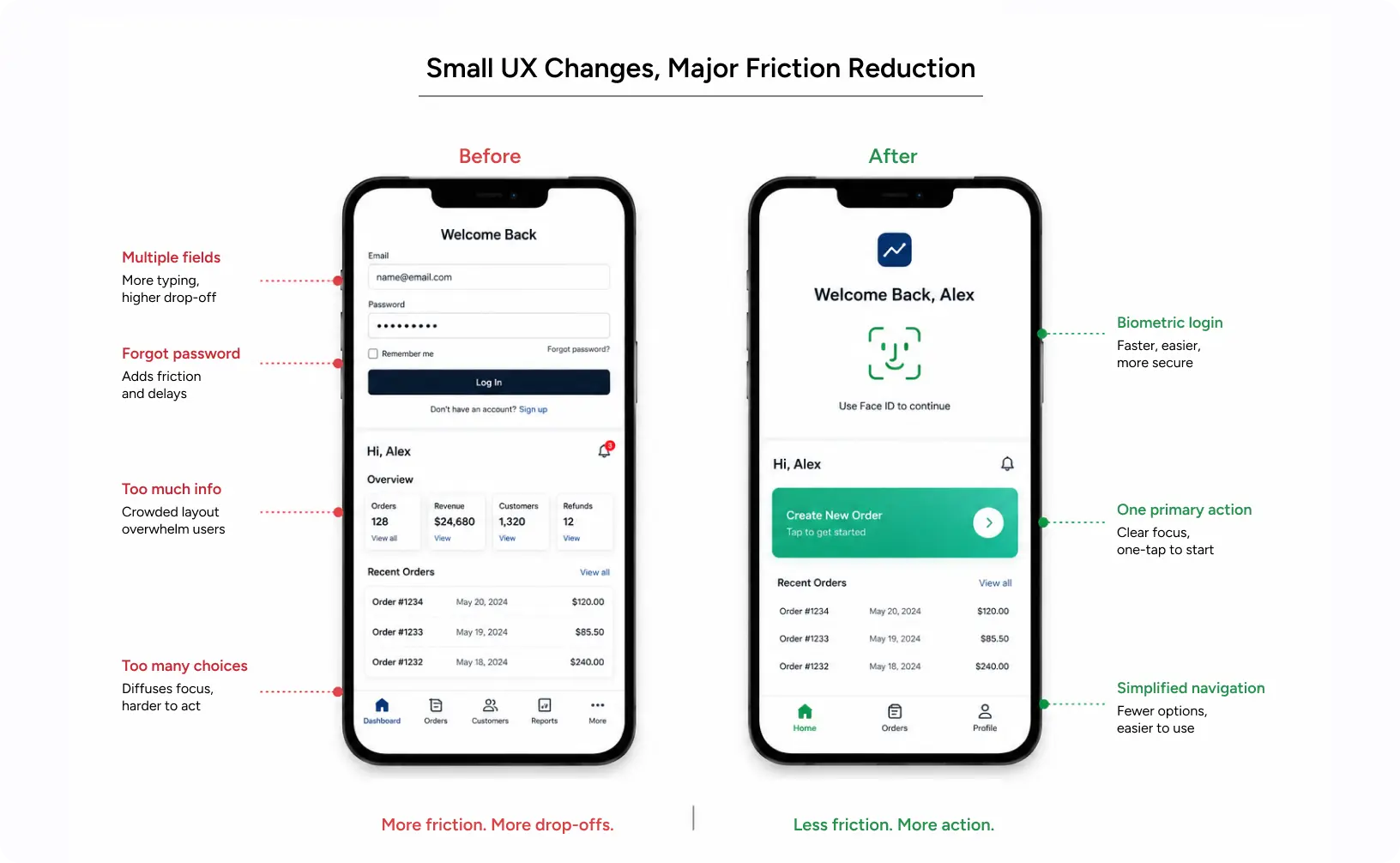
2. Access and authentication friction. Login loops, forgotten passwords, clunky biometrics. A 2025 study found 30% of users hit obstacles using banking apps, and the most common complaint was simply getting into the app. People open a bank app several times a week. If login fails even now and then, the frustration compounds fast.
3. Task-completion friction. Transfers, bill payments and statements buried under too many taps. Each tap is a chance to second-guess, get distracted, or give up. Complex products tend to hide their best features behind menus most users never open.
4. Trust friction. Unclear security cues, vague error messages, confusing fees. In banking, uncertainty reads as danger. A user who isn’t sure a payment went through will call support, or worse, switch banks.
How to Diagnose Which Friction You Have
You can’t fix what you can’t name. Start with your funnel data. If most drop-offs happen before the first successful login, you have an access problem. If it happens during account opening, onboarding is the culprit.
Session recordings fill in the rest. Watch where fingers hover, where users pinch to zoom, where they hit the back button over and over. App-store reviews are a free and brutally honest source too; people describe their friction in plain language. Cluster the complaints and your priority list more or less writes itself.
Also read: 2026: Agentic AI Moves from Experimentation to Enterprise
Core Principles of Strong Banking UX
A few foundational rules separate good fintech ux design from forgettable apps. Clarity beats cleverness, so users should never have to guess what a screen wants. Speed is a feature because every extra second of load time nudges someone toward the exit. Trust has to be designed rather than assumed, which means security and transparency need to be visible. And accessibility isn’t optional, because banking serves everyone.
These hold because money is emotional. A confusing retail app is annoying. A confusing banking app feels dangerous. That higher stake is why fintech UX design demands more discipline than almost any other category.
Designing for the Anxious Moment
Every banking flow has a moment of peak anxiety: the instant right before a user confirms a payment. Get that moment right and trust deepens. Get it wrong, and even a successful transaction leaves a bad taste.
Show the recipient name, the amount and the source account in plain, large type. Confirm clearly the second the transfer completes. Skip the clever animation that delays reassurance. Honestly, designing for this one moment is the highest-leverage habit in banking app ux design.
Accessibility Is a Banking Requirement, Not a Nice-to-Have
Banking serves every age and ability. An app that fails users with low vision, motor difficulties, or low digital literacy is failing a big chunk of its own market. In India especially, first-time smartphone users and older customers lean on clear, forgiving design.
Good colour contrast, large touch targets, readable type, screen-reader support: none of these are extras. They widen the funnel. Accessible banking user experience is just good business, since every excluded user is a lost account.
Why Mobile Banking UX Matters?
Impact on User Experience
Every UX decision touches four things: usability, accessibility, cognitive load, and emotional response. A cluttered screen spikes cognitive load, and users freeze. Poor colour contrast breaks accessibility and people with low vision give up. An unclear transfer confirmation, and anxiety climbs.
Strong banking user experience lowers all of that. It cuts the mental effort a task demands, which directly cuts abandonment. Users don’t notice good UX. They just keep using the app. That invisibility is the whole point.
Impact on Business Metrics
This is where banking app ux stops being a design conversation and becomes a revenue one. Better UX moves four numbers every product leader watches.
Engagement goes up when flows get simpler: more daily active users, more features actually used. Conversion improves because smoother onboarding means more accounts opened and cutting account-opening friction recovers a real share of those 60% drop-offs. Retention follows, since users who trust the experience stay and the 33% who leave over a bad digital experience are pure preventable churn. And brand trust rides on all of it, because a clean, reliable app signals a clean, reliable bank.
The mobile banking market itself is booming, growing around 15.6% a year and on track to reach USD 3.47 billion by 2030. Competing in that market without strong mobile banking UX is like opening a flagship store with a jammed front door.
Common Mistakes to Avoid
Failing apps tend to repeat the same errors. They cram every feature onto the home screen and drown out the few tasks users actually want. They treat security as a wall instead of a guided path, which makes login a chore. They copy competitors instead of testing with real users. And they launch redesigns without measuring whether anything got better.
The fix isn’t more features. It’s a better fintech UX design that respects the user’s time, attention, and trust, usually with help from a fintech UX agency that has solved these exact problems before.
How to Fix a Failing Banking App
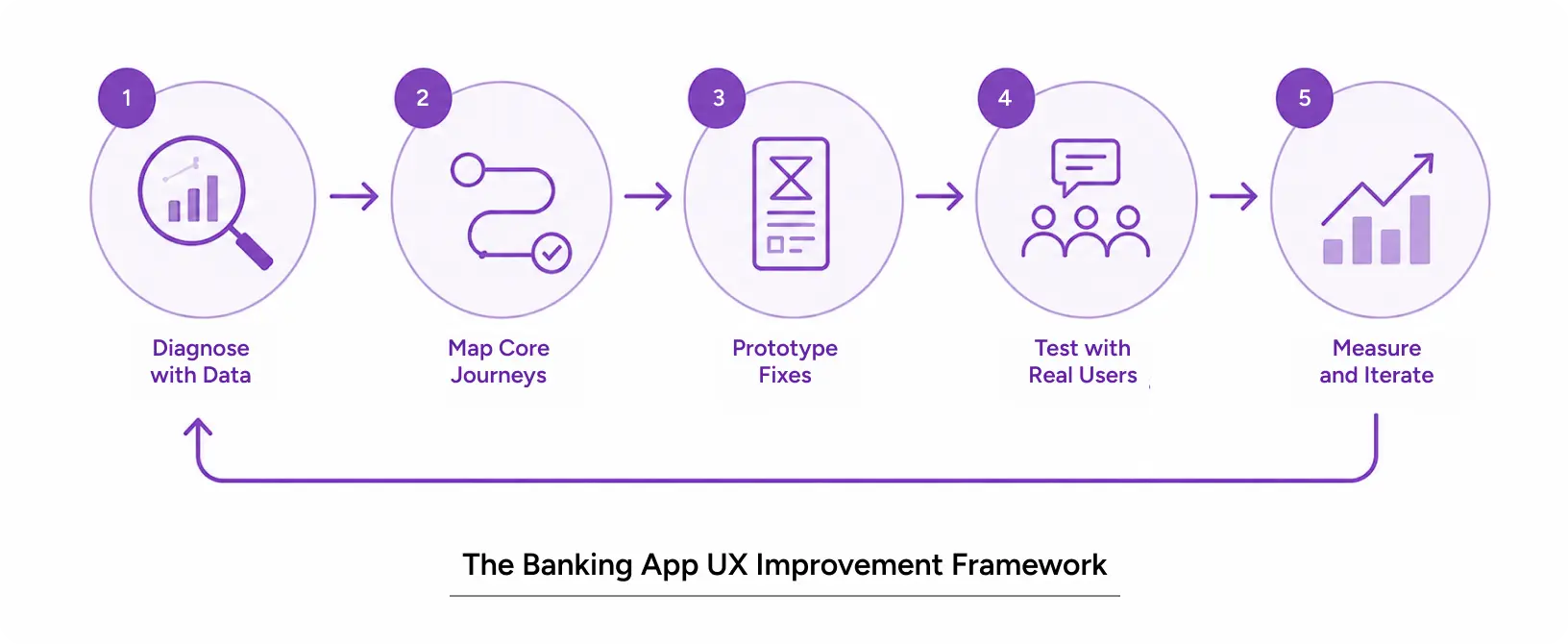
You don’t repair a leaky app by guessing. You diagnose, prioritise, redesign and test. Here’s a workflow any product team or a specialised fintech ux agency can follow.
Step-by-Step Workflow
- Diagnose with data. Pull analytics on drop-off points, plus session recordings and app-store reviews. Find the exact screens where users quit.
- Map the core journeys. List the five tasks users do most: check balance, transfer, pay bills, view statements, get support. These get the most attention.
- Prototype the fixes. Rebuild those journeys in Figma with fewer steps, clearer labels, and visible trust cues.
- Test with real users. Run usability sessions before launch and watch where people hesitate.
- Measure and iterate. Ship it, track the same metrics, refine. Good banking app ux design is never really “done.”
Pro Tips from Designers
Strong banking app UX design comes from a few hard-won habits. Default to biometric login so users never have to fight a password. Auto-populate forms with ID scanning to cut onboarding time. Write error messages that say what to do next, not just what went wrong. And put the user’s most frequent action, usually “transfer” or “pay,” within one tap of opening the app.
Above all, design for the anxious moment. The instant before someone hits “send” on a payment is where trust is won or lost and confirmation clarity matters more than any animation.
Tools and Resources
The modern fintech UX design stack is pretty approachable. Figma for design and prototyping. Maze or UserTesting for remote usability testing. Hotjar or FullStory for behavioural analytics. Stark or axe for accessibility audits. None of these replace skilled judgment, but together they turn opinions into evidence, which is exactly what a serious fintech UX agency brings to the table. The right fintech ux agency pairs these tools with real banking experience.
Also Read: Navigating the Agentic Era: Redefining UX for Real-World Impact
Real-World Application: Datamate Case Study
Theory is cheap. Outcomes aren’t. So here’s what a focused banking app UX design effort actually produced.
DataMate is the flagship core banking product from DataVision Software Solutions. It helps banking professionals run internal operations across retail, commercial, and transaction banking. YUJ Designs partnered with DataVision to redesign it for a global audience.
The first review found one core problem: information was buried. Modules sat in a long, ungrouped list. The home screen alone carried 576 links spread across 34 groups. That wrecked scanability, hurt discoverability and dragged down how the whole product felt.
Our team started with the business, not the screens. We mapped DataVision’s goals, market vision and success factors first. Then we rebuilt the structure around how bankers actually work.
We cut 576 links across 34 groups down to 12 clean groups. We replaced the home-screen dump with a collapsible navigation panel on every page, plus quick search. Users could finally hop between tasks and find links fast.
Then we simplified the heavy tasks. Long workflows became shorter and clearer, which reduced clicks by 20%. The staff finished work in less time. Lower complexity also cuts training time, which cuts costs.
That’s the payoff of disciplined banking UX: fewer clicks, faster tasks, lower training costs and a tool people actually trust.
Read More: DataMate UX Design Case Study
Conclusion
The 33% who quit your bank app aren’t going to tell you what’s wrong. They just leave. Every confusing screen, slow load, and clunky login is a silent vote against your product and a quiet win for a competitor with cleaner mobile banking UX.
The good news is that this is fixable. Diagnose the real friction, simplify the core journeys, design for trust and test relentlessly, and a leaky app turns into one people genuinely depend on. Strong banking user experience isn’t a cost centre. It’s the most direct lever you have on conversion, retention and brand trust. And it compounds: every smooth interaction makes the next one feel more reliable.
That’s the thinking behind every project at YUJ Designs: user-first, backed by real outcomes. If you’re ready to stop losing users to friction, the right design partner makes all the difference.

FAQs