The future of ux design in 2026 is defined by AI-adaptive interfaces, conversational interaction layers, and radical transparency. Designing AI products now requires UX to handle uncertainty, build user trust, and communicate model behaviour, not just look good. The shift from static screens to context-aware, personalised experiences is the defining challenge of modern AI UI UX design.
Why 2026 Is a Turning Point for AI UX
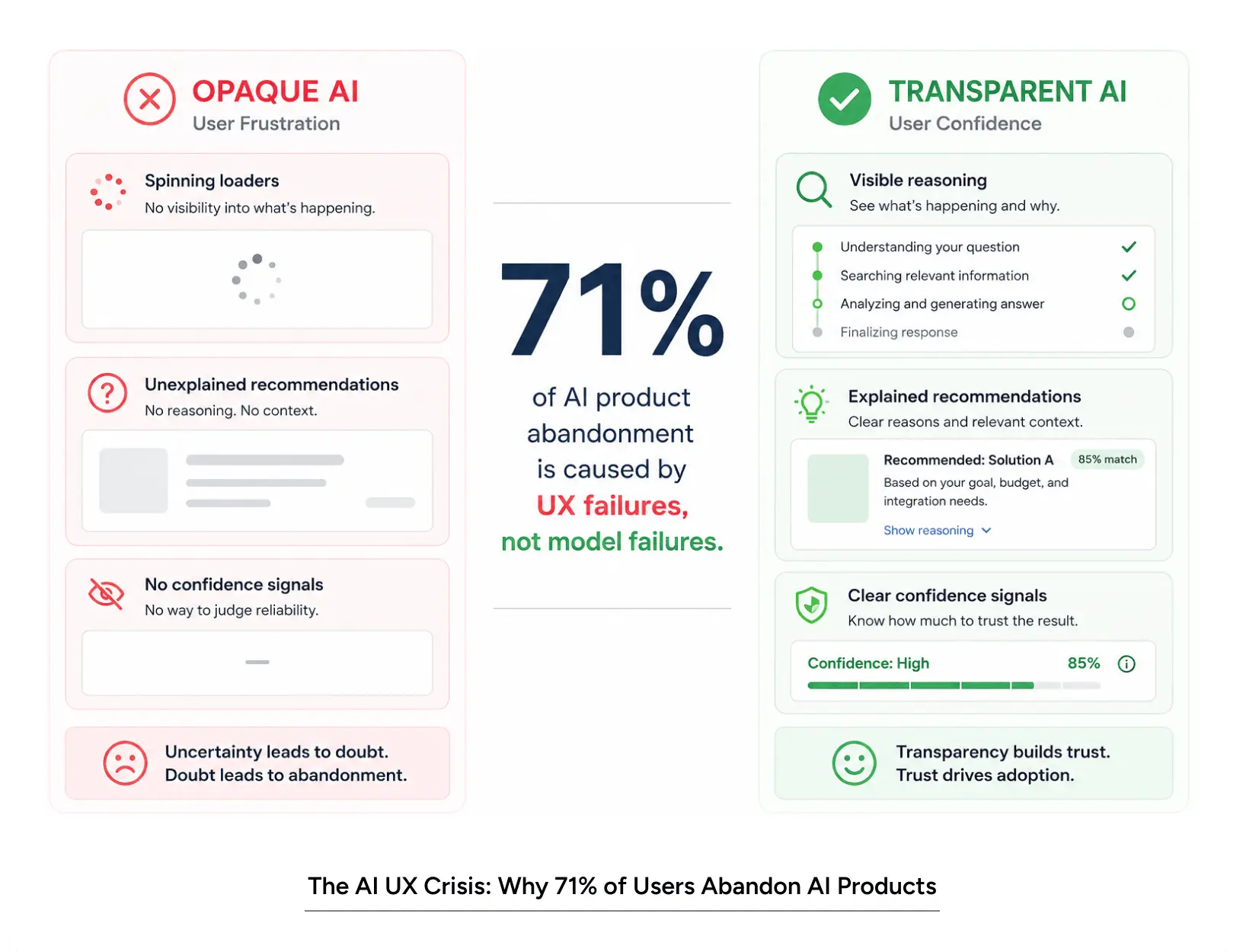
Here’s a number that should stop product teams cold: 71% of users who abandon an AI-powered product say the AI wasn’t the problem. The interface was.
Most teams building AI products in 2026 are doing so with 2020-era UX thinking. The model improves every quarter. The interface doesn’t. And users who now interact with AI tools daily, across banking, healthcare, e-commerce, and education, have developed strong instincts. They know when a product is hiding something. They know when the AI is guessing. They know when the design was built for the demo, not for them.
The future of UX design is not about adding a chatbot to your product page. It’s about rethinking the entire interaction layer around how AI behaves and how users need to feel about that behaviour.
This blog covers 7 trends that define AI UI UX design in 2026. Each one is grounded in what’s actually happening in product teams, not speculation. By the end, you’ll have a clear lens for evaluating your own product against where the field is heading.
Understanding AI UX Design in 2026
AI UI UX design is the practice of designing interfaces that mediate between users and AI-powered systems. That sounds simple. In practice, it means solving problems that didn’t exist five years ago.
Traditional UX design assumed deterministic systems. A button press produced a predictable result. Designing AI products is fundamentally different. The output varies. The confidence level varies. The context varies. The user can’t always tell what the AI knows versus what it’s inferring. And if the design doesn’t communicate that- clearly, in real time- trust collapses.
What Makes AI UX Different From Conventional Design
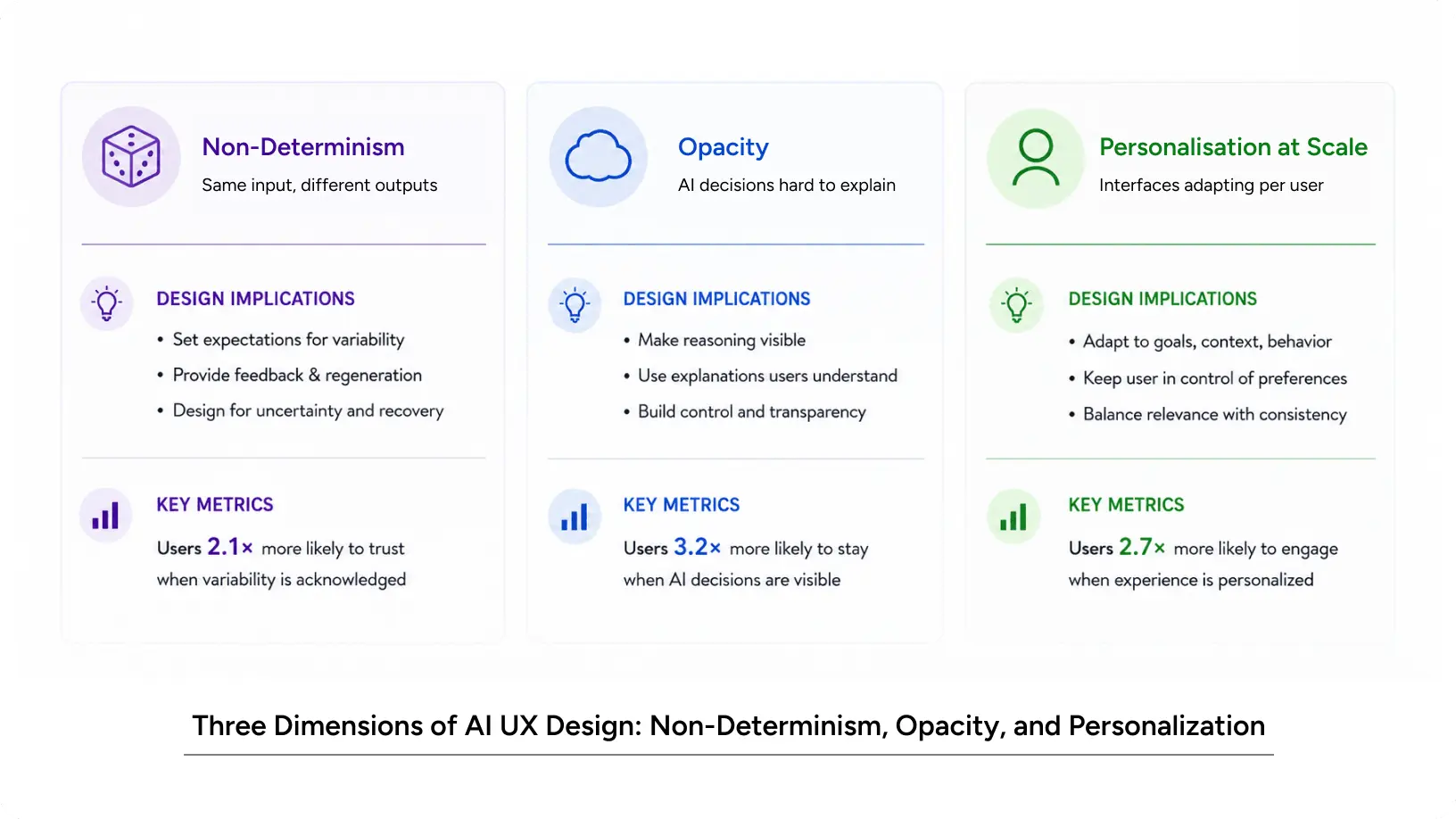
Three things separate AI UX from conventional product design.
- Non-determinism. The same input can produce different outputs. Design must handle uncertainty without alarming users.
- Opacity. AI decisions are hard to explain. UX must create the perception of transparency even when the model is a black box.
- Personalisation at scale. AI enables interfaces that adapt per user. UX must design the adaptation logic – not just the layout.
Understanding these three dimensions is the starting point for any team serious about the future of UX design.
Key numbers to anchor this:
- 71% of AI product drop-off is caused by UX failures, not model failures
- Users are 3.2× more likely to stay engaged when AI decisions are made visible
- 58% of users distrust AI products that don’t explain their recommendations
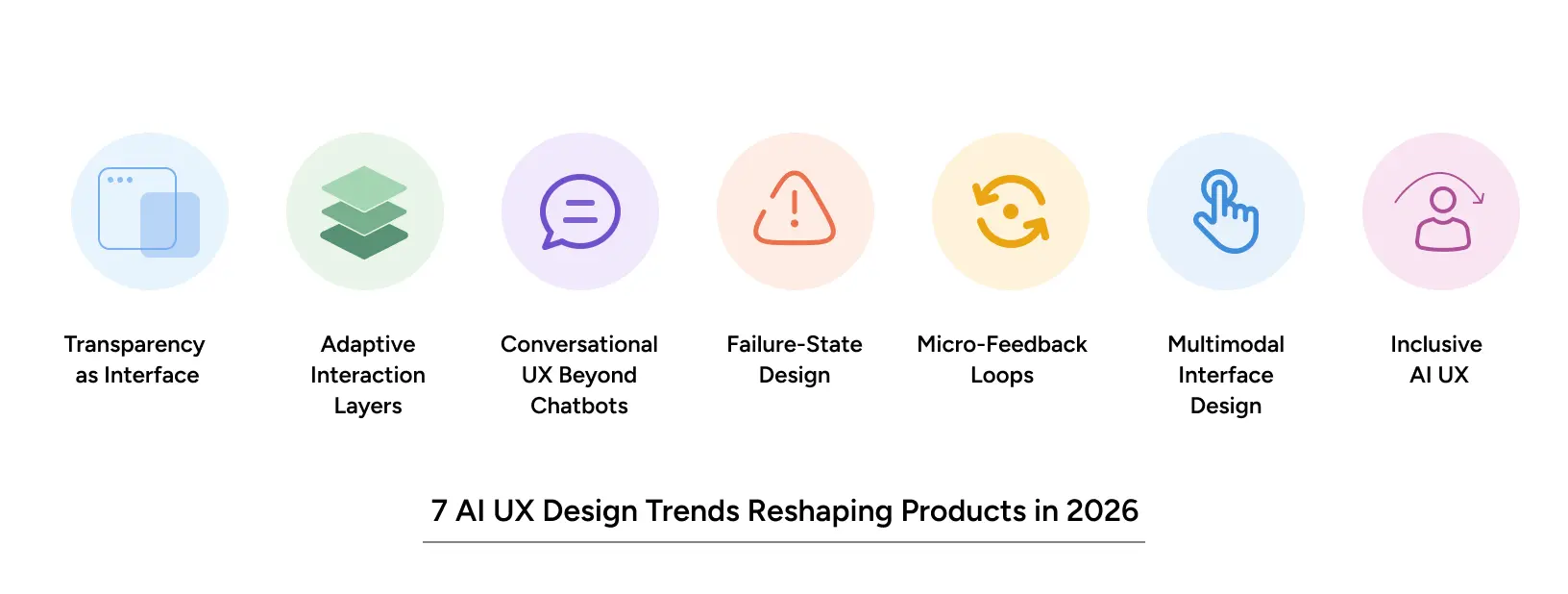
7 AI UX Design Trends Reshaping Products in 2026
1. Transparency as Interface
The biggest shift in AI design over the past 18 months isn’t visual. It’s epistemic. Products that show users how confident the AI is and where that confidence comes from, dramatically outperform those that don’t.
In fintech, this means surfacing the data inputs behind a credit recommendation. In healthcare, it means showing which clinical signals drove a risk alert. In e-commerce, it means explaining why a particular product ranked first. The design challenge is doing all of this without overwhelming the user. Most teams add a tooltip and call it done. That isn’t enough.
Transparency as an interface means building progressive disclosure directly into the output layer- so users who want depth can get it, and users who just want the answer aren’t buried in explanation.
2. Adaptive Interaction Layers
Static UI is increasingly a liability in AI UI UX design. The best products in 2026 adjust their interface based on user behaviour, expertise level, and context- in real time.
A first-time user of a financial planning tool sees guided prompts and plain-language explanations.
The underlying AI is identical, yet the user experience diverges based on familiarity: a returning CFO accesses a data-dense dashboard with advanced filters, while a novice user meets a simplified interface. This distinction demands a system of interfaces rather than a single design- each calibrated to a different user posture.
3. Conversational UX Beyond Chatbots
The chatbot era is ending. What replaces it is conversational UX embedded into traditional interfaces- not a chat window, but a product that responds to natural language across every interaction point.
For AI design web teams, this means rearchitecting how forms, filters, and navigation work. Search becomes dialogue. Filters become preferences. Navigation becomes intent-driven. The UI shrinks as the AI absorbs complexity. The design job becomes defining what the AI should do with ambiguous input and how the interface communicates when it’s uncertain about intent.
4. Failure-State Design
Most products are designed for success flows. AI products need equally rigorous design for failure states. When the model is uncertain, data is missing, or the recommendation falls outside the user’s context, what does the interface do?
Smart teams now design for uncertainty- they show it clearly instead of hiding it.
“We’re not confident about this recommendation. Here’s why. Here’s what we’d need to be sure.” That kind of honesty builds trust faster than a polished UI ever could. It also reduces support volume- users who understand why the AI hesitated are far less likely to raise a ticket.
5. Micro-Feedback Loops
The best AI design experiences collect feedback invisibly- through documents users ignore, recommendations they override, prompts they rephrase. A thumbs up/down button is an afterthought, not real feedback.
This requires UX thinking applied to data architecture, and it demands collaboration between UX designers and ML engineers that rarely happens in practice.
6. Multimodal Interface Design
Voice, vision, and text are converging in designing AI products for 2026. An AI product on mobile might take a photo, extract structured data from it, and surface a recommendation in one gesture. Designing that flow requires rethinking what “input” and “output” mean entirely.
Teams that treat multimodal as a feature add-on will build clunky experiences. Teams that design for it from the ground up will build the next generation of AI-native products. The interaction patterns for multimodal UX are still being established, which makes right now the time to define them, not wait for consensus.
7. Inclusive AI UX
The person using your product at 11 pm, on a slow connection, in a language that wasn’t the model’s primary training language, that user is real, and usually ignored.
Inclusive ai ui ux design in 2026 means designing for low-literacy users, low-bandwidth environments, and populations underrepresented in training data. This isn’t a checkbox. It’s a philosophy. And it’s a growing competitive differentiator, especially for products expanding across North America’s diverse urban markets, where user expectations vary dramatically across demographics.
Why These Trends Matter for Your Product
Impact on User Experience
Each of these trends targets a specific failure mode in current AI products. Opacity kills trust. Static interfaces lose engagement. Chatbot-only UX alienates users who came for a product, not a conversation.
For teams building on the AI design web, whether that’s a SaaS dashboard, a fintech app, or an enterprise tool, the UX is increasingly the product. Users can’t evaluate the model. They evaluate the experience. Getting the UX right isn’t a design upgrade. It’s a product survival decision.
Impact on Business Metrics
The business case for better AI design isn’t theoretical. In our work with complex digital products, improving UX clarity alone without changing the underlying model consistently drives measurable gains. Trial-to-paid conversions improve. Onboarding completion rates recover. Support ticket volumes fall.
Data suggests: Improving AI UX, particularly through better personalization and reduced friction, increases trial-to-paid conversion rates by 40-60%.
These aren’t soft benefits. They’re revenue.
Common Mistakes to Avoid
- Building the interface around the model’s capabilities, not the user’s mental model
- Using loading spinners as substitutes for real-time progress communication
- Designing AI output as if it were authoritative – rather than probabilistic
- Treating accessibility and inclusion as post-launch work
- Over-explaining AI mechanics to users who just want an outcome
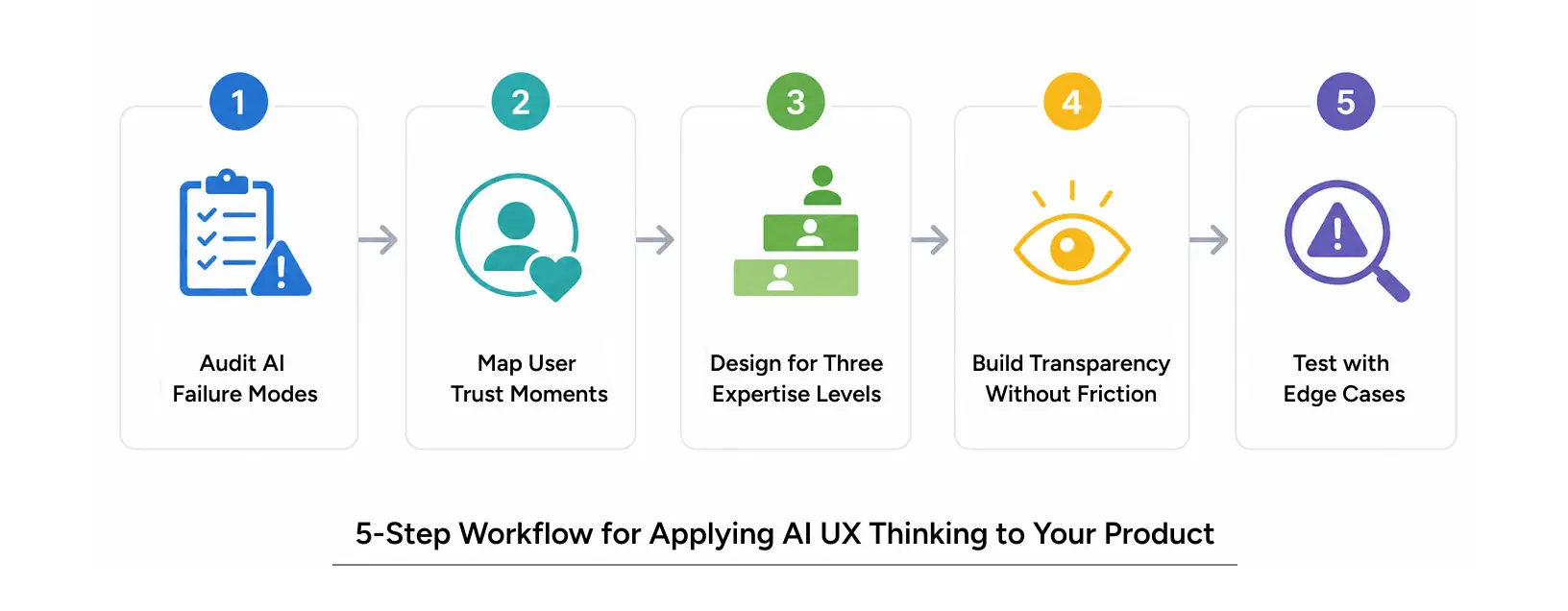
How to Apply AI UX Thinking to Your Product
Step-by-Step Workflow
Step 1: Audit your AI’s failure modes. List every state where the model can be uncertain, wrong, or unavailable. These become your design brief. Most teams skip this entirely and pay for it in user research sessions six months later.
Step 2: Map user trust moments. At what point does the user decide to trust or distrust the AI? It often happens in the first 90 seconds. Design for those moments specifically – not the end-of-journey state.
Step 3: Design for three expertise levels. Beginner, intermediate, and advanced users need different amounts of AI explanation. Build adaptive states, not just a single UI. This is where component systems earn their keep.
Step 4: Build transparency without friction. Progressive disclosure is the key principle. Surface AI reasoning on demand, not constantly. “Why this recommendation?” is a pattern that works. A six-paragraph explanation forced on every user is not.
Step 5: Test with the edges, not the average. Your AI UX is only as good as how it performs for users outside the happy path, with low connectivity, non-native language speakers, and first-time users under time pressure. If you’ve only tested in controlled conditions, you’ve only seen part of the picture.
Pro Tips from Our Design Team
“Users don’t abandon AI products because the AI is inaccurate. They abandon it because the AI is opaque. The design job is to make uncertainty feel safe, not invisible.” UX Lead, YUJ Designs
- Run dedicated failure-state sprints and design sessions focused only on what the UI does when things go wrong
- Involve your Machine Learning team in user research. They need to see what confusion looks like in a real session
- Audit competitor AI products for transparency patterns before finalising your own approach
- Treat your AI’s confidence threshold as a UX variable, not just a technical parameter
Real-World Application: StubHub
How UX Clarity Drives Conversion
The principles behind AI design also apply to complex, information-dense platforms where users need confidence before making decisions. StubHub, the largest online secondary ticketing marketplace in the United States, faced stagnant conversion rates despite strong demand. Confusing seat selection flows, poor event schedule representation, unclear labels, and unintuitive categorisation created friction in the buyer journey.
YUJ Designs used user research to identify where buyers lost confidence and redesigned the experience around decision clarity. The team improved the information architecture, simplified micro-interactions, reduced unnecessary steps, and introduced a dynamic seat map with real-time pricing and seat-view previews.
The result was a 4.4% increase in conversion rate, generating an ROI of USD $117M. The case highlights a core principle of designing AI products: users convert when experiences feel clear, understandable, and trustworthy, not overwhelming.
Read More: StubHub Case Study
Conclusion: The UX Work That Defines AI Product Success
The seven trends in this blog aren’t predictions. They’re observations from products that are already winning and products that are quietly losing users to competitors who understood these principles earlier.
The future of UX design is not a new tool, a new framework, or a new job title. It’s a fundamentally different understanding of what design does in an AI-native product. Design is no longer the wrapper around a feature. It’s the mediator between a probabilistic system and a human who needs to trust it.
Teams that treat AI design as a visual layer will build products that look impressive and perform poorly. Teams that treat UX as a strategic function embedded in model thinking, research, and business outcomes will build the products their users don’t abandon.
Whether you’re working on an AI design website, a mobile-first fintech app, or a complex B2B platform, the design decisions you make right now are setting the user trust ceiling for the next two years. That’s worth getting right.
FAQs